One Pipeline, Three Jobs: Wazuh, Zeek and Grafana in a SOC Home Lab
Wazuh as the SIEM, Zeek as a second pair of eyes on the same interface, and Loki with Grafana for hunting: the rule that keeps a home SOC lab's memory budget sane, and a real Zeek notice that corrected an earlier assumption.
show ip route | toc (9 sections)
- The rule that shaped everything: alerts in the SIEM, telemetry in the log platform
- Job one: Wazuh raises and correlates alerts
- Job two: Zeek describes what happened
- Job three: Loki, Alloy and Grafana let a human see
- Making the whole thing debuggable
- Security decisions inside the lab
- What I would tell someone starting this
- Frequently asked questions
- What comes next
By the end of the previous post, Suricata alerts were landing in a file on my sensor VM as clean JSON. A file is not a security operation, though. Someone has to read it, correlate it with other evidence, decide what matters and show the result. This post covers the machinery that does that: Wazuh as the SIEM, Zeek as a second pair of eyes on the same network interface, and Loki with Grafana for hunting and dashboards.
I call the design one pipeline with three jobs, because each tool has a different job and the design falls apart when they are asked to do each other's. Wazuh raises and correlates alerts. Zeek describes what happened on the network. Loki and Grafana let a human search and see. I will take them in that order, then explain the one rule that ties them together.
Everything in this post runs on a single VM, soc-sensor (Ubuntu Server 24.04, 192.168.56.10). Suricata, Zeek, Wazuh, Loki, Alloy and Grafana all live there, alongside the DVWA container and sshd that they are watching. The attacker, a Kali VM at 192.168.56.20, is a separate machine on the same host-only lab network. That single-host layout is a real trade-off, and I come back to it below rather than pretend it does not matter.
The rule that shaped everything: alerts in the SIEM, telemetry in the log platform
A SIEM is expensive to feed. Its indexer stores and indexes every event so that rules and searches are fast, and that costs memory and disk. A network sensor like Zeek produces enormous volumes: one line for every connection, DNS query, HTTP request and TLS handshake. On a busy network that is millions of lines a day.
If I sent all of Zeek's output into Wazuh, the indexer, which is already the biggest memory consumer in the lab, would grow for little benefit. Most of those lines are not alerts. They are records that you look at when you are investigating something specific.
So I split the flow. Anything that is already an alert, or that should become one, goes to Wazuh. That means Suricata alerts and Zeek's notice log. Everything else, meaning Zeek's connection, DNS, HTTP, TLS and SSH logs, plus the host firewall log and a copy of the Wazuh alerts themselves, goes to Loki, a log store designed to be cheap for bulk text and fast to search by label and time. Grafana reads Loki, and it is where I hunt.
This mirrors how many real security teams work. The SIEM is the place that says "look here." The log platform is the place you go to answer "what else did this source do?"
Job one: Wazuh raises and correlates alerts
Installing it on a budget
Wazuh has three parts: a manager that analyzes events, an indexer that stores alerts, and a dashboard. The official installation assistant can put all three on one machine with a single command, which is what a lab needs. I wrapped it in a script that checks the VM has at least 8 GB of RAM before it starts (the all-in-one install needs that much), saves the generated admin password to a private file outside the repository, and then caps the indexer's Java heap.
The heap cap matters. The indexer is a Java process, and unconstrained it will happily use half of the machine's memory. I searched the indexer's configuration for its heap lines, set both the initial and maximum values to 4 GB on the 16 GB machine, and restarted it. On a smaller machine the script accepts a variable to set a lower value. Sizing a Java process before it surprises you is a habit that transfers to every JVM-based tool a SOC uses, which is most of them.
Reading files directly, no agent in the way
Wazuh's log collector reads files that you list in its configuration. Because the manager
and every source it needs to read share the same VM, I never install a separate agent. I
added a block that reads the Suricata EVE file as JSON, the Zeek notice log as JSON, the
DVWA container's Apache access log and error log, and the host firewall (ufw) log. The
manager's configuration accepts more than one configuration block in the same file, so my
script appends a clearly marked block rather than editing the vendor's sections. That way an
upgrade cannot collide with my changes, and removing the lab's settings is a matter of
deleting one marked block. The same block also turns on real-time file integrity monitoring
on /etc/ssh, since sshd is one of the two attack targets in the lab and a
changed configuration file there is worth knowing about immediately.
There is one subtle point here. Wazuh has a built-in decoder for Suricata's JSON, and built-in rules that fire on it. Rule 86600 is a silent parent that matches any JSON event containing a timestamp and an event type. Rule 86601 is a child that matches the alert event type and raises a level 3 alert titled with the signature name. Out of the box you already get every Suricata alert in the SIEM, at a low level.
Turning severity into response time
A level 3 alert for everything is not useful, because a scan alert and an exploit attempt should not have the same priority. I wrote custom rules that extend the built-in one instead of replacing it. Each is a child of rule 86601 that also checks the alert's severity field. Suricata severity 1 becomes Wazuh level 12 (rule 100100), severity 2 becomes level 9 (rule 100101) and severity 3 becomes level 5 (rule 100102).
Building on the built-in rule matters for maintenance. If Wazuh improves its Suricata
decoding in a later release, my rules inherit that improvement, because they depend on the
parent rule rather than reimplementing the decoding. My rules also live in their own file,
soc_homelab_rules.xml, with an ID range (100100 to 100299) reserved for the
lab, so I never touch the default ruleset.
Then I attached policy to those levels. Level 12 and above should be looked at within fifteen minutes. Level 9 to 11 within an hour. Lower levels are reviewed in a daily digest. Writing that down turns a number into an operating procedure, and it is the sort of thing a hiring manager likes to see, because it shows I think about who has to react and when.
Turning many alerts into one incident
A fast port scan can generate dozens of alerts in a second. Triaging each one wastes time
and hides the real story, which is that one address is scanning. Rule 100110 is a frequency
rule that fires when eight or more Suricata alerts (matching the same 86601 parent) arrive
from the same source address within two minutes. It uses a same-field condition on
src_ip, so the count is per source rather than global.
The result is a level 13 incident alert that says eight or more alerts from this source in two minutes, and that is the alert a person should read first. The individual alerts remain searchable underneath it for evidence. I like this pattern because it does not throw away detail. It adds a layer of summary on top.
Testing a rule without waiting for an attack
Wazuh ships a tool called wazuh-logtest. You paste a log line, and it shows the
decoder that matched, the fields it extracted and the rule that fired, including the level
and description. I used it to test every rule with a captured alert line before deploying,
and the runbook includes the exact line so anyone can repeat the test.
This is the closest thing detection engineering has to a unit test, and I would encourage
anyone building rules to make it a habit. A rule you have not tested against a sample is a
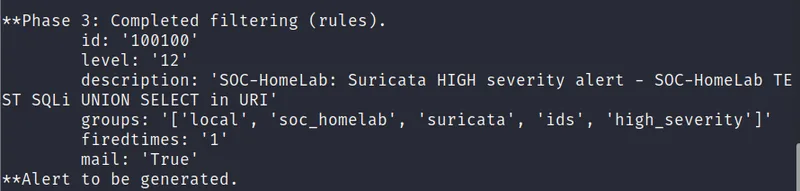
guess. Here is what Phase 3 of the actual test run showed, after pasting a synthetic
SQL-injection alert line into wazuh-logtest:
**Phase 3: Completed filtering (rules).
	id: '100100'
	level: '12'
	description: 'SOC-HomeLab: Suricata HIGH severity alert - SOC-HomeLab TEST SQLi UNION SELECT in URI'
	groups: '['local', 'soc_homelab', 'suricata', 'ids', 'high_severity']'
	firedtimes: '1'
	mail: 'True'
**Alert to be generated.
Rule 100100, level 12, exactly as designed: severity 1 in Suricata's own alert maps straight through to a level-12 Wazuh incident, tagged with the groups my rule file assigns and marked for mail because it cleared the fifteen-minute-response threshold. Watching a rule do exactly what its design says it should, before a single real packet has to prove it, is worth the two minutes it takes.
The host view: living without an agent
Network and IDS sensors cannot see everything that matters. They cannot see a login that succeeded, a file that changed, or what a web server's own process recorded about a request. On a design with more hosts I would run a Wazuh agent on each one and forward its events to the manager. Here, because the manager, the DVWA target and sshd all sit on the same VM, the manager's own log collector just reads the files those services already write: the DVWA container's Apache access and error logs, bind-mounted to a host directory, and the ufw log for blocked connection attempts. No agent, no transport layer, one less thing to install and keep in version lock-step with the manager.
That is a fair trade for a lab of this size, and it is worth naming out loud rather than hiding it. A single VM means a host compromise could also tamper with its own sensors and its own log files, and it means I am reading host evidence and network evidence from the same failure domain, the same limit I named in the design post. A design with more than one host would put at least one real Wazuh agent on a separate machine, and I would say so in an interview if asked how I would harden this.
Wazuh's built-in rules do a lot for free here too. Common web attack strings and 400-series errors in an Apache access log, and directory traversal patterns, raise alerts without any custom rule work on my part. That is a good reminder that detection engineering is mostly about choosing, tuning and connecting good rules, and only occasionally about writing new ones.
Job two: Zeek describes what happened
Why Zeek in addition to an IDS
Suricata matches signatures, which means it can only tell you about things somebody has already described. Zeek takes a different approach. It analyzes traffic and writes a structured log of what it observed: every connection with its duration and byte counts, every DNS query and answer, every HTTP request with its user agent and status code, every TLS handshake with its server name. It does this whether or not anything is malicious.
That makes Zeek the tool for questions no signature anticipated. Which hosts did this address talk to? Which domain names failed to resolve? Did that client make identical requests at regular intervals? Those are hunting questions, and they are answered from Zeek's logs.
The deployment: one standalone node
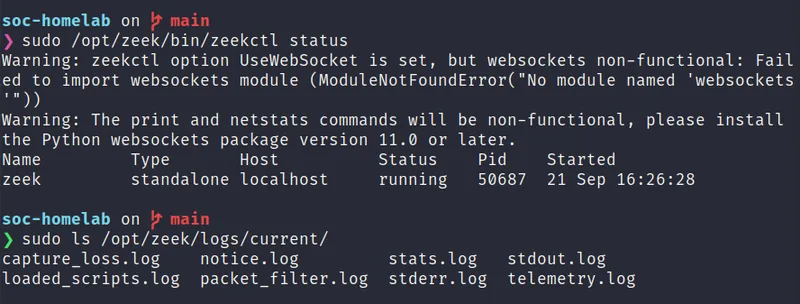
Zeek is managed with a tool called zeekctl, and a file called
node.cfg decides what runs and where. A larger deployment with sensors on
multiple physical taps would need a small cluster, a manager, a logger, a proxy and one
worker per tap, because each worker can only watch one interface. My lab has one sensor
interface, enp0s8, carrying all of the lab's traffic, the same interface
Suricata reads. So node.cfg configures a single standalone node:
type=standalone, host=localhost, interface=enp0s8.
Zeek's manager, logger and analysis all run inside that one process.
That is not a shortcut, it is the right size for the network it watches. A multi-worker
cluster earns its complexity when there are multiple physical taps or a link fast enough
that one process cannot keep up. Neither is true of a host-only lab network with two VMs on
it, so I would rather run one process I understand completely than a cluster I do not need.
If I ever add a second sensor point, extending node.cfg to a real cluster is a
config change, not a redesign.
A separate file, networks.cfg, tells Zeek which address ranges are local, in
this lab the whole 192.168.56.0/24. Zeek uses that to mark each connection's originator and
responder as local or remote in its logs, which matters when I am reading conn.log
later and trying to tell an internal hop from an external one. A shared systemd unit,
sensor-nic.service, turns off NIC offloads on enp0s8 before either
sensor starts (the same unit Suricata's service depends on from the previous post), because
merged or unfinished packets confuse analysis either way. Zeek's own unit runs
zeekctl deploy only after that preparation unit has finished, and it is enabled
at boot.
Making it useful
By default, Zeek writes tab-separated logs. I turned on the JSON logging policy
(policy/tuning/json-logs, redef LogAscii::use_json = T), so every
log line is a JSON object. That removes any custom field splitting from the rest of the
pipeline, since Wazuh, Alloy and my Python scripts all parse JSON natively.
Then I loaded three detection scripts that raise notices. The scan script
(misc/scan) flags a source that touches many ports or many hosts. The SSH
script (protocols/ssh/detect-bruteforcing) flags password guessing. The HTTP
script (protocols/http/detect-sqli) flags SQL injection patterns from a source
that repeats them. I lowered the scan and SSH thresholds for lab scale in
local.zeek, because the defaults assume a larger network where a handful of
attempts is normal noise: Scan::addr_scan_threshold and
Scan::port_scan_threshold are both set to 15, and
SSH::password_guesses_limit is set to 10, down from a default of 30 guesses.
A detail worth knowing is that the SQL injection script does not fire on a single suspicious request. It needs a count of matching requests in a time window, on the order of fifty in five minutes. If you test it with one crafted request, you will see nothing and may conclude it is broken. In my attack script, the SQL injection step loops sixty times for exactly that reason.
Notices go into a log called notice.log. That is the one Zeek file I send to
Wazuh, where a custom rule chain in soc_homelab_rules.xml turns each notice type
into an alert with an ATT&CK technique tag. Rule 100200 is a silent parent matching any
notice line. Rule 100201 catches Scan::Port_Scan and
Scan::Address_Scan at level 10, tagged
T1046.
Rule 100202 catches SSH::Password_Guessing at level 10, tagged
T1110.
Rule 100203 catches HTTP::SQL_Injection_Attacker and
HTTP::SQL_Injection_Victim at level 10, tagged
T1190.
Rule 100204 is a catch-all at level 4 for any other notice type Zeek raises, so nothing
silently disappears even if I have not written a specific rule for it yet. Tagging
techniques makes alerts easier to explain and easier to group later.
This is the part of the build I got wrong the first time, and I want to leave the correction
in rather than quietly fix it. When I first ran zeekctl check, the scan, SSH and
SQL injection scripts all failed to load with a "can't find" error, so I documented all
three as unavailable on this zeek-8.0 package and commented them out. A later
run against real attack traffic told a different story. Reading straight out of
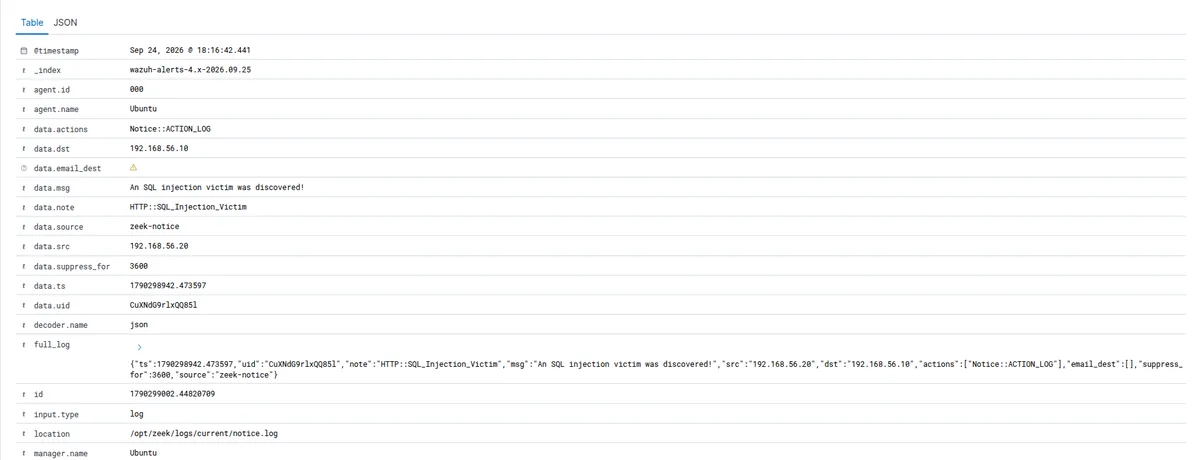
notice.log on the sensor produced a genuine, live notice:
{"ts":1790298942.473597,"uid":"CuXNdG9rlxQQ85l","note":"HTTP::SQL_Injection_Victim",
"msg":"An SQL injection victim was discovered!","src":"192.168.56.20","dst":"192.168.56.10",
"actions":["Notice::ACTION_LOG"],"email_dest":[],"suppress_for":3600,"source":"zeek-notice"}
protocols/http/detect-sqli is loaded and firing on this exact install, which
means my original troubleshooting note was stale for that one script specifically. I
corrected the documentation with a dated note rather than silently editing the earlier claim
away, and I did not touch the scan or SSH brute-force scripts in the same edit, since this
evidence only speaks to SQL injection detection. Each of the three needs its own
confirmation before I change what I say about it, and I would rather show a corrected
mistake in the open than pretend the first read was right all along.
Job three: Loki, Alloy and Grafana let a human see
Loki: cheap to store, fast to search by label
Loki is a log database from Grafana Labs. Unlike a full text index, it indexes only a small set of labels for each stream and stores the log lines compressed. Queries select streams by label and then filter or parse the text at query time. For a lab with modest hardware, that trade is exactly right: storage is cheap and the queries I run are mostly "this source, this time window."
I run it as a single process with local disk storage and a fourteen day retention (336 hours), and it listens on localhost only. Grafana and the log shipper run on the same machine, so nothing needs to be exposed.
Alloy: the shipper, and why not Promtail
The tool that reads the files and pushes lines into Loki used to be Promtail. Promtail
reached end of life in March 2026, and Grafana's replacement is Alloy, a more general
collector configured in its own declarative language. Building a new lab on a tool that has
reached end of life would be a strange thing to publish, so I used Alloy. The configuration
reads the Suricata EVE file, the ufw log, seven Zeek logs (conn,
dns, http, ssl, ssh, notice,
weird) and the Wazuh alerts file, and forwards all of it to Loki.
The most important choice in that file is which labels to attach. Loki's performance depends
on keeping the number of distinct label combinations small. Labels should describe the
stream, not the content of a line. So I used only a job label to say which
pipeline a line came from (suricata, zeek, wazuh,
ufw), a zeek_log label for which Zeek log a line is from, and an
event_type label for Suricata's event type. Things like source address,
destination address and signature name are not labels. They are parsed at query time from
the JSON.
This is the mistake that makes new Loki users unhappy. If you turn source addresses into labels, every distinct address creates a new stream, and the index explodes. Parsing at query time with the JSON parser costs a little CPU per query and saves the database.
There was a permissions detail worth mentioning because it is exactly the kind of thing that
costs an evening the first time. The log shipper runs as its own user, alloy,
and the files it reads belong to other services. I added it to the adm group so
it can read the ufw log, and used setfacl on the Suricata log directory so it
can read eve.json now and any files created later when Suricata rotates its
logs (a default ACL, not just a one-time grant). I added it to the wazuh group
to read the alerts file. Zeek's logs needed no extra grant because they are world-readable
under /opt/zeek/logs/current/. The install script does all three and restarts
Alloy so the new group memberships take effect. If a panel is empty and everything else
looks right, permissions are the first place to look.
Grafana: from lines to answers
Grafana connects to Loki as a data source, provisioned from a file so it is set up the same
way every time. The dashboard is also provisioned from a file, and it appears in a folder
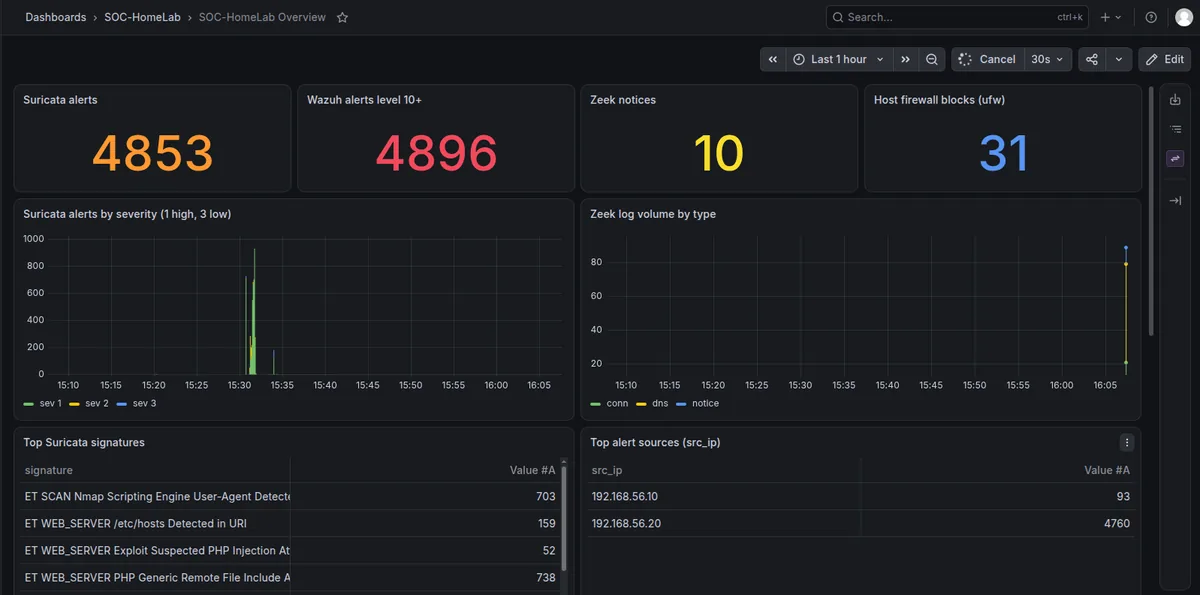
called SOC-HomeLab on first start. It has four number tiles at the top: Suricata alerts,
Wazuh alerts level 10+, Zeek notices and host firewall blocks (ufw). Below them are two time
series, Suricata alerts by severity (1 high to 3 low) and Zeek log volume by type. Then four
tables: top Suricata signatures, top alert sources (src_ip), top DNS queries
seen by Zeek and Wazuh alerts by rule. At the bottom are two log panels, one for Zeek notices
and one for Wazuh alerts of level 7 and above.
The queries use LogQL. A few examples show the pattern. To count alerts from one source, select the Suricata stream, parse the JSON and filter on the source field. To see what that source did on the network, switch to the Zeek connection stream and filter on the originator address. To count firewall blocks, select the ufw stream and filter lines that contain the block action. Zeek's dotted field names, such as the originator address, become underscore names after the JSON parser flattens them, which is a small thing that costs a lot of confusion the first time.
Making the whole thing debuggable
A pipeline with several hops fails in several places. I built the health check script to
test every hop and print pass or fail. It checks that services are running, that ports are
listening, that Zeek reports a running node, that the EVE file is fresh and parses as JSON,
that Loki is ready and has the job label, and that Grafana's health endpoint
responds.
Two decisions made this more useful. The script exits with a failure code when anything fails, so it can be run from a scheduled job. And each failure message points at a section of the troubleshooting guide, so the person debugging, who is usually me a week later, does not need to remember why something was configured a certain way.
I think this is the most valuable habit in the project. A lab you can verify in ten seconds is one you will actually use, and one you can hand to someone else.
Security decisions inside the lab
Even a lab deserves basic hygiene, and it makes for good talking points. The SOC VM runs a default-deny host firewall (ufw) that allows only the lab network, 192.168.56.0/24, to reach SSH, the Wazuh dashboard, DVWA on port 80 and Grafana on port 3000. Everything else is dropped and logged. Suricata and Zeek both read the interface before ufw makes its decision, so a blocked scan is still detected even though it never reaches the service it was aimed at. Loki listens on localhost only, since Grafana and Alloy are on the same machine and nothing outside needs to query it directly. The Wazuh installer's generated password is saved to a private file outside the repository and excluded by the ignore file. DVWA is deliberately vulnerable software, so it is bound to the lab's host-only address, 192.168.56.10, rather than published on every interface, and the documentation says clearly that it must never be exposed outside the lab network, the same "least exposure by default" instinct behind a Linux hardening audit I ran against my own machine earlier in this security series.
What I would tell someone starting this
Budget memory first, then install. Cap the Java heap.
Put alerts in the SIEM and telemetry in the log platform. Do not make your indexer carry data that you only search occasionally.
Extend the built-in rules instead of replacing them, and test every rule with logtest before you rely on it.
Size the deployment to the network you actually have. A standalone Zeek node is the right answer for one sensor interface. A cluster is the right answer when you have more than one.
Keep labels boring. Job, log type and event type are enough.
Validate each hop of the pipeline, and write the check as a script the first time.
And when a documented assumption turns out to be wrong, as the Zeek scripts above were, correct it with a dated note instead of quietly editing it away. The correction is more convincing than the original claim ever was.
Frequently asked questions
Why do alerts go to Wazuh and telemetry go to Loki instead of putting everything in one place?
A SIEM's indexer is expensive to feed because it indexes every event so that rules and searches stay fast, and that costs memory and disk. Zeek alone can produce millions of lines a day, and most of those lines will never become an alert. Sending all of that into Wazuh would make the biggest memory consumer in the lab bigger for very little benefit. Instead, anything that is already an alert, or should become one, goes to Wazuh, and everything else goes to Loki, which is built to be cheap for bulk text and fast to search by label and time.
Why extend Wazuh's built-in Suricata rule instead of writing rules from scratch?
Wazuh already ships a decoder and a base rule, 86601, that matches any Suricata alert event. Writing custom rules as children of that rule, rather than re-parsing the Suricata JSON independently, means that if a future Wazuh release improves how it decodes Suricata's output, the lab's own rules inherit that improvement automatically instead of silently breaking because they duplicated logic Wazuh already had.
Why does Zeek run as a single standalone node instead of a cluster?
A Zeek cluster with a manager, logger, proxy and multiple workers earns its complexity when
there are multiple physical taps or a link fast enough that one process cannot keep up. This
lab has exactly one sensor interface carrying all of its traffic, so a single standalone node
is the right size for the network it watches, not a shortcut. Extending node.cfg
into a real cluster later is a configuration change, not a redesign, if a second sensor point
is ever added.
Why was a documented Zeek detection gap later found to be wrong?
Zeek's SQL injection detection script, protocols/http/detect-sqli, could not be
found on this lab's zeek-8.0 package when it was first checked, so it was
documented as disabled and commented out of the loaded scripts. A later run showed a genuine
HTTP::SQL_Injection_Victim notice in Zeek's own notice.log, read
straight off disk, which only happens if that exact script is loaded and running. The most
honest explanation is a package update or a mistake in the original check, not a mystery,
and the fix was correcting the documentation with a dated note rather than quietly editing
away the earlier, wrong claim.
What comes next
In the next post, I run the attacks. I predict what each tool should see, run a scripted attack from Kali against the SOC VM, record what actually happened, and triage a few alerts using the playbooks in the repository. I also show the Python digest that lists sources seen by more than one tool, and a beacon hunter that finds regular connection intervals in Zeek data: First Alerts.
Repository: github.com/rachata072/soc-homelab