Designing a Two-VM SOC Home Lab: Small Scope, Real Detection Work
Why I cut a segmented, multi-firewall SOC design down to two VirtualBox VMs, the networking and memory budget that came out of that decision, and the threat model that decided what belonged in the lab.
show ip route | toc (14 sections)
- What I set out to build
- Why two VMs, not a segmented network
- VirtualBox networking: one lab network plus a way out for updates
- The lab network plan
- What each machine does, and why
- The resource budget
- Honest limits, stated up front
- A small threat model
- How I will know it worked
- What I chose not to build
- The scripts: making the build repeatable
- What this design taught me before I ran a single attack
- Frequently asked questions
- Where this goes from here
Most home lab posts start with a list of tools. I want to start with a different question, because the tool list is the easy part. The question is: what should this lab be able to teach me, and what would a real organization actually need it to prove?
I am building toward a security operations role. That means the daily loop I need to practice is not "install Wazuh." It is: an alert fires, I decide what it is, I confirm it with a second source, I write it up, and I say what should change. To practice that loop I do not need a large network. I need one machine with real traffic worth watching, sitting next to one attacker worth detecting, and a pipeline that turns raw packets and logs into something I can triage. So the first job was designing that pair of machines and the network between them, and only then choosing which sensors watch it.
This first post covers the design: what I set out to build, why two virtual machines is the right scope for this version of the lab, the VirtualBox networking choices, the memory budget, and the reasoning behind the architecture. The posts that follow cover the Suricata and Zeek sensors on the SOC VM, the Wazuh, Loki and Grafana pipeline, and finally the attacks the lab actually caught.
What I set out to build
The brief was simple to say and took a while to design. A small, free, self-contained lab where I attack a target and watch three independent tools catch it, then triage what I find the way an analyst would. I added three constraints that shaped every decision after that.
First, everything must be free. No trial licenses that expire in the middle of a project, no cloud bills, nothing that stops working the week I need it most for an interview. Second, it must run entirely inside VirtualBox, on infrastructure I control and can reset. Third, it must be understandable. A lab I cannot explain to a hiring manager in three minutes is a lab I cannot use to get hired. Every extra moving part has to earn its place by answering a real detection question, or it does not belong.
The stack that came out of those constraints is Suricata as a network intrusion detection system, Zeek for network metadata and behavioral notices, Wazuh as the SIEM that turns raw log lines into ranked alerts, and Grafana with Loki for dashboards and log hunting. A Kali VM plays the attacker, and a deliberately vulnerable web app called DVWA plays the target, alongside a plain SSH service that stands in for a real login I would want to protect.
Why two VMs, not a segmented network
My first pass at this design was bigger. I sketched a firewall appliance in front of everything, four network segments, a separate client machine, and log forwarding from multiple hosts into a central SIEM. It looked like a real small office, and that was the point. It was also too much lab and not enough detection work for a first version. A firewall build alone is a multi-day project on its own, and most of the extra segments would have taught me about VLAN-style isolation and rule ordering rather than about reading an alert and deciding what it means. I made the call to cut the segmented, multi-firewall design down to the smallest network that still tells a complete detection story, so the whole thing would be buildable in a weekend and every hour I spent would go toward the SOC loop I actually need to practice. That segmented design is not gone, it is a good second project once this one is running, and I say so later in this post.
What is left after that cut is two virtual machines on one network. soc-sensor is the machine that matters: it runs the target application, the detection stack, and the SIEM, all in one place. soc-kali is the attacker: a small VM with the standard offensive tools, nothing else installed on it. One target, one attacker, one network between them. That is the smallest lab that still lets me run a real attack, see it land in three independent tools, and practice triage on a genuine (if self-inflicted) alert.
I want to be precise about what "smallest" buys me, because it is not just less work. Every additional VM in the old design added a network boundary, and every network boundary adds a firewall rule set, a routing question, and a new way for the lab to quietly break in a way that has nothing to do with detection. With two VMs and one flat network, there is exactly one path for traffic to take, which means when something does not show up in a log, the reason is almost always in the sensor configuration, not in a misrouted packet three hops away. That makes the lab easier to debug, and a lab that is easier to debug is a lab I actually finish.
VirtualBox networking: one lab network plus a way out for updates
VirtualBox offers several network modes, and getting this part right is the difference between a lab that just works and hours of "why can't these two VMs see each other." I ended up using exactly two of them, one per VM, for two different jobs.
Host-only Network connects the virtual machines to each other and to the
host, with no route out to the internet. This is the lab network. I created one host-only
adapter in VirtualBox (File > Tools > Network Manager > Host-only
Networks), gave it the address 192.168.56.1 with a /24
mask, and turned its DHCP server off. Both VMs get a static address on this network:
192.168.56.10 for soc-sensor and 192.168.56.20 for soc-kali.
Because it is host-only, attack traffic between Kali and the sensor VM never touches my
real network or the internet. That matters for a lab whose whole purpose is running port
scans, SQL injection attempts and password brute forcing against a target: I want that
traffic contained to a network that goes nowhere else.
NAT is the second adapter on each VM, and it does one job only: it lets
apt install packages, lets Suricata pull the ET Open ruleset, and lets Wazuh's
installer download what it needs, all through the host's own internet connection. Every VM
sits alone behind its own NAT, which is fine here because the two VMs never need to reach
each other over this adapter, only the lab network is for that. I disabled the DHCP server
on the host-only network on purpose, because I want static addresses I can write into
scripts, not addresses that might change on a reboot in the middle of a demo.
The result is that each VM has two network cards, and their order matters. On both
soc-sensor and soc-kali, the first adapter is NAT and the second is host-only. On the
Ubuntu VM those come up as enp0s3 (NAT) and enp0s8 (host-only).
On Kali they come up as eth0 (NAT) and eth1 (host-only). Every
sensor, every firewall rule and every script in the repository assumes that mapping, so I
verify the adapter order in the VirtualBox GUI once for each VM right after creating it,
since a swapped card is the single most common reason a fresh build looks broken.
The lab network plan
Here is the full plan in one table.
| Network | VirtualBox type | Subnet | Members |
|---|---|---|---|
| Lab network | Host-only adapter, DHCP off | 192.168.56.0/24 | Host adapter .1, soc-sensor .10, soc-kali .20 |
| Internet access | NAT, one per VM | VirtualBox default | soc-sensor and soc-kali, downloads only |
| VM | OS | RAM | vCPU | Disk | NICs |
|---|---|---|---|---|---|
| soc-sensor | Ubuntu Server 24.04 | 16 GB | 4 | 100 GB (thin) | NAT (enp0s3), host-only (enp0s8) |
| soc-kali | Kali Linux | 2 GB | 2 | 40 GB | NAT (eth0), host-only (eth1) |
Once the network was addressed, my own browser is the third participant, even though it is
not a VM. From the host, I reach the Wazuh dashboard at https://192.168.56.10
and Grafana at http://192.168.56.10:3000 over the same host-only network,
since the host itself sits at 192.168.56.1 on that adapter. No port
forwarding, no extra hop, the same address I use for everything else on the lab network.
What each machine does, and why
soc-sensor carries almost the entire lab. It runs the target application and the full detection stack side by side, which is a trade-off I made deliberately and will come back to. On this one VM:
Suricata, installed from the official OISF PPA, sniffing
enp0s8 in IDS mode with the ET Open ruleset plus three custom test rules
(SIDs 9000001 through 9000003) that I wrote specifically so I always have a signature I
know should fire, independent of whatever the community ruleset happens to catch that day.
Zeek 8.0, running as a standalone node, also on enp0s8,
writing JSON logs and running scan, SSH brute force and SQL injection notice scripts so it
raises behavioral alerts, not just connection records.
Wazuh 4.14, deployed as an all-in-one install (manager, indexer and
dashboard on the same VM). It does not use an agent and does not receive anything over
syslog. Its manager includes a local agent by default, so it reads Suricata's
eve.json, Zeek's notice.log, the DVWA Apache access log, and the
ufw log directly off the local filesystem. That single decision removed an
entire category of problems I would otherwise have had to debug: agent enrollment,
agent-to-manager TLS, and a transport layer that exists only to move log lines a few
centimeters across the same disk.
Loki, Grafana Alloy and Grafana, for dashboards and ad-hoc log search. I
used Alloy rather than Promtail, because Promtail reaches end of life in March 2026 and
Alloy is the log shipper Grafana Labs now supports going forward. Alloy ships Suricata,
Zeek, ufw and Wazuh alert files to Loki with a small, deliberately
low-cardinality label set (job, zeek_log, event_type);
source IPs and signature names stay inside the JSON payload and get parsed at query time
instead of becoming labels, because high-cardinality labels are the most common way to
make Loki slow and expensive.
DVWA, running in Docker, bound specifically to
192.168.56.10:80 rather than published on every interface. Docker publishes
container ports around the host firewall by default, so binding to one address is what
keeps a deliberately vulnerable web app off any network but the lab one.
sshd on port 22, which exists as a second target so password guessing has something real to guess against, not just a web form.
ufw, set to default deny with every block logged, allowing only the lab
network (192.168.56.0/24) in to ports 22, 80, 443 and 3000.
soc-kali is much simpler by design: nmap, nikto, hydra, curl and sqlmap, and nothing else running on it. Its only job is to generate traffic that looks like an attack, on a schedule I control, so the sensors on the other machine have something worth catching.
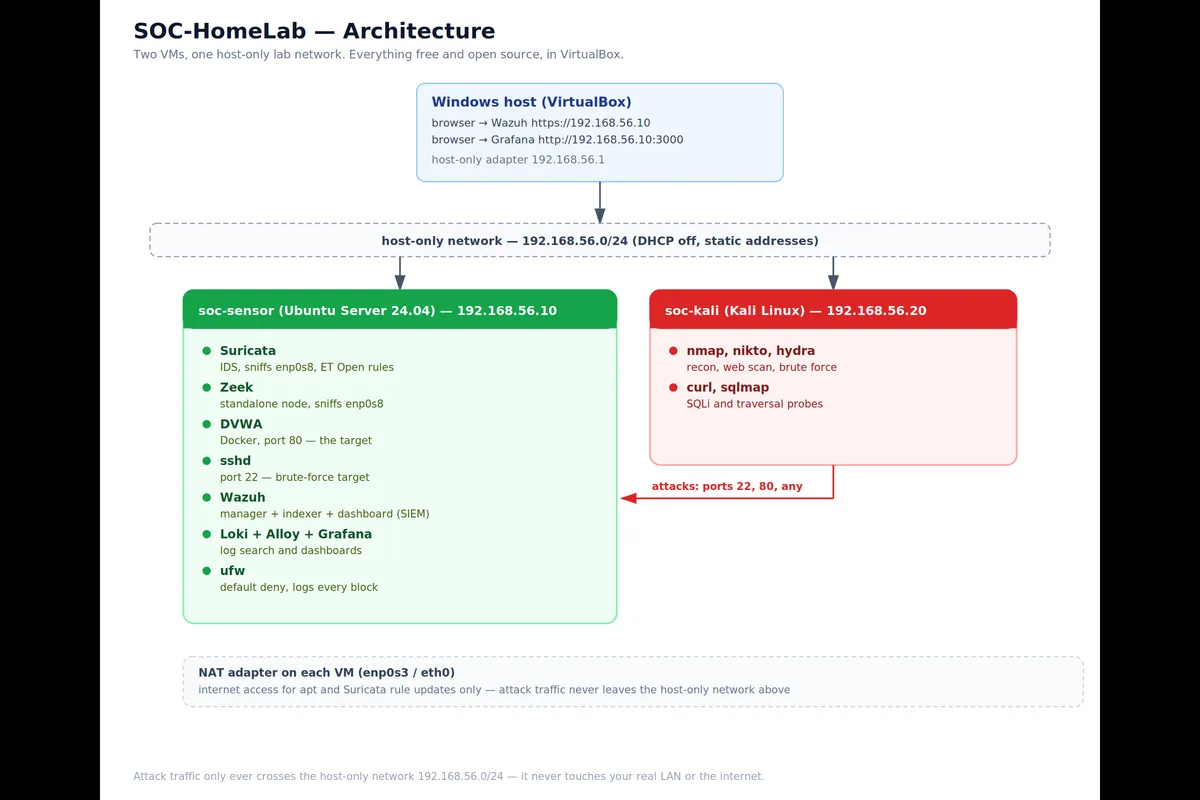
Two design decisions on soc-sensor are worth explaining, because they are the kind of thing that looks like a small config line but actually decides whether the lab tells the truth.
The first is HOME_NET. Suricata's whole rule logic depends on knowing which
side of a connection is "home" and which is the outside. Because Kali sits in the same
/24 as the sensor VM, if I had set HOME_NET to the whole
192.168.56.0/24 subnet, Kali would count as internal too, and most of the
rules that are written to fire on inbound attacks from an external source would simply
never trigger. So HOME_NET is set to the SOC VM's single address,
192.168.56.10, and nothing else. That one line is what makes Kali count as an
attacker instead of a neighbor.
The second is where the sensors sit relative to ufw. Suricata and Zeek both
read enp0s8 directly through AF_PACKET, which means they see every frame as
it arrives on the wire, before the kernel firewall has decided whether to drop it. A scan
that ufw blocks and logs is still a scan that Suricata and Zeek saw in full.
That ordering is what makes it possible to compare "what the firewall blocked" against
"what the sensors detected" as two separate, honest signals, instead of only seeing
whatever got past the firewall.
I also extended Wazuh's ruleset rather than replacing it. The lab's custom rules (numbered
100100 through 100204) use if_sid to attach to Wazuh's own built-in Suricata
decoder rule, 86601, instead of re-parsing the Suricata JSON from scratch. If a future
Wazuh ruleset update changes how the built-in decoder works, my rules still inherit that
fix, rather than silently breaking because I duplicated logic Wazuh already had.
The resource budget
Wazuh, Zeek, Loki and Grafana are not light, and all of them run on the same 16 GB VM as the target application. Building without a memory budget in hand is how a lab freezes at the exact moment the interesting alert arrives, so I planned the budget before installing anything rather than after.
| Component | Typical RAM |
|---|---|
| Wazuh indexer (JVM heap 4 GB plus overhead) | about 5 GB |
| Wazuh manager | about 1 GB |
| Wazuh dashboard | about 1 GB |
| Suricata (ET Open rules) | about 1 GB |
| Zeek (standalone) | about 1 GB |
| Loki, Alloy, Grafana | about 1 GB |
| DVWA container | about 0.5 GB |
| Ubuntu and page cache | about 2 GB |
That adds up to roughly 12.5 GB against a 16 GB allocation, which leaves headroom for the moments when the indexer's JVM garbage collector spikes, or several tools are writing at once during an attack run. The single largest consumer by far is the Wazuh indexer, a Java process, so I capped its heap explicitly at 4 GB rather than letting it claim whatever the machine happened to have free. soc-kali needed almost no planning by comparison: 2 GB is enough for a handful of command-line scanning tools that run one at a time, not a desktop environment doing real work.
That budget held up honestly, not selectively. The indexer's heap stayed under its 4 GB
cap through every check I ran during the attack simulation, so the plan on paper matched
the machine in practice for the piece I was most worried about. What actually strained the
VM was not memory at all: during the heaviest attack run, with Suricata, Zeek and the
Wazuh indexer all working at once, the scheduler fell behind badly enough that Zeek itself
crashed mid-run, not at boot, while free -h still reported healthy headroom.
The tell was in dmesg, not free: an RCU-preempt CPU-starvation
warning paired with systemd-oomd missing its own watchdog heartbeat, the
service whose entire job is to intervene before things get that bad. That is a real limit
worth stating plainly: this VM is sized correctly for its memory budget and slightly
undersized for its CPU budget under sustained multi-service load, and the fix is
operational, not a config change: do not run a desktop GUI or an IDE on the same VM while
a simulation is live, and prefer SSH.
The budget also drove a design rule I think is worth keeping even outside this lab: the
SIEM holds alerts, and the log platform holds telemetry. Zeek's connection log,
conn.log, can run to millions of lines a day even on a quiet network. Pushing
all of that into Wazuh's indexer would make the biggest memory consumer in the whole lab
bigger for very little benefit, since most of those lines are never going to become an
alert. Instead, only Zeek's notice.log goes into Wazuh, where it becomes a
ranked, correlated alert. The bulk logs, conn.log, dns.log,
http.log and ssl.log, go to Loki, where they are cheap to store
and fast to search with LogQL when I want to hunt rather than triage. The next post in
this series covers that pipeline in detail.
Honest limits, stated up front
A design is also a list of trade-offs, and I would rather name mine than have someone else find them first.
Sensors and target share a host. Suricata, Zeek and Wazuh all run on the same VM as the application they are protecting. A real network puts sensors on a span port or a tap, physically separate from anything an attacker could reach. Here, a compromise of soc-sensor could in principle tamper with its own sensors, and that is worth saying out loud in an interview, along with the fix: a dedicated sensor host and log forwarding, which is the natural next version of this project.
It is one flat network with no firewall appliance in front of it. There is no segmentation, no boundary an attacker has to cross to go from scanning the target to reaching anything else, because in this version there is nothing else to reach. That is the scope I chose, described above, and it is a limit, not an accident.
Suricata runs in IDS mode only, never IPS. It watches and logs, it never drops a packet on its own. That was a deliberate choice, not a shortcut I ran out of time for: I want to see and tune alerts before I ever let a signature act on traffic automatically, because a wrong rule in blocking mode causes an outage, not just a noisy log line.
The beaconing behavior I simulate is exactly that, simulated. kali-beacon-sim.sh
sends twenty requests to DVWA, thirty seconds apart, to produce a regular interval pattern
for the beacon-hunting tool to find. It is a stand-in for command-and-control traffic, not
the real thing, and the results in this series say so.
A small threat model
A design without a threat model is decoration. Mine is modest, and writing it down kept me from adding features that did not serve it.
The attacker is an unauthenticated person who can reach whatever soc-sensor exposes on the lab network: a web application and an SSH service. They will scan for open ports and services, probe the web app for injection and traversal flaws, and try common passwords against SSH. If any of that succeeds, their next move in a real environment would be to look around from the machine they just landed on.
The defender, which is me, wants to answer four questions quickly for any given alert. Did
someone scan us? Did someone attack the web app? Did someone try to guess a password, and
did any guess work? And is there a pattern in the traffic that looks like something calling
home on a schedule? Each question maps to a specific sensor. The first is answered by
Suricata's port scan and SYN burst signatures alongside Zeek's own scan detection. The
second by Suricata's web application attack category, Zeek's HTTP log, and DVWA's own
Apache access log. The third by Zeek's SSH analysis and the sshd and
ufw logs Wazuh reads directly. The fourth by the interval analysis in
tools/beacon_hunt.py against Zeek's conn.log.
This is also how I decided what belonged in the lab. A feature earns its place only if it answers one of those four questions. That rule is the reason there is no Windows domain, no active blocking, and no second network segment in this version.
How I will know it worked
I set success criteria before building, so I could not quietly redefine success after the
fact. The lab works if a scripted attack against soc-sensor produces at least one alert in
each detection layer (Suricata, Zeek and Wazuh), if at least one finding is confirmed by
two independent tools for the same source address, if the soc_digest.py tool
correctly correlates those sources across all three log sources, and if I can go from a raw
alert to a written ticket in under fifteen minutes using my own triage playbook. The
criterion I care about most is the simplest to state and the hardest to fake: that I can
explain, for every alert I keep, why it fired and what I did about it.
Those numbers came back real. Every attack simulation run raised at least one alert in
each of the three detection layers: Suricata's own test signatures, Wazuh's correlation
rules, and, as the run confirmed, a genuine Zeek notice too. The SQL injection step in
particular ended up confirmed by three independent tools watching the same source address,
not just two, which is a stronger result than I expected going in. soc_digest.py
correctly listed both the attacker and the target under sources seen by more than one
tool, and the completed ticket for the lab's highest-severity finding, a Shellshock probe
that turned out to be sent but never executed, went from raw alert to a written, evidenced
ticket well inside the fifteen-minute window the lab's own policy sets for a level 12 or
higher alert. The later posts in this series walk through exactly how each of those numbers
came about.
What I chose not to build
Every design is also a list of things left out, and I think listing them is a sign of maturity rather than weakness.
I did not add a second network segment with its own firewall rule set in this version. It would let me practice sensor placement across a real boundary instead of on a single host, and it stays on the roadmap once this smaller lab is solid.
I did not turn on blocking. Suricata stays in alert-only mode for the reasons already covered above.
I did not add a Windows endpoint. It would be realistic for a lot of organizations and it is a natural next step, most likely as a Wazuh agent with Sysmon, but it adds a whole second operating system's worth of complexity to a version one build whose job is to prove the core loop, not cover every asset type.
I did not put anything in the cloud. The lab costs nothing and is exposed to nothing outside the host-only network, and it will still be here when a free trial would have expired.
The scripts: making the build repeatable
A build I can only do by clicking through installers is a build I can only do once. So the
repository has a numbered script for every stage: one that creates the two VirtualBox VMs
with the correct NIC order, one that prepares the base Ubuntu install and enables
ufw, and one each for Suricata, Zeek, DVWA, Wazuh and the Grafana stack. There
is also a health check script that prints a pass or fail for every hop in the pipeline,
which turned out to be the most useful script of all, because it tells me which link is
broken in seconds instead of forcing me to check each service by hand.
Repeatability matters for another reason too. I take a snapshot of both VMs before each
attack run, named clean-baseline, so I can restore the whole lab and run the
same test again under the same starting conditions. A lab you can reset on demand is a lab
you can actually run experiments on, instead of a lab you are afraid to touch. This is the
same instinct behind
a
Linux hardening audit I ran against my own machine earlier in this series of security
write-ups: build the thing so you can safely break it again.
What this design taught me before I ran a single attack
Even before any traffic flowed, the design work taught me three things I plan to carry into any real environment.
Scope is a design decision, not a compromise. Cutting the segmented network down to two VMs was not settling for less, it was choosing the smallest system that still teaches the full detection loop, and it is the reason this lab actually got built and finished rather than stalling halfway through a firewall rule set.
Sensor placement decides what a sensor can know. Because Suricata and Zeek read the
interface before ufw makes its decision, they see everything, including what
gets blocked. If they sat behind the firewall instead, blocked traffic would be invisible
to them, and I would be blind to exactly the attempts a defense-in-depth story depends on
catching.
Every default encodes an assumption, and a lab will violate some of them.
HOME_NET covering the whole subnet is a reasonable default for a network where
every device is actually internal, and it is the wrong default the moment an attacker
shares that subnet on purpose. I now read every sensor and firewall default with the
question "what is this assuming about my network, and is that assumption true here?"
Frequently asked questions
Why build a two-VM SOC lab instead of a segmented network with a firewall appliance?
A firewall build with multiple network segments is a multi-day project on its own, and most of that extra time goes toward VLAN-style isolation and rule ordering rather than the actual SOC skill of reading an alert and deciding what it means. Two VMs on one flat network is the smallest lab that still produces a complete detection story: an attack, independent detections across three tools, and one place to triage. The segmented design is not abandoned, it is a good second project once this smaller one is solid.
Why does Suricata's HOME_NET only include the sensor's own address instead of the whole subnet?
The attacker VM and the sensor VM sit on the same 192.168.56.0/24 host-only network. If HOME_NET were set to the whole subnet, the attacker would count as internal too, and the rules written to fire on inbound attacks from an external source would never evaluate as true. Setting HOME_NET to only the sensor's single address makes the attacker count as EXTERNAL_NET automatically, so every rule written the normal way still works even though both machines share a subnet in real life.
Why does Wazuh run without a separate agent in this lab?
Wazuh's all-in-one install includes its own local agent by default, and because the manager, the target application, and the SSH service all live on the same VM, that local agent can already read every file it needs directly off the filesystem: Suricata's EVE JSON, Zeek's notice log, the target's own access log, and the host firewall log. Adding a second, remote agent would only be necessary once a real second host exists to monitor, and it would introduce agent enrollment and agent-to-manager TLS as new things that can quietly break.
Is it a problem that the sensors and the target application run on the same virtual machine?
Yes, and it is worth stating plainly rather than glossing over. A real network puts sensors on a span port or a tap, physically separate from anything an attacker could reach, so a compromise of the target cannot also compromise the thing watching it. Here, a genuine compromise of the sensor VM could in principle let an attacker tamper with the very sensors meant to catch them. That is a real limit of this version of the lab, and a dedicated, separate sensor host is the natural next iteration once this smaller design is solid.
Where this goes from here
The full runbook, the architecture document, every script, and the screenshot checklist
are on GitHub:
github.com/rachata072/soc-homelab.
Part 2 of this series puts Suricata and Zeek to work on enp0s8:
Suricata on the SOC VM.
This is part of an ongoing series of networking and cybersecurity projects I am building for my portfolio while studying for the CCNA (more on my background here). More lab notes and write-ups land here as each one ships.