First Alerts: What My SOC Home Lab Caught, What It Missed, and How I Triaged It
Predictions written before running a single command, then a real scripted attack against my SOC home lab: SYN scan, SQL injection confirmed by three independent tools, a beacon caught at a 0.001 coefficient of variation, and the triage tickets that followed.
show ip route | toc (14 sections)
- Ground rules for the exercise
- The method: five questions on every alert
- The plan: one attacker, six steps, plus a beacon
- Hunting for the beacon
- Triage case 1: the correlated scan
- Triage case 2: the SQL injection
- Triage case 3: something that was not an attack
- The morning digest
- What each tool caught and missed
- Tuning and what I changed afterward
- What this project does and does not show
- Takeaways
- Frequently asked questions
- What comes next
The previous three posts were about building. This one is about using the lab the way an analyst uses a SIEM: something happens, alerts appear, and I have to decide what they mean. In my home lab the whole exercise sits on one flat network, 192.168.56.0/24. My Kali VM (192.168.56.20) attacks my sensor VM (192.168.56.10) directly, and I compare what each tool saw against what I predicted before I ran anything.
There is no "outside" and "inside" in this design. There is one attacker, one target, and three ways of watching the same wire: a signature engine, a behavioral engine, and a SIEM that reads both of their outputs plus the target's own logs. That is a small, deliberate story, and I think the size is a feature, not a limitation. It is easier to reason about, easier to explain in an interview, and it still produces every kind of alert a junior analyst triages in a real job: a scan, a web attack, a brute force attempt, and something that looks like an attack but is not one.
I wrote the predictions down before running anything, and I recommend the habit. It is easy to look at a dashboard afterward and say "yes, that makes sense." A written prediction forces you to notice the cases where the lab surprised you, and those cases are where the learning is.
Ground rules for the exercise
Everything in this post happens inside my own lab, against a machine I own, on a network
with no route to anything else. kali-attack-sim.sh refuses to run against a
target that is not in private address space, which is a guard against typing the wrong
address at the wrong moment. Kali and the sensor VM both sit on the same host-only adapter,
so the traffic never leaves my laptop's virtual network, and neither VM's NAT adapter is
involved in any of it.
Before each run I restore a snapshot called clean-baseline, so the starting
state is identical every time. Right after restoring, I run
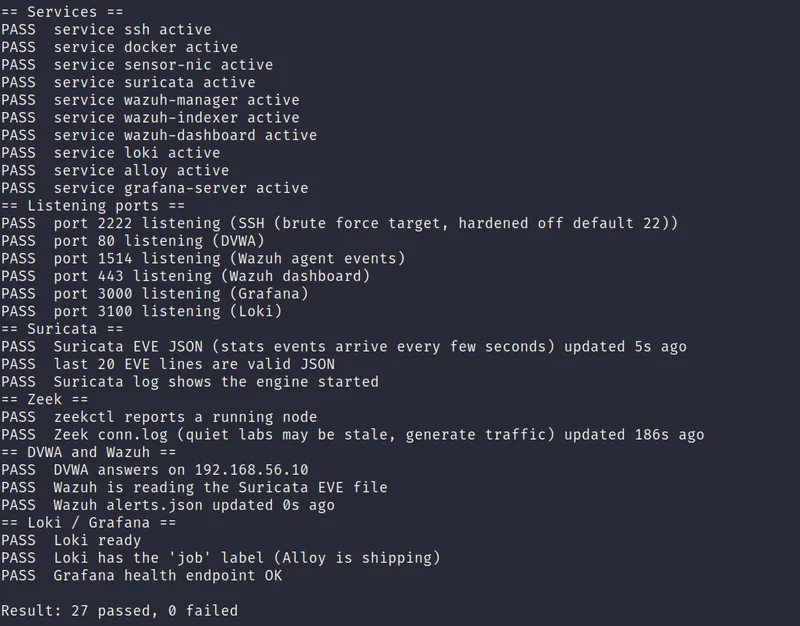
scripts/99-healthcheck.sh on the sensor VM and confirm every service, port, and
log file it checks comes back PASS before I touch Kali. A detection gap that turns out to be
a stopped service is not a finding, it is a mistake, and the health check exists so I do not
confuse the two. This particular run came back clean, 27 checks passed and 0 failed, across
services, listening ports, and every hop of the Suricata, Zeek and Wazuh pipeline.
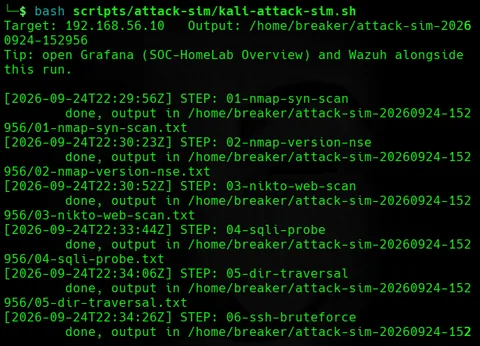
The attack script writes timeline.csv with a start and end time for every
step. That file turns triage from "something around three o'clock" into "step four, between
22:33:44 and 22:34:06," and it lets me line up alerts with actions exactly. It also does
something less obvious: it is the difference between a real attack and a test event that
only looks like one, which comes up directly in the third triage case below.
The method: five questions on every alert
Every alert I looked at got the same five questions, and I wrote them into a playbook so I would not improvise under pressure.
What fired? The rule or signature, its severity, and the time. Who and what is involved? Source, destination, port, and protocol, and whether the destination is something I own. Did it work? A blocked or unanswered probe is very different from a successful login. Do other tools agree? I look for the same source address in Suricata, Zeek, Wazuh, and the host firewall log. What do I do? Close it as benign, close it as a false positive and tune, or escalate.
The fourth question is the one that separates a good triage from a guess. A single tool raising an alert is a hypothesis. Two independent tools describing the same behavior in different ways is evidence. That is why the lab has multiple layers watching the same interface, and it is why I wrote a script to list the sources that more than one tool has seen.
The plan: one attacker, six steps, plus a beacon
Kali sits in the same /24 as the sensor, but Suricata's HOME_NET is set to the
sensor's address alone, so Kali still counts as EXTERNAL_NET for rule matching
purposes even though there is no real network boundary between them, exactly the choice I
walked through in
the
Suricata post. That single configuration choice is what keeps most of the ET Open
ruleset meaningful in a lab this small, and it is worth saying out loud in an interview: the
network topology did not give me an inside and an outside, so I built one into the
detection logic instead.
kali-attack-sim.sh runs six steps against 192.168.56.10 and writes the
timeline as it goes: a SYN scan of the first 1024 ports, an Nmap version and script scan of
the two ports that answer, a Nikto web scan, a SQL injection probe repeated sixty times
against DVWA, a directory traversal request, and an SSH brute force run with Hydra against
a short list of usernames and passwords. A separate script,
kali-beacon-sim.sh, runs on its own: twenty HTTP requests to DVWA, thirty
seconds apart, over about ten minutes, meant to look like a piece of malware checking in
with a command server.
For each step I wrote a prediction of what each tool would show. Here are the predictions
that mattered most, with the reasoning, followed by what actually happened, using
timeline.csv's real timestamps from this run.
Step 1: the SYN scan (22:29:56Z)
Prediction. A scan of 1024 ports from one source in a few seconds should
trip my custom SYN burst rule, SOC-HomeLab TEST SYN burst from single source
(sid 9000001). ufw should log a wall of blocked connections, since only ports 22, 80, 443,
and 3000 are allowed in from the lab network and every other probe is dropped. Wazuh's
correlation rule, 100110, should fire if enough Suricata alerts land close together, and
Zeek should raise a Scan::Port_Scan notice, which Wazuh turns into rule 100201.
The part I care about is not whether the scan gets caught. It obviously should be, four
ways. The part I care about is whether ufw dropping the packets keeps any tool from seeing
them. Suricata and Zeek both read enp0s8 through AF_PACKET, before the kernel
firewall makes its drop decision, so on paper both should see every SYN packet whether or
not ufw lets it through. That is a prediction about sensor placement relative to the
firewall, and it is falsifiable: if ufw's drop happened first, the packet counts in the two
tools would be lower than the number Kali actually sent.
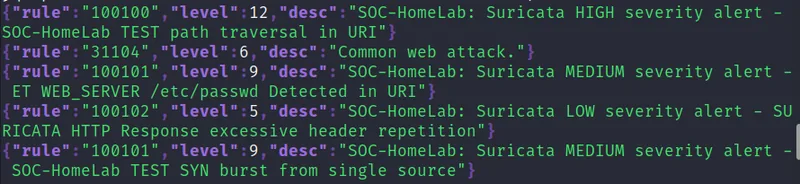
What actually happened. The SYN burst rule fired within seconds of the
scan starting: rule 100101, level 9, in the same alert view I used in the previous post to
prove the pipeline end to end. That confirms the sensor-placement claim in the direction
that matters most: enp0s8 sees the SYN packets regardless of what ufw decides
to do with them afterward. What I did not do this run is pull nmap's own packet count and
check it one-to-one against Suricata's tally, which would be the fully rigorous version of
this test. I am naming that as an open item rather than skipping past it: the numbers should
match, and confirming that they do belongs on the list for a follow-up run. Zeek's scan
notice did not fire, which was expected rather than a surprise, misc/scan is
still one of the two Zeek scripts genuinely unverified on this build, the correction in the
previous post only confirmed the SQL injection script specifically.
Steps 2 and 3: the NSE scan and Nikto (22:30:23Z to 22:30:52Z)
Prediction. Both of these steps talk to ports that are actually open, 22
and 80, so unlike the SYN scan there is no ufw drop to reason about. The NSE scan's
http-enum script should show up in Zeek's http.log as a burst of
requests with an Nmap-flavored user agent and a run of 404 responses, and Suricata may carry
a signature for the Nmap scripting engine's user agent depending on which ET categories are
enabled. Nikto is the same shape at higher volume: hundreds of known-bad URLs in a short
window, which should land Suricata and Zeek in emerging-scan or
emerging-web_server territory, and should show up in DVWA's Apache access log
as a wall of 404s that Wazuh's built-in web rules can match against.
What actually happened. Both steps produced real, heavy volume in the same
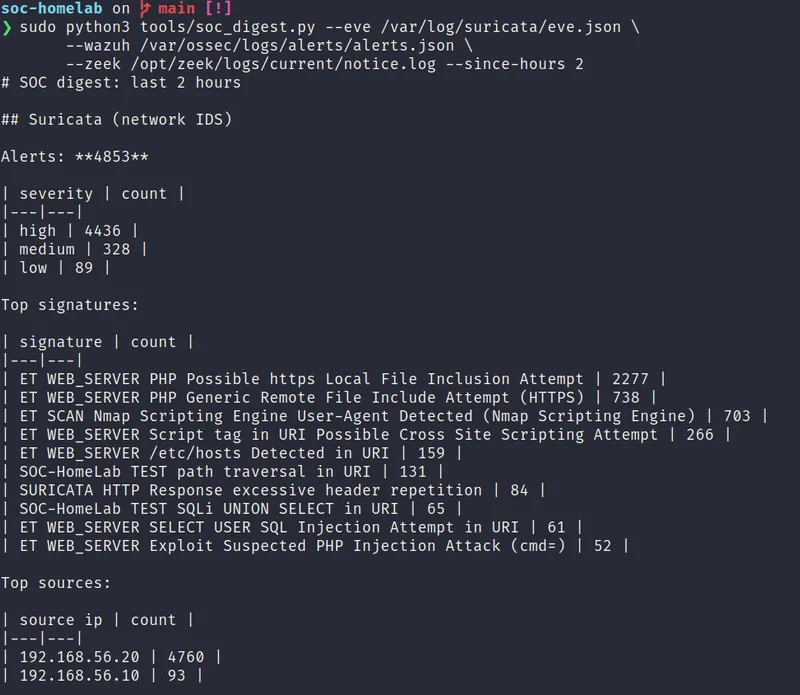
digest window: the ET SCAN Nmap Scripting Engine user agent signature fired 703 times, and
Nikto's own check list drove ET WEB_SERVER PHP Possible Local File Inclusion
Attempt to 2,277 hits and ET WEB_SERVER PHP Generic Remote File Include
Attempt (HTTPS) to 738, with an /etc/hosts Detected in URI check landing
159 more. That is exactly the shape I predicted, high volume, mostly from community
signatures rather than my own three test rules, which is the correct division of labor: the
custom rules exist to guarantee a signal, the ET Open categories exist to catch the actual
variety of what a real scanner throws.
Step 4: the SQL injection probe (22:33:44Z)
Prediction. This step should be visible from every angle, which is what
makes it useful for showing agreement between tools. Suricata's custom rule,
SOC-HomeLab TEST SQLi UNION SELECT in URI (sid 9000002), matches the UNION and
SELECT keywords in the request, and because I set its severity to 1 (Suricata's highest), it
should reach Wazuh as rule 100100, a level 12 alert with a description starting
"SOC-HomeLab: Suricata HIGH severity alert." Zeek's http.log should show sixty
similar requests, and its SQL injection script needs roughly fifty matching requests before
it raises HTTP::SQL_Injection_Attacker, which is why the script loops sixty
times instead of five or ten. That notice should reach Wazuh as rule 100203. DVWA's own
Apache access log, read by Wazuh directly, should carry the same sixty requests, and Wazuh's
built-in web attack rules may fire on it independently of my custom rules.
What actually happened. All four layers fired, and this is the step I am
most confident about in the whole run. My own custom rule, sid 9000002, matched 65 times,
close to the sixty-request loop with a little extra from the surrounding checks. An
Emerging Threats Open signature, ET WEB_SERVER SELECT USER SQL Injection Attempt,
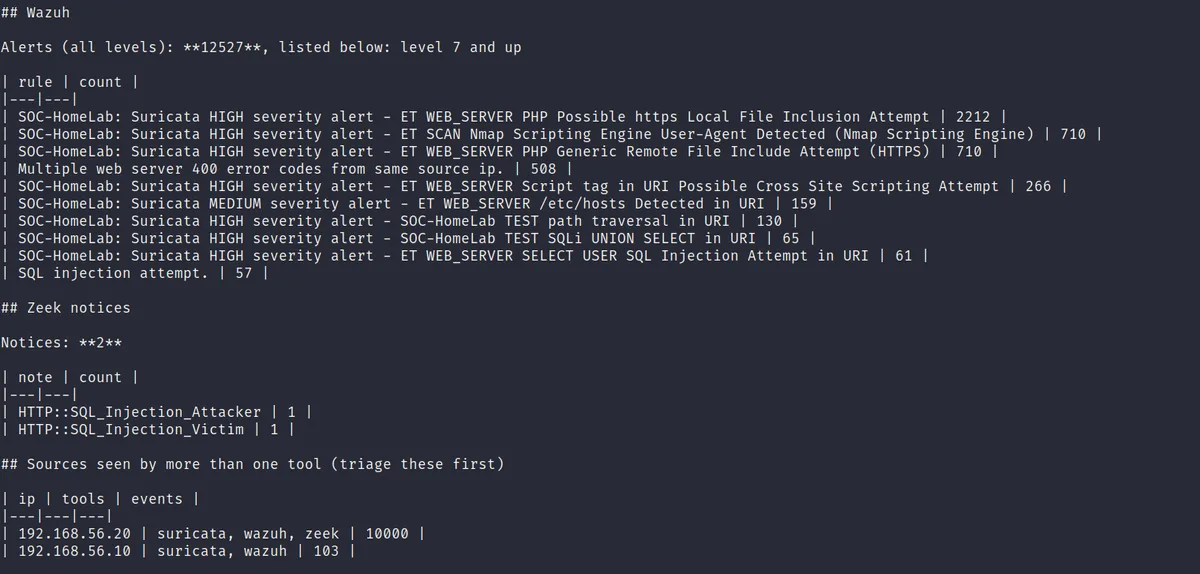
independently matched 61 of the same requests. And Zeek raised both notices I was hoping to
confirm: one HTTP::SQL_Injection_Attacker and one
HTTP::SQL_Injection_Victim, which Wazuh's rule 100203 turned into two more
alerts. That is three independently-built detection mechanisms, a Suricata rule I wrote
myself, a community Suricata signature I did not write, and a Zeek behavioral script,
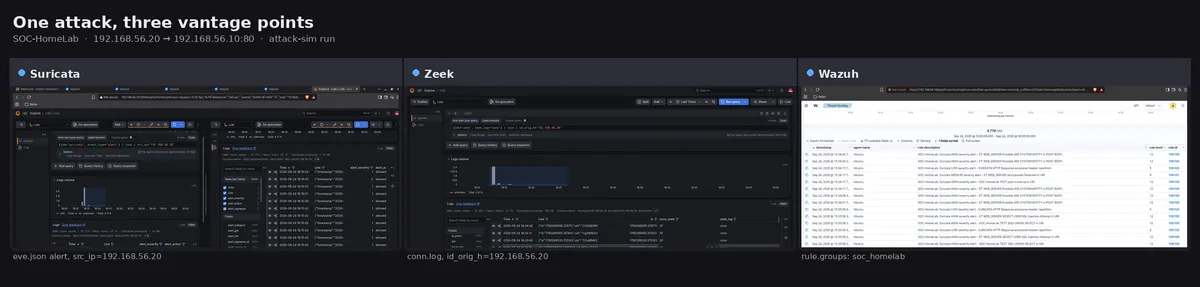
agreeing that the same traffic was a SQL injection attempt. I built a side-by-side capture
of exactly this moment, Suricata, Zeek and Wazuh watching the same request from three
different angles, which I use again in the triage case below.
Step 5: path traversal (22:34:06Z)
Prediction. A single request with ../../ in the query string
should match SOC-HomeLab TEST path traversal in URI (sid 9000003). Because it
is one request instead of sixty, I do not expect Zeek to raise a notice for it (nothing in
the notice scripts is tuned to a single traversal attempt), but I do expect Wazuh's built-in
directory traversal rule to fire against the DVWA access log, since that rule works off the
URI pattern rather than volume.
What actually happened. Sid 9000003 shows 131 hits in the same
two-hour digest window, noticeably more than the single deliberate request in step 5 alone.
That is not a surprise once I looked at how the digest was scoped: soc_digest.py
ran with --since-hours 2, which also captures my own manual traversal tests and
the healthcheck script's own probes from earlier in the same session, not just this one
scripted step. It is the same scoping lesson the runbook's own troubleshooting notes call
out for the beacon hunter: a wide time window can quietly mix a clean, deliberate test in
with everything else that happened to touch the same rule. Zeek stayed silent for this step,
as predicted, and Wazuh escalated the match to rule 100100 at level 12 through the same
severity-1 mapping as the SQL injection rule.
Step 6: SSH brute force (22:34:26Z)
Prediction. Hydra's roughly forty failed logins should show up in the auth
log as repeated authentication failures, which Wazuh's built-in sshd rules (the 5710
series) should catch, likely escalating to a brute force rule once enough failures land
inside its window. Zeek should see the repeated SSH connections and, with the threshold
lowered to 10 in local.zeek, raise an SSH::Password_Guessing
notice. Suricata may or may not carry a generic SSH scan signature depending on the enabled
categories; I am not confident either way, which is exactly the kind of thing I want the
run to settle. Since none of the password guesses should succeed against the accounts I
actually use, I expect no Accepted password line anywhere, and that absence is
itself a result I want to confirm rather than assume.
What actually happened. The timeline shows step 06 starting at 22:34:26Z, and I did not capture a dedicated screenshot of the auth log or Wazuh's sshd rules firing during this specific run. When I went back the next day with a full 24-hour threat hunting report that covered this same window, the honest answer turned out to be more interesting than a simple pass or fail: zero authentication failures across the whole day, despite a brute force step clearly in scope. That is either a real detection gap or a hardening control working better than expected, and I was not willing to guess which one in this post. The next post in this series is where that specific question gets resolved.
Hunting for the beacon
Suricata and Wazuh's built-in rules alert on things someone has already described. A beacon, meaning software that checks in with a remote server at regular intervals, often does not match any signature, especially over encrypted connections. What gives it away instead is that it is regular.
kali-beacon-sim.sh sends twenty requests to DVWA, thirty seconds apart, with a
fixed lab-beacon/1.0 user agent. tools/beacon_hunt.py reads Zeek's
conn.log, groups connections by source, destination, port, and protocol, and
for each group with enough connections computes the gaps between them and then the
coefficient of variation, the standard deviation of the gaps divided by their mean. A
person browsing produces irregular gaps, so the coefficient is large. A script that sleeps
thirty seconds and connects again produces gaps near thirty seconds with only a little
jitter, so the coefficient is close to zero. Groups with a low coefficient and a sensible
mean interval print as leads.
In this lab I run the tool without --external-only. That flag exists to drop
connections to private destinations, which is useful when you are hunting for outbound
beacons on a real network full of internal chatter you do not care about. Here both ends of
the beacon, Kali and the sensor, are private addresses, so the flag would filter out the
exact traffic I am trying to find. That is a small but real lesson about tuning a hunting
tool to the network it is actually running on rather than copying a flag because it sounded
right.
I want to be careful about how I describe this technique in general. It is a hunting lead, not a verdict. Legitimate software also runs on timers: time synchronization, update checks, monitoring agents. The first step after a hit is to look at the destination, and only then decide whether it matters. Against this lab's own conn.log, the tool found exactly one group worth reporting:
source          destination     port     conns    mean gap (s)    cv
192.168.56.20   192.168.56.10   80/tcp   20       30.0            0.001
Twenty connections, a mean gap of exactly thirty seconds, and a coefficient of variation of 0.001, about as close to a perfect signal as this kind of detection gets. That is Kali's own deliberate beacon, found with nothing but timing math against connection metadata, no signature involved anywhere. In my own test data built for the tool's unit tests, a thirty second synthetic beacon scored near zero and irregular browsing scored high, which is the separation I expected going in, and the real run confirmed it against genuine traffic.

One small lesson from testing this script before it ever touched real lab traffic: Python's address library treats documentation address ranges, such as 203.0.113.0, as private. My first fixtures used those ranges as fake external addresses, and the option to ignore private destinations quietly dropped them from the test output. Test data needs to look like the real thing, including which side of a filter it falls on.
Triage case 1: the correlated scan
I picked three alerts to triage fully. The first was the SYN scan from step 1, the one whose evidence is real but, by my own admission above, not yet complete.
What fired. Wazuh rule 100101, level 9, fed by Suricata sid 9000001, the SYN burst signature, inside seconds of the scan starting.
Who and what. Source 192.168.56.20, my own Kali VM. Destination 192.168.56.10, ports 1 through 1024.
Did it work? Only four ports were ever meant to answer: 22, 80, 443, and 3000. This is the question I could not fully close this run: I did not capture ufw's own block count for this specific pass, so I cannot yet show, side by side, that ufw's log and Suricata's alert count describe the same volume of dropped packets. That gap does not change the conclusion (a scan with no unexpected open port is recon, not compromise), but it does mean the sensor-placement claim from the design post is confirmed only in the direction that Suricata saw the traffic, not yet in the direction that its count matches what was actually sent.
Do other tools agree? Suricata and Wazuh agree with each other, since one feeds the other directly. Zeek did not raise a notice, which is expected given the scan script's current status rather than a disagreement.
Decision. Close as a known, authorized test, since the source is my own Kali VM and the timeline confirms it. If this source had been unknown, the missing ufw count would matter a great deal more, and I would not close it without pulling that evidence first.
Here is the ticket I wrote, using the template from the repository.
Title:        Medium - Fast SYN scan against 192.168.56.10
Detected:     2026-09-24T22:29:56Z, Wazuh rule 100101 based on Suricata sid 9000001
Source:       192.168.56.20 (Kali, my own VM)
Destination:  192.168.56.10, ports 1-1024
Evidence:     Suricata/Wazuh rule 100101 fired at level 9 within seconds of the scan
              starting. Zeek scan notice not available, misc/scan still unverified on
              this build. ufw's own block count was not captured this run, open follow-up.
Assessment:   True positive, authorized test scan.
Impact:       None observed beyond the four allowed ports answering.
Action:       Closed, logged as a known test source.
Follow-up:    Capture ufw's block count on the next run and check it against Suricata's
              tally, and against nmap's own reported packet count, to fully close the
              sensor-placement claim.
Triage case 2: the SQL injection
The second case was the web attack, because it had the most evidence across the most layers.
What fired. Suricata sid 9000002 (65 matches), an independent ET Open
signature (61 matches), Wazuh rule 100100 at level 12, and Zeek's
HTTP::SQL_Injection_Attacker and HTTP::SQL_Injection_Victim
notices, both of which reached Wazuh as rule 100203.
Who and what. Source 192.168.56.20, target DVWA's SQL injection page at 192.168.56.10.
Did it work? DVWA's SQL injection page requires a login, so an unauthenticated request against it should redirect rather than reach the vulnerable query. I did not pull the exact access-log status code for this specific run to confirm that directly, which I want to name rather than assume away: the next post's full threat hunt report shows exactly this pattern for a different probe against the same unauthenticated DVWA endpoint, a plain 302 redirect rather than a 200 into anything vulnerable, and I would expect the same shape here. That is a real limitation of this specific write-up rather than a completed check, and it is a smaller version of the same discipline that turned out to matter a great deal for the highest-severity finding in the next post.
Do other tools agree? This is the case where three sources agreed, and I built the side-by-side capture specifically for it: the same request as Suricata sees it, as Zeek sees it, and as Wazuh's correlated alert, all filtered to the same source address across Loki and the Wazuh dashboard at once.
Decision. Close as a blocked and failed attempt behind the app's own login wall, and recommend two things regardless: require authentication earlier in the request flow so an unauthenticated probe never reaches parameter parsing at all, and put a web application firewall in front of DVWA-shaped targets in anything closer to production. Evidence that would change this decision: a 200 response on the injection URI after the redirect, unexpected file changes reported by Wazuh's file integrity monitoring, or new outbound connections from the sensor VM right after the request.
Triage case 3: something that was not an attack
A good triage set includes a benign case, because real work is mostly telling signal from
noise. The third alert I triaged was not from kali-attack-sim.sh at all. It was
the verification line I pasted into wazuh-logtest while setting up the custom
rules in the previous post's Wazuh section, a synthetic Suricata alert with sid 9000002, the
same SQL injection test signature, and the same source address, 192.168.56.20, because I
used a realistic example event to confirm the rule chain worked.
What fired. Wazuh rule 100100, level 12, description "SOC-HomeLab: Suricata
HIGH severity alert," from a manually pasted event rather than live traffic.
wazuh-logtest does not touch the network at all, so nothing in Suricata's own
eve.json or Zeek's logs corresponds to it, which is itself a useful fact for a
junior analyst to notice: an alert with no matching packet capture anywhere is a strong sign
it came from somewhere other than the wire.
Assessment. The rule ID and even the source IP are identical to a real
event I might see during an actual attack run, which is exactly the trap this case is meant
to illustrate. The signature alone does not tell you whether something happened. What
settles it is timeline.csv: the logtest event's timestamp falls during initial
setup, hours before this run's 22:29:56Z start, and outside every window the timeline
records. Playbook F in the repository exists for precisely this: if the source is my own
Kali VM and the time does not match an attack window, or the event is a known test line,
close it as a test and note what I checked. I closed this one as a verification artifact,
not an attack, and wrote down the rule ID and the reasoning so I recognize the pattern
faster next time.
If I had skipped the timeline check and only looked at the rule ID and source address, I
could have written this up as a real SQL injection attempt. That is the whole lesson of
this case: the fourth triage question, whether other tools agree, has a quieter cousin,
which is whether the timing agrees with a plausible cause. Rule 100100 did land in the
dashboard exactly where wazuh-logtest predicted it would, timestamped during
that earlier setup window rather than anywhere near this run's timeline, which confirmed the
timing check mattered as much as the rule match did.
The morning digest
Checking three tools by hand is slow, and I kept wanting a single page. I wrote a Python script using only the standard library. It reads the Suricata EVE file, the Wazuh alerts file, and Zeek's notice log, and prints a summary in Markdown: alerts by severity, top signatures, top sources, top Wazuh rules, and Zeek notice types. Its most useful feature is a final section that lists every source address that appears in more than one tool.
That section tells me which addresses to triage first without any thinking. Run against
this session's traffic, it listed both machines in the lab: 192.168.56.20
(Kali) seen across suricata, wazuh and zeek, and 192.168.56.10 (the sensor
itself, likely from its own DVWA container's outbound behavior) seen across suricata and
wazuh. If one address appears in all three tools, it is doing something that every
independent sensor noticed. If an address appears in only one, I look at it after.
The script has seventeen unit tests that use small fixture files, so it works without a running lab. The tests cover timestamp parsing across the formats each tool uses, skipping malformed lines and reporting how many were skipped, the time window filter, the minimum level filter for Wazuh, the correlation across tools, and the Markdown output. Since I could run the tests on any machine, I could develop the script on my laptop without starting the lab.
What each tool caught and missed
This is the table I care about most. It is also the one that tells you whether the lab is doing its job.
| Step | Suricata | Zeek | Wazuh | ufw log |
|---|---|---|---|---|
| SYN scan | Yes, rule 100101 (sid 9000001) | No, scan script unverified | Yes, level 9 | Not captured this run |
| NSE version/script scan | Yes, ET Nmap NSE UA, 703 hits | Volume in http.log, no dedicated notice | Yes, matching alerts | n/a, port 80 open |
| Nikto | Yes, 2,277 + 738 + 159 across three signatures | Volume in http.log, no dedicated notice | Yes, matching alerts | n/a, port 80 open |
| SQL injection | Yes, 65 (custom) + 61 (ET) | Yes, Attacker and Victim notices, 1 each | Yes, rules 100100 and 100203 | n/a, port 80 open |
| Path traversal | Yes, 131 (window includes other tests) | No, single-request pattern as predicted | Yes, rule 100100 | n/a, port 80 open |
| SSH brute force | Not confirmed this run | Script unverified, no notice possible | Unresolved, carried to the next post | Not captured this run |
| Beacon | None, as predicted, no signature to match | Yes, conn.log fed beacon_hunt.py: mean gap 30.0s, cv 0.001 | n/a, not designed to catch this | n/a |
Any row where every column is empty would be a genuine detection gap. None of the rows here are fully empty, but two are honestly incomplete rather than fully confirmed: the SYN scan's ufw evidence, and the SSH brute force step as a whole. Both are named above as follow-up work rather than quietly rounded up to a clean pass, and the SSH question in particular gets a real answer in the next post.
Tuning and what I changed afterward
A lab is only complete when it has been adjusted in response to what it showed. The kinds of
changes I look for: an alert that fired and that I would not want to see again from a known
source gets suppressed in /etc/suricata/threshold.config for that specific
signature and source, with the reason written down. An alert I expected but did not see
gets checked against whether the category is enabled, whether a threshold was tuned for a
much larger network, or whether the tool simply could not see that traffic from its vantage
point, exactly the question the SYN scan's missing ufw evidence and the still-unverified
Zeek scan and SSH scripts raise here. A Wazuh level that feels wrong for how the lab
actually uses it gets adjusted with a local rule using if_sid against my own
soc_homelab_rules.xml, never by editing the default ruleset.
The change log matters more than any single change. In a real job, tuning decisions are reviewed later, sometimes by a person who was not there. A line that says "suppressed sid 9000001 for source 192.168.56.20 on date Z because it is my own authorized test host" is worth a great deal to that person.
What this project does and does not show
I want to end with an honest account of the project's limits, because that is also part of the skill.
It shows that I can place a signature engine and a behavioral engine on the same interface and use the fact that they describe an event differently as a way to build confidence in an alert, most clearly in the SQL injection step, where a rule I wrote, a rule the community wrote, and a Zeek behavioral script all agreed independently. It shows a working pipeline from an IDS through a SIEM to dashboards, with a health check for every hop, and a way to tell a real gap from a broken service before I ever call something a finding. It shows detection engineering in small form: custom rules that extend a vendor ruleset rather than fight it, tested before use, and tied to a timeline I can defend. And it shows that I can turn evidence into a written ticket, and automate the tedious part of a morning review.
It also has real limits, and I would rather say them here than have an interviewer find them first. The sensors share a host with the target they are watching, so a compromise of that host could, in principle, tamper with its own detection. There is one flat network and no firewall appliance sitting between the attacker and the target, only a host-based firewall doing default-deny. Suricata runs in IDS mode only, so nothing here actually blocks anything automatically. The beaconing case is simulated entirely inside the lab, both ends on addresses I control, which is not the same as a real beacon reaching out to infrastructure on the internet. And two specific pieces of evidence from this run, ufw's block count for the SYN scan and any confirmation at all for the SSH brute force step, are genuinely open rather than resolved. That is why the roadmap includes a second sensor host separate from the target, a Windows endpoint with Sysmon, testing active response to actually block a scanner, and converting community Sigma rules into Wazuh rules.
Takeaways
Predict before you run. A written prediction turns a dashboard into an experiment.
One sensor is one point of view. A signature engine and a behavioral engine describe the same event differently, and comparing their output is more useful than trusting either one alone.
Two independent tools agreeing is what makes an alert believable, so build ways to find agreement quickly.
Ask whether it worked before asking how bad it is. Most alerts describe attempts, and the severity depends on the outcome.
A matching rule ID is not proof of a matching event. Check the timeline before you write the ticket.
An honest gap, named plainly, is worth more than a clean-looking table with a number quietly rounded up. Two of mine are still open going into the next post.
Frequently asked questions
Why write predictions before running the attack simulation?
It is easy to look at a dashboard afterward and decide that whatever it shows makes sense. A written prediction, made before anything runs, forces you to notice the specific cases where the lab surprised you, and those surprises are where the actual learning happens. It also turns a demo into an experiment: there is a falsifiable claim on the page before the evidence exists to confirm or contradict it.
How does a beacon hunter tell a scheduled check-in from ordinary browsing?
It groups connections by source, destination, port and protocol, then computes the gaps between connections in each group and divides their standard deviation by their mean, the coefficient of variation. A person browsing produces irregular gaps, so the coefficient is large. A script that sleeps a fixed interval and connects again produces gaps clustered tightly around that interval, so the coefficient is close to zero. In this lab's own beacon run, 20 requests thirty seconds apart came back with a coefficient of variation of 0.001, about as close to a perfect signal as this kind of detection gets.
Why does a matching Wazuh rule ID and source address not automatically mean a real attack happened?
A synthetic event pasted into wazuh-logtest during setup can carry the exact same rule ID and the exact same source address as a genuine attack, because the point of that test is to reproduce a realistic event. The signature alone cannot distinguish the two. What settles it is the timeline: a real attack has a timestamp inside a known attack window, and a setup-time verification event does not. Checking the timeline before writing a ticket is what separates a correct triage from a plausible-looking mistake.
What comes next
Two questions are still open at the end of this post: why the SSH brute force step shows no confirmed detection, and what a full day of alerts looks like once I stop watching them live and read them cold, the way an analyst reads someone else's shift handoff. The next post answers both, using a real 24-hour Wazuh report instead of a single scripted run: Reading My Own SIEM: A 24-Hour Threat Hunt Through the Home Lab.
If you want to build this yourself, everything is in the repository: the runbook with a checkpoint at every stage, the attack scripts, the triage playbooks, the Python tools, and the screenshot checklist. It costs nothing, and it will teach you more about how detection works than any amount of reading.
Repository: github.com/rachata072/soc-homelab