Reading My Own SIEM: A 24-Hour Threat Hunt Through the Home Lab
A full 24-hour Wazuh threat hunting report read cold: eight level-15 Shellshock alerts pulled apart record by record, a Zeek detection I had documented as broken turned out to be live, and an honest look at zero authentication failures.
show ip route | toc (15 sections)
- Why generate a report instead of just reading the dashboard
- The headline numbers
- What MITRE ATT&CK tagging is actually telling you
- Alert volume, condensed
- Finding 1: the highest severity alert in the report, and why closing it took more than reading the rule name
- Finding 2: a detection I had documented as broken turned out to be working
- The smaller findings, and why I did not skip them
- Writing the ticket, not just the finding
- The part that does not show up in any single finding: keeping the evidence honest
- Two images built specifically for this project
- What changed in the documentation because of this hunt
- What this hunt shows, and what it does not
- Takeaways
- Frequently asked questions
- Where this goes from here
The first four posts in this series were about building a detection stack and testing it with a single, scripted attack run. That is a controlled experiment: I know exactly what I sent and roughly when, and the job is mostly confirming the tools saw what I expected. This post is different. I let the lab run for a full day, two separate attack passes included, and then did what a SOC analyst actually does at the start of a shift: opened Wazuh's own report generator, pulled twenty four hours of alerts I had not personally been watching in real time, and worked through them cold.
That distinction matters more than it sounds like it should. Triaging your own attack, minutes after you launched it, is not the same skill as triaging a report full of alerts you did not personally witness fire. The second one is closer to the actual job. You get a wall of numbers, a handful of severities, and no memory of exactly what happened when. You have to reconstruct the story from evidence alone, the same way you would with someone else's shift handoff.
This post walks through that reconstruction: how the report was generated, what the headline numbers said, two findings that needed the raw alert record pulled apart before I could trust either the good news or the bad, and a handful of smaller findings that turned out to matter more than they looked at first glance. I also want to talk about something that does not usually make it into a technical write-up: the discipline of organizing the evidence itself, screenshots, file names, and a change log, because a finding nobody can retrace six months later is not much better than no finding at all.
Why generate a report instead of just reading the dashboard
Wazuh has a Threat Hunting module with a built-in report generator, and it is easy to
overlook if you are used to reading alerts live off the dashboard as they land, which is
exactly what I had been doing through the first four posts. Generating a formal report forces
a few good habits at once: you pick a fixed time window instead of an open-ended "whatever is
on screen right now," you get a portable PDF you can commit to the repository as evidence,
and you get a second artifact that was generated independently of my own
soc_digest.py script from the previous post. If the two disagree about
something, that disagreement is itself worth looking at.
The steps, for anyone building the same habit into their own lab:
Open the Wazuh dashboard and go to Threat Hunting in the left menu. Set the time range to
the window you actually want to review, mine covered 2026-09-23T19:24:45 to
2026-09-24T19:24:45, a full day that turned out to capture two separate
kali-attack-sim.sh runs, which I did not know going in. Filter to
manager.name: Ubuntu, the single node this lab runs. Click Generate Report in
the top right, or the export icon on the module itself, and choose PDF. Commit the PDF into
docs/evidence/ under a name that includes the date range, so it stays attached
to the write-up in git history rather than living only as a chat attachment or a screenshot
that eventually gets lost.
Do this after every meaningful run worth keeping as portfolio evidence. It takes about two minutes and gives you an artifact that was not shaped by your own memory of what you meant to send.
The headline numbers
| Field | Value |
|---|---|
| Window | 2026-09-23T19:24:45 to 2026-09-24T19:24:45 (24 hours) |
| Manager | Ubuntu, single node, soc-sensor |
| Total alerts | 24,479 |
| Level 12+ (15 min response per lab policy) | 8,719 |
| Level 15 (top severity) | 8, all rule 31168, "Shellshock attack detected" |
| Authentication failures | 0 |
| Authentication successes | 53 |
Two numbers jumped out immediately. Eight alerts at the absolute top severity is a small enough set that I could read every single one by hand, which is exactly what a level 15 alert should demand. And zero authentication failures against a full day of traffic that was supposed to include an SSH brute force run is either a detection gap or a control working better than expected, and I was not going to guess which without checking.
The alert timeline also showed something the summary numbers alone would not have told me:
two distinct spikes, similar in shape, both landing in the afternoon and evening. That meant
this window held two attack-sim passes, not one, which changes how you read every count that
follows. Averaging two runs together into one number blurs the story. The fix was simple:
pull timeline.csv from both Kali runs and line each one up against its own
spike before writing anything else up.
What MITRE ATT&CK tagging is actually telling you
Wazuh's report includes a Top 10 MITRE ATT&CKs panel, and it is worth being honest about what that panel is and is not. It is not Wazuh confirming that a technique happened. It is Wazuh reporting the technique tag attached to whichever rule fired, and that tag comes from the rule's own metadata, written by whoever authored the rule, not from behavioral confirmation at alert time.
Here is what the panel showed, largest slice first, with my own read on how much I trust each label:
| Technique, as labeled by Wazuh | Likely source in this lab | Confidence |
|---|---|---|
| Vulnerability Scanning | nmap and Nikto | High |
| Exploit Public-Facing Application | SQLi, traversal, RFI and LFI signatures against DVWA | High |
| JavaScript | XSS and script-tag-in-URI signatures from Nikto and NSE payloads | Medium |
| Process Injection | Needs drill-down, likely mis-tagged from a cmd= or PHP injection signature rather than real injection | Low, verify before citing it |
| File and Directory Discovery | /etc/passwd, /etc/hosts, /etc/shadow, /system32/ checks in the URI | High |
| Exploitation for Privilege Escalation | Older GPL and ET exploit signatures (ISAPI, iissamples) plus Shellshock | Medium |
| Command and Scripting Interpreter | cmd.exe in the URI, PHP cmd= injection attempts | High |
| Valid Accounts | 53 successful PAM logins, my own SSH admin sessions, not attacker traffic | High |
| Sudo and Sudo Caching | 49 successful sudo to root, my own admin work on the VM | High |
| Exploitation of Remote Services | ET EXPLOIT VMware Spring Cloud Directory Traversal signature, CVE-2020-5410 | Medium |
The reason I keep a confidence column at all is that a signature named after a technique is a hypothesis about what happened, and the alert evidence underneath it is what actually proves or disproves that hypothesis. Treating the tag itself as proof is the fastest way to write a report that sounds confident and turns out to be wrong in a review. That is a small point, but it is one worth saying out loud in an interview, because it shows the difference between a label and evidence, the same distinction that runs through MITRE ATT&CK's own Exploit Public-Facing Application page, which documents the technique itself but leaves confirming any specific alert to whoever is reading it.
Alert volume, condensed
The full counts live in the committed PDF. The shape of it, condensed to what actually mattered for triage: generic web-server 400 responses and multiple-400-from-one-source correlation rules accounted for roughly 13,400 alerts between them, almost entirely scanner noise from Nikto and nmap's script engine hitting hundreds of nonexistent paths across two runs, expected volume rather than a finding on its own.
The high severity Wazuh rule for Suricata alerts, 100100, stacked against several PHP local
and remote file inclusion signatures from the ET Open ruleset, accounted for close to six
thousand alerts, a lot for what amounts to two scan passes. Two runs plus Nikto's large
built-in check list explains most of that volume, but it is exactly the kind of number I
wanted to confirm against timeline.csv rather than assume.
My own custom Suricata test signatures behaved exactly as designed: the SYN burst rule, the
SQLi UNION SELECT rule, and the path traversal rule all fired at counts consistent with two
runs through kali-attack-sim.sh. That consistency matters more than it sounds,
because it means the rules are doing their job predictably, not just occasionally.
The SQL injection traffic specifically showed up across three independent rule sources: my own custom Suricata signature, a built-in ET Open SQL injection signature, and Wazuh's own SQL injection attempt rule. Three separate detections of the same underlying traffic is worth pausing on, because it is the clearest example in the whole report of the core idea behind this lab: one signature firing is a data point, three independent tools describing the same event is evidence you can actually stand behind.
Shellshock probe alerts, rule 31166, landed 112 times, all Nikto's built-in Shellshock check running against DVWA, expected behavior for step 03 of the attack simulation from the previous post, and the seed for Finding 1 below.
My own admin activity on the VM, PAM sessions opening and closing and successful
sudo escalations, accounted for over a hundred alerts on its own, worth knowing
specifically so a future reader of the alert stream does not mistake ordinary administrative
work for something adversarial. Knowing what your own noise looks like is half of knowing
what an attacker's noise looks like.
Two entries stood out as genuinely unexpected given what the project's own documentation said going in: a single Zeek SQL injection notice, and a pair of Security Configuration Assessment findings unrelated to any of the attack traffic. Those became Findings 2 and 5.
Finding 1: the highest severity alert in the report, and why closing it took more than reading the rule name
Eight alerts at level 15, the top of the scale, all rule 31168, "Shellshock attack detected." This is the single item Wazuh's own Top 3 Agents With Level 15 Alerts panel exists because of. Per the lab's triage playbook, anything level 12 or above gets a fifteen minute look before it goes anywhere else. Reading the rule name alone tells you almost nothing about whether to be worried. Pulling the raw record is what actually settles it.
Wazuh's Document Details view for one of the eight alerts:
data.srcip          192.168.56.20
data.url            /index.php
decoder.name        web-accesslog
location            /var/log/dvwa/access.log
rule.id             31168
rule.description    Shellshock attack detected
rule.firedtimes     2
rule.groups         web, accesslog, attack
rule.info           CVE-2014-6271  https://cve.mitre.org/cgi-bin/cvename.cgi?name=CVE-2014-6271
full_log            192.168.56.20 - - [25/Sep/2026:13:13:02 +0000] "GET /index.php HTTP/1.1" 302 336
                    "() { _; } >_[$($())] { echo 93e4r0-cve-2014-6278: true; echo; }"
                    "() { :; }; echo 93e4r0-cve-2014-6271: true;echo;echo;"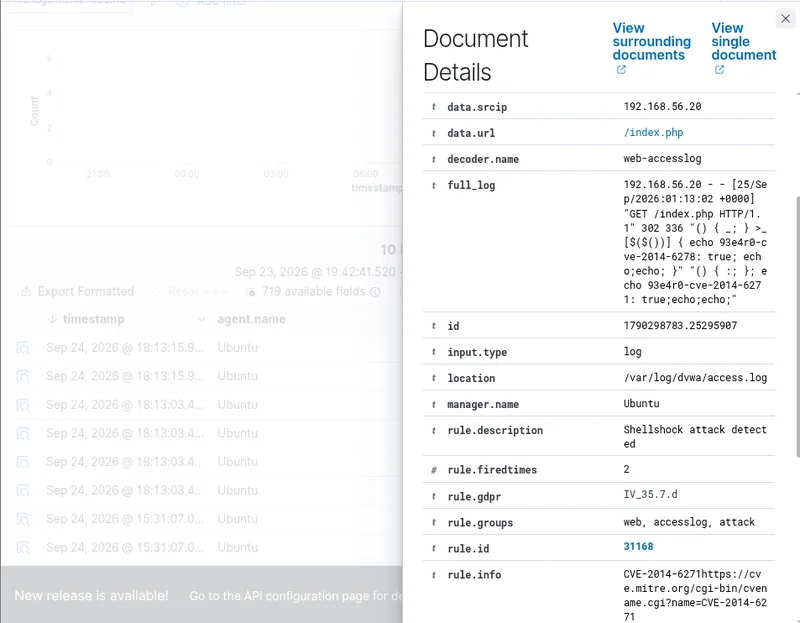
Reading the raw Apache combined log line closely: the third quoted field is the
Referer header, and it carries Nikto's CVE-2014-6278 check. The fourth quoted
field is the User-Agent header, carrying its CVE-2014-6271 check. Both are
classic Shellshock probes, both sent in the same request. The server's response was
302 336, an ordinary redirect of 336 bytes, exactly what DVWA does for every
unauthenticated request regardless of what headers it received. There is no reflected
93e4r0-cve-2014-6271: true string anywhere in the response, no unusually large
or slow reply, nothing that looks like the header content was ever evaluated as a shell
command rather than just read as a string.
The decoder itself matters here too. decoder.name: web-accesslog confirms this
record came from Apache's own access log, not from a process trace or a command execution
log. Wazuh detected a string pattern in the incoming request, which is precisely what it is
supposed to do, and it never claimed to detect execution in the first place. Confusing "the
probe was sent" with "the probe worked" is an easy mistake to make when moving fast through
a stack of level 15 alerts, and it is exactly the mistake this finding is designed to catch.
My conclusion: true positive for "Shellshock probe delivered." Nikto's check ran exactly as
documented in the attack simulation's step 03. No evidence of execution, and DVWA's
PHP-and-Apache stack was never invoking scripts through CGI in the first place, which is the
one condition Shellshock actually needs to matter. I want to be precise about how I know
that rather than just asserting it: the access log, by its nature, could never show
execution evidence either way, even if execution had happened, because it only records what
was sent, not what the server did with it afterward. That is a real limitation of this
specific evidence source, not a gap in this particular check, and I flagged it as a
follow-up rather than quietly ignoring it. A one-time confirmation that DVWA's container has
no CGI module loaded (docker exec dvwa apachectl -M | grep -i cgi) would close
that last assumption for good, cheaply.
I closed the finding as benign, with the evidence attached, rather than either rubber-stamping the rule name or leaving eight level 15 alerts sitting open indefinitely. In a real deployment running a CGI-invoking web server, the exact same probe would deserve immediate escalation instead. The rule fired correctly either way. What changes is what you do next, and that decision has to come from the evidence, not the severity label alone.
Finding 2: a detection I had documented as broken turned out to be working
This is the finding I am most glad I pulled the raw record for, because it directly contradicts something I had written down as settled fact earlier in this series.
Back in the runbook's troubleshooting section, I documented that Zeek's
protocols/http/detect-sqli script was not available on this lab's
zeek-8.0 package, based on zeekctl check failing to find it at the
expected path. I wrote that step 04 of the attack simulation was "two vantage points, not
three" as a direct result, Suricata and Wazuh catching the SQL injection traffic, Zeek
staying silent on it. That was a documented, specific, checked conclusion at the time. This
report showed Wazuh rule 100203, which corresponds to Zeek's
HTTP::SQL_Injection_Attacker and HTTP::SQL_Injection_Victim
notices, firing once each in the window. That should not have been possible if the script
really was missing.
Wazuh's Discover view for the record:
@timestamp        Sep 24, 2026 @ 18:16:42.441
agent.name        Ubuntu
data.note         HTTP::SQL_Injection_Victim
data.msg          An SQL injection victim was discovered!
data.source       zeek-notice
data.src          192.168.56.20
data.dst          192.168.56.10
data.actions      Notice::ACTION_LOG
location          /opt/zeek/logs/current/notice.log
full_log          {"ts":1790298942.473597,"uid":"CuXNdG9rlxQQ85l","note":"HTTP::SQL_Injection_Victim",
                  "msg":"An SQL injection victim was discovered!","src":"192.168.56.20","dst":"192.168.56.10",
                  "actions":["Notice::ACTION_LOG"],"email_dest":[],"suppress_for":3600,"source":"zeek-notice"}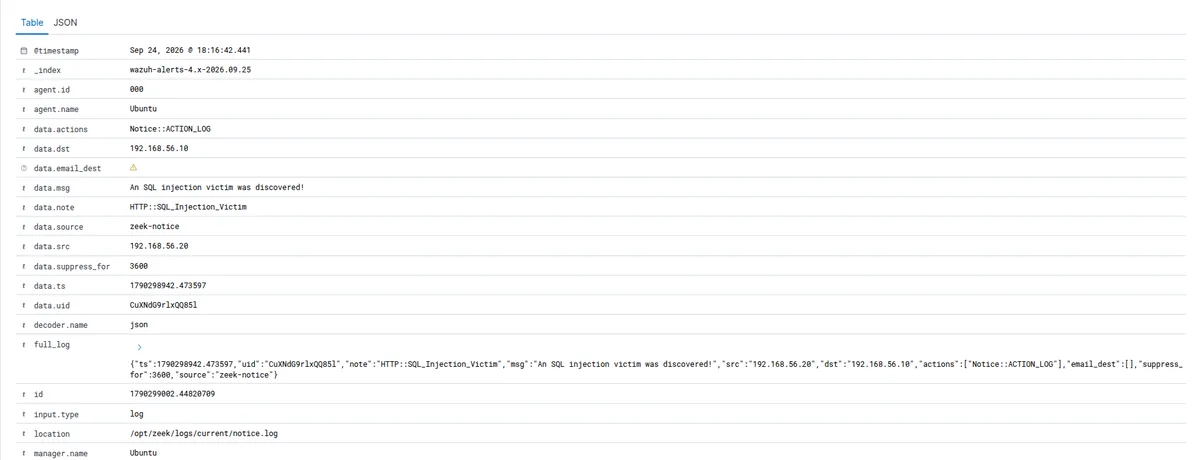
data.source: zeek-notice and location: /opt/zeek/logs/current/notice.log
rule out a decoder coincidence or a mislabeled Suricata event borrowing the rule number.
This is a genuine Zeek HTTP::SQL_Injection_Victim notice, read directly out of
notice.log on the sensor. Whatever caused the script to appear missing when I
wrote the original troubleshooting entry, a package update, a version difference between
when I checked and when this ran, or a mistake in how I read zeekctl check's
output at the time, is not the current state of this install.
protocols/http/detect-sqli is loaded and firing right now.
I closed this as confirmed and updated the documentation across the repository rather than leaving the contradiction sitting between two files. The runbook's troubleshooting entry, the attack simulation's results table, and the README's known-limits section all needed the same correction: SQL injection detection goes from two independently corroborating tools to three, Suricata, Zeek, and Wazuh all catching the same traffic independently, the same three-way agreement I photographed in the pipeline post once I confirmed it. I was careful about the scope of that correction, though. The scan detection script and the SSH brute-force detection script are still documented as unavailable on this install, and I did not touch that claim, because this report gave me evidence about SQL injection detection specifically, not about the other two scripts. Assuming the whole troubleshooting entry was wrong just because one third of it turned out to be wrong would be trading one unverified claim for another. Each of the three needs its own check before I change what I say about it.
There is one more caveat worth stating plainly rather than glossing over: this report caught one Victim-side notice and one Attacker-side notice across a twenty four hour window that included two full attack runs. That is real evidence the detection works, but it is not yet enough runs to call it fully reliable. A couple more confirmed firings before I stop hedging that sentence would make the claim stronger.
The smaller findings, and why I did not skip them
Four other things came out of this report, none of them dramatic on their own, all worth recording honestly rather than leaving as an unexplained line in a table.
The two attack windows in one day, mentioned above, are a reminder that a single day's
report can quietly contain more than one event. Before writing anything up publicly, I
checked timeline.csv on the Kali side to confirm this was two intentional
passes rather than one run plus an accidental repeat. Either answer is a fine one to write
down. Guessing which happened is not.
Zero authentication failures against a full day that was supposed to include an SSH brute
force step needed a real explanation rather than either alarm or a shrug. I checked two
things in order: whether the brute force step actually ran inside this particular twenty
four hour window at all, and if it did, whether PasswordAuthentication in
sshd_config was already set to no from an earlier hardening pass.
If password authentication is disabled at the SSH daemon level, Hydra's password attempts
get rejected before they ever reach PAM, which is exactly why they would not show up as PAM
authentication failures. That would not be a detection gap at all, it would be the control
working correctly, closing the door before detection was ever needed. I want to be honest
that I have not yet fully confirmed which of the two explanations is the real one in this
specific run, that check is still open, but I am not willing to write "SSH brute force went
undetected" in a public post until I have ruled out the more interesting and more flattering
explanation first. Writing up an unverified negative as a gap when it might actually be a
working control would be the exact mistake this whole exercise is trying to teach me not to
make.
Wazuh's Security Configuration Assessment module surfaced two real hardening gaps that had
nothing to do with the attack traffic at all: a CIS Ubuntu 24.04 benchmark score under fifty
percent, and systemd-timesyncd flipping from passed to failed at some point
during the window, meaning time synchronization on the sensor stopped being enforced. That
second one matters specifically for a lab built around correlating timestamps across four
different tools, the same correlation habit that made the beacon-hunting math and
the
triage tickets in the previous post possible in the first place. If the sensor's own
clock drifts, every cross-tool correlation in this whole project gets a little less
trustworthy, and a SIEM whose own clock cannot be trusted undermines the story it is telling
about everything else. That is worth fixing on its own, and it lines up closely with the
kind of gap I went looking for directly in
an
earlier hardening audit: a clean scan or a passing benchmark score is worth very little
if you never go looking for what it missed.
And setting all four of those aside, the routine parts of the run worked exactly as designed. My own custom Suricata signatures fired at expected counts across two runs. The SQL injection traffic was independently corroborated by three separate rule sources. Wazuh's own aggregation rules correctly grouped repeated behavior from a single source address into the right correlation alerts. That is not a dramatic finding, but it is the actual point of the lab, and a report like this is where you get to confirm it held up under real volume rather than a single clean test run.
Writing the ticket, not just the finding
A finding that lives only in a markdown heading is not the same thing as a closed incident. The triage playbook in this repository includes a ticket template, and I used it for the Shellshock finding above, since it had the clearest evidence trail of the two major findings.
Title:        [High -> Closed] Wazuh rule 31168 - Shellshock attack detected x8, benign
Detected:     2026-09-25T13:13:02Z (this hit), Wazuh, rule 31168, level 15, firedtimes 2
Source:       192.168.56.20 (soc-kali)
Destination:  192.168.56.10 (soc-sensor, DVWA / Apache), GET /index.php
Evidence:     Wazuh full_log via decoder web-accesslog, location /var/log/dvwa/access.log:
              Referer header carries the CVE-2014-6278 check, User-Agent header carries the
              CVE-2014-6271 check, both Nikto's standard Shellshock probes. Server responded
              302 336, DVWA's ordinary unauthenticated-redirect response, no reflected output,
              no anomalous size or timing.
Assessment:   True positive for "probe delivered" (Nikto step 03 ran as documented), no
              evidence of execution. Detected via the access log (string match on the request),
              which by its nature could never show execution evidence either way even if
              execution had occurred, a real limitation of this evidence source, flagged for
              follow-up rather than ignored.
Impact:       None observed. Nikto's Shellshock probes are inert against DVWA's PHP and Apache
              stack, no CGI path for headers to reach a shell. In a real deployment running a
              CGI-invoking web server, the same probe would be worth escalating immediately.
Action:       Closed as benign, with evidence attached.
Follow-up:    Confirm mod_cgi is genuinely absent from the DVWA container rather than inferring
              it from the app type alone, cheap to check, removes the last assumption.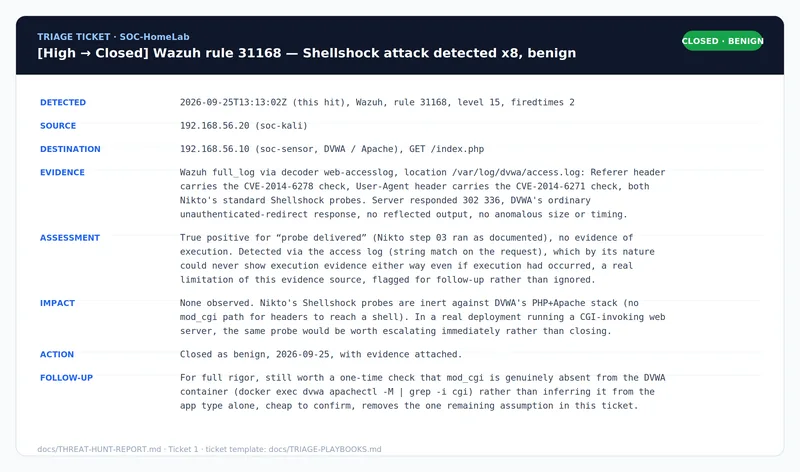
I rendered this ticket into an actual image rather than leaving it as a code block, since a completed ticket with real evidence attached is more convincing as a screenshot than as text, and it doubles as the required capture for the triage playbook document.
The part that does not show up in any single finding: keeping the evidence honest
Something I did not expect to spend real time on going into this post was the housekeeping around the evidence itself. Screenshots had accumulated across four separate build-and-test sessions, numbered roughly in the order I happened to capture them rather than the order a reader would actually walk through the documentation. A screenshot referenced in the runbook as step four might have been the eleventh image I actually took. That is a small thing until someone, including future me, tries to follow the documentation in order and the numbers do not line up with the walkthrough.
Fixing it meant going through every document that references a screenshot, the runbook, the
attack simulation guide, the triage playbook, and this report, and renumbering every image
so the numbers run in the same order a reader actually encounters them, start to finish. A
few images turned out to have no reference anywhere, so they moved into an
extras/ folder instead of being deleted outright, since a draft capture can
still be useful evidence even when it is not part of the required set. And two images built
for this write-up, an architecture diagram and a side-by-side comparison of one attack seen
through three different tools, had been generated and committed but never actually embedded
anywhere with a real image tag, just mentioned in a checklist. That is the kind of gap that
is invisible until you go looking for it specifically, and it is worth building the habit of
checking, before calling documentation finished, that every file you reference actually
exists on disk and every file you built actually gets referenced somewhere.
One capture from this exact process is still outstanding as of this writing: a screenshot of the report generator itself, mid-export, from step one of this post. I would rather say that plainly here and add it later than paste in a placeholder that quietly breaks.
That discipline is not a glamorous finding, but it is exactly the kind of thing that separates documentation someone can actually follow from documentation that only looks complete at a glance. A broken image link or a screenshot numbered out of order is a small thing individually, and a real cost across an entire repository someone new is trying to learn from.
Two images built specifically for this project
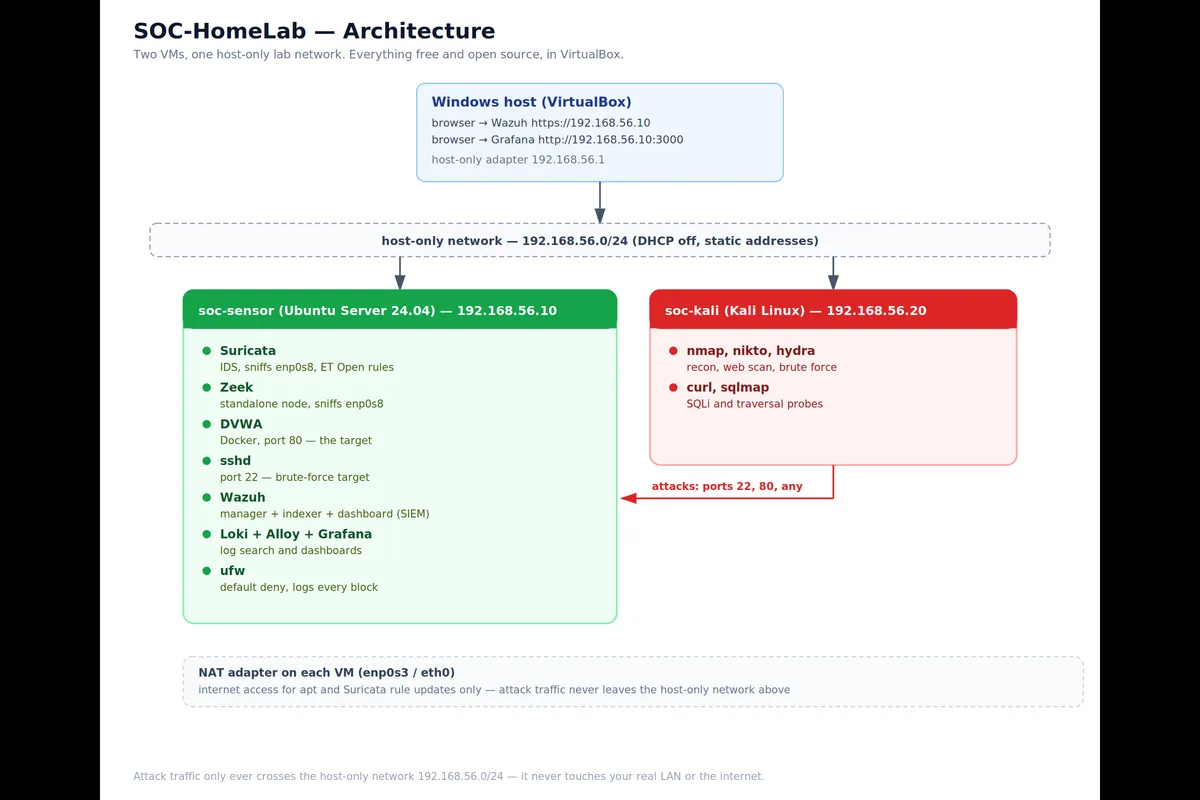
The architecture diagram is the clean version of the ASCII layout that has appeared throughout the series, the same two-VM, one-network design, redrawn so it reads clearly at a glance rather than requiring a monospace font to line up correctly.
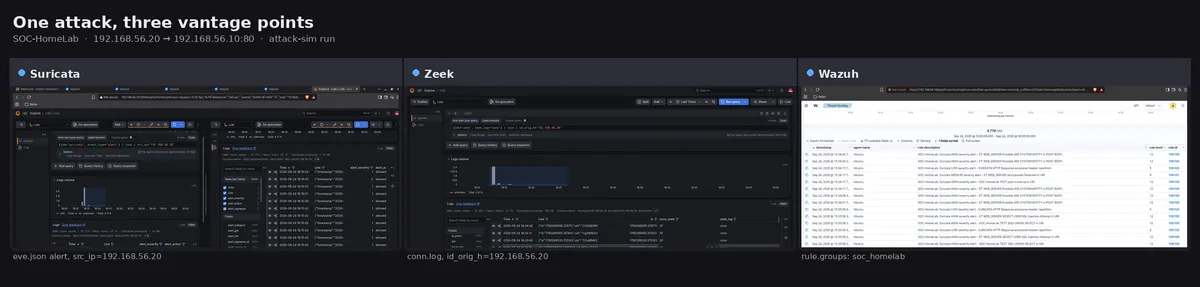
The second image is the one I keep coming back to as the clearest single illustration of
what this whole project is actually for. One attack, the SQL injection step from
kali-attack-sim.sh, shown through three completely different lenses at once:
Suricata's signature match, Zeek's behavioral notice, and Wazuh's correlated alert, built
from real captures of each tool's own view of the identical traffic. That is the entire
argument of this series in one picture. No single tool tells the whole story. Comparing what
each one saw, and did not see, is where the actual confidence comes from.
What changed in the documentation because of this hunt
I want to be specific about what this report actually changed, rather than leaving it as a vague "lessons learned" gesture, because the specific edits are themselves a small case study in how a real finding should ripple through documentation instead of sitting isolated in a single report file.
The runbook's troubleshooting section for the missing Zeek scripts now carries a dated correction noting that the SQL injection detection script specifically has turned out to be live, while explicitly stating that the scan and SSH brute-force scripts remain unverified rather than implying the whole entry was simply wrong. The attack simulation guide's results table for the SQL injection step now points at this report's Finding 2 instead of the old "currently disabled" language. The README's known-limits section keeps the original limitation bullet about Zeek's scan and brute-force scripts, and adds a separate, clearly dated correction bullet underneath it for the SQLi detection specifically, so a reader sees both the original claim and the update side by side rather than one silently overwriting the other. And the troubleshooting document's Zeek section gained a single added sentence noting that the earlier diagnosis has since turned out to be stale for this one script, pointing at both this report and the runbook's own update note.
None of those edits deleted or hid the original, incorrect claim. Each one added a dated correction next to it. That is a small editorial choice, but it is the one that matters most if this repository is ever read by someone deciding whether to trust the rest of it. A documentation set that quietly fixes its own mistakes without a trace is less convincing than one that shows its work, including the parts where an earlier conclusion turned out to be wrong and got corrected in the open.
What this hunt shows, and what it does not
In keeping with the honesty this whole series has tried to hold itself to, I want to end with the limits of this particular exercise rather than let the two confirmed findings stand in for more than they actually prove.
This report shows that I can take a real volume of alerts, most of them noise, and separate the eight that mattered from the twenty four thousand that did not, using the raw record rather than the rule name alone. It shows a documented instance of correcting my own prior, written conclusion when new evidence contradicted it, and doing that correction in the open rather than quietly. It shows a completed ticket with real evidence attached, not just a closed checkbox. And it shows that the underlying detection pipeline, built and described across the earlier posts in this series, held up under a full day of real volume across two separate attack passes, not just one clean scripted run.
It does not show a real attacker. Every byte of traffic in this report came from my own Kali VM, on a network I control, against a target I built specifically to be attacked. It does not show detection at scale, twenty four thousand alerts in a day from a two-machine lab is a very different volume problem than a production network generates. And two open items from this hunt, confirming which explanation accounts for the zero authentication failures, and fixing the two Security Configuration Assessment findings, are genuinely unresolved as of this writing, not glossed over, just not yet done. I would rather say that plainly here than have it surface later as something I skipped.
Takeaways
Generate a formal report on a fixed window occasionally, not just alerts as they scroll by live. A report forces a defined scope and gives you a second, independently generated artifact to check your own tooling against.
A severity label and a technique tag are both hypotheses, not verdicts. The raw record underneath the label is what turns a hypothesis into a finding you can defend.
When new evidence contradicts something you already wrote down and published, correct it in the open, with a dated note, rather than quietly editing it away. The correction is more convincing than the original claim ever was.
A confirmed absence, like zero authentication failures, deserves the same rigor as a confirmed presence. Check whether a control is working before writing up a gap that might not be one.
Evidence organization is not separate from the finding. A screenshot numbered out of order or an image built but never referenced is a small failure that compounds across a whole repository.
Three independent tools agreeing on one event is worth more than any single tool's alert, and building the habit of looking for that agreement, rather than trusting the first alert you see, is the actual skill this whole project is meant to practice.
Frequently asked questions
Why does a level 15 Shellshock alert not automatically mean the server was compromised?
Wazuh's rule matched a string pattern in the incoming HTTP request, specifically the classic Shellshock function-definition syntax inside the Referer and User-Agent headers. That confirms the probe was sent. It does not confirm the probe was executed, because the access log the rule reads from only records what came in, never what the server did with it afterward. In this lab, the response was an ordinary 302 redirect with no reflected output, and the target's Apache and PHP stack was never invoking those headers through CGI in the first place, so the correct read is a delivered but inert probe, not a successful attack.
Why is a MITRE ATT&CK technique tag on an alert a hypothesis rather than a confirmed fact?
The technique label comes from metadata written into the rule by whoever authored it, not
from Wazuh confirming the technique's behavior actually occurred. A rule named after Process
Injection can fire on a much more mundane string match, like a cmd= parameter in
a URL, that only resembles the technique's description. The tag tells you where to look, and
the raw alert record underneath it is what actually proves or disproves the hypothesis.
What should you check before writing up zero detected authentication failures as a security gap?
Two things, in order: whether the brute-force attempt actually happened inside the time
window you are reviewing, and whether password authentication was already disabled at the
SSH daemon level before the attempt reached the authentication log at all. If
PasswordAuthentication is set to no, failed password attempts get
rejected before PAM ever logs them, which means zero logged failures is the hardening
control working correctly, not a detection gap. Writing up an unverified negative as a
finding is the same mistake as writing up an unverified positive.
Where this goes from here
Two things are still open at the end of this series as it stands: confirming which explanation accounts for the zero authentication failures, and fixing the two Security Configuration Assessment findings, then recording the before and after CIS score, which is a clean, low-effort follow-up sitting right on top of this post. Both are on the list.
Everything in this series is in the repository if you want to build it yourself: the runbook with a checkpoint at every stage, the attack scripts, the triage playbooks, the Python tools, the full threat hunt report this post is drawn from, and the screenshot checklist that keeps the evidence honest. It costs nothing to build, and working through a real day's worth of alerts taught me more than any single scripted test run did.
Repository: github.com/rachata072/soc-homelab. More about how I approach lab projects like this is on the about page.