Suricata on the SOC VM: Installing and Tuning a Host-Based IDS
Installing Suricata from the OISF PPA on a two-VM SOC home lab: why HOME_NET has to be one address instead of a subnet, three custom rules that always fire, and reading real EVE JSON alerts end to end.
show ip route | toc (14 sections)
- What an IDS actually does
- Why the sensor sits on the target host, and what that costs
- Preparing the SOC VM: turning off NIC offloads
- Installing Suricata from the OISF PPA
- Choosing rule categories for a modest VM
- Custom rules that always fire
- Reading eve.json directly: why there is no transport hop to build
- Proving the alerts actually show up
- Reading an EVE alert
- Tuning: the part nobody puts in the tutorial
- What I would do differently
- Recap
- Frequently asked questions
- Where this goes from here
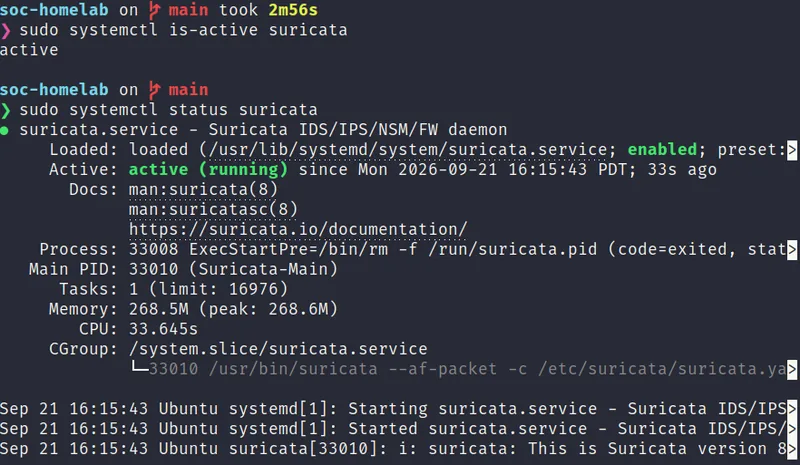
In the first post in this series I laid out the design: two VMs on one host-only network, a sensor host that carries the whole detection stack and a Kali box that plays the attacker. This post puts the first sensor in place. Suricata runs directly on the SOC VM (soc-sensor, 192.168.56.10), watching its own network interface, and its alerts land in a local JSON file that Wazuh reads without any network hop in between.
It sounds like a single package install, and the install itself really is close to that simple. Everything around it is where the learning happens: what a host-based sensor can honestly claim to see, why a virtual NIC needs a specific setting before any of this works, why the home network for the sensor has to be a single address instead of the whole subnet, how to pick a rule set that fits a modest VM, and why I wrote three small custom rules whose only job is to guarantee the lab always has something to detect. I will walk through all of it.
What an IDS actually does
An intrusion detection system inspects network traffic and compares it against a library of patterns called signatures. When traffic matches, it writes an alert. Suricata is an open source engine that does this at high speed, and it understands application protocols like HTTP, DNS and TLS, so a signature can say "an HTTP request whose URI contains this string" instead of just "these bytes at this offset in the packet."
Suricata can run in two modes. In IDS mode it watches a copy of traffic and alerts on matches. In IPS mode it sits in line and can drop traffic that matches. I run it as an IDS, deliberately. A signature that is slightly too broad will, in blocking mode, cut off something legitimate and cause an outage. In alert mode the same mistake just produces a noisy alert I can go tune. For a learning lab, and honestly for the first weeks of any real deployment, alert mode is the responsible starting point.
The signatures come from a rule set. I use Emerging Threats Open, which is free and updated regularly. It groups its rules into categories such as scan, exploit, web server, malware and policy. Choosing categories is one of the more important decisions you make here, and I come back to it below.
Why the sensor sits on the target host, and what that costs
The design for this lab is two VMs, not a dedicated appliance with its own interface for
sensors to sit behind. That means Suricata does not get a privileged vantage point like a
span port or a network tap. It sits on soc-sensor itself and sniffs the same interface
(enp0s8) that carries every packet Kali sends toward DVWA, sshd, and the rest
of the stack.
There are real reasons this still works as a first sensor position. Every packet that Kali
sends toward the SOC VM has to cross enp0s8, so nothing an attacker does
against this host can avoid the interface Suricata is watching. Suricata and Zeek both read
that interface through AF_PACKET before ufw's firewall rules get a chance to
drop anything, so a port scan against a closed or blocked port is still visible to the
sensor, even though ufw quietly throws the packets away afterward. That is the
same "see it before it's dropped" advantage a perimeter sensor would have, just scoped to
this one host instead of an entire network boundary.
But I want to be honest about the cost, because it is the kind of trade-off an interviewer
will ask about directly. Suricata and Zeek run on the exact machine they are protecting. If
an attacker gets code execution on soc-sensor, they are not just compromising a web app or
an SSH account, they are standing next to the sensor's own process, its rule files and its
log output. A truly hostile actor with a foothold on this box could, in principle, kill
Suricata, edit local.rules, or tamper with eve.json before
anything downstream ever reads it. A real production deployment separates these roles:
sensors sit on a span port or a network tap that only receives a copy of traffic and has no
interactive access for anyone, and their logs ship to a collector the sensor host cannot
touch. I did not build that here, on purpose, because a two-VM lab is the smallest setup
that still tells a complete detection story (one attack, independent detections, one place
to triage), and a dedicated sensor tier is a good next project once this one is solid, a
limit I named up front in
the design
post and one I say plainly in interviews rather than let someone assume I do not know
the difference.
Preparing the SOC VM: turning off NIC offloads
There is one setting that matters more than any other when you run a packet-inspection tool inside a virtual machine, and it is easy to miss entirely: checksum and segmentation offloading.
On real hardware, network cards often calculate packet checksums themselves, and the operating system hands the card a packet with a placeholder value that the card fills in as it transmits. Large receive offload and generic segmentation offload go further, merging or splitting frames below the kernel's normal view of a "packet." A sensor that captures the packet before the card finishes its work sees a checksum that looks wrong, or a frame that does not match what actually went on the wire. Suricata, like most IDS engines, may then treat the packet as invalid and silently drop it from analysis. Virtual NICs do the same thing in software, so the problem does not go away just because there is no physical card involved.
I handle this with a small systemd service rather than a manual command I would forget to
repeat after a reboot. configs/systemd/sensor-nic.service runs once at boot,
after networking comes up and before Suricata or Zeek start:
[Unit]
Description=Prepare the sensor interface (offloads off)
After=network-online.target
Wants=network-online.target
Before=suricata.service zeek.service

[Service]
Type=oneshot
RemainAfterExit=yes
ExecStart=/bin/sh -c 'ip link set enp0s8 up; ethtool -K enp0s8 gro off lro off tso off gso off rx off tx off 2>/dev/null || true'

[Install]
WantedBy=multi-user.target
It brings enp0s8 up and turns off generic receive offload, large receive
offload, TCP segmentation offload, generic segmentation offload, and receive and transmit
checksum offload, in one line, with ethtool -K. The
Before=suricata.service zeek.service ordering matters: both sensors need the
interface already tamed before they start capturing, not after.
scripts/01-prep-soc-vm.sh installs this unit and enables it before anything
else in the build order touches Suricata. Skip this step and you can do everything else
correctly and still stare at an empty alerts file wondering what went wrong. I put it at
the top of my own troubleshooting notes for exactly that reason, and if you ever suspect
offloads crept back on, ethtool -k enp0s8 | grep checksum tells you in one
line, and sudo systemctl restart sensor-nic fixes it without a reboot.
Installing Suricata from the OISF PPA
Ubuntu's default repositories carry an older Suricata build, so I install from the OISF
(Open Information Security Foundation) stable PPA instead, which tracks current releases.
The whole flow lives in scripts/02-install-suricata.sh, and walking through it
is more useful than just running it blind.
sudo add-apt-repository -y ppa:oisf/suricata-stable
sudo apt-get update
sudo apt-get install -y suricata
That is the entire install. What comes after is configuration, and it is where the script
earns its keep. It edits /etc/suricata/suricata.yaml with two targeted
sed substitutions rather than hand-editing a several-thousand-line file: one
sets HOME_NET to the SOC VM's own address, the other points the first
- interface: entry under af-packet at enp0s8. It
keeps a one-time backup of the original file (suricata.yaml.orig) before
touching anything, which has saved me from having to remember what the defaults were more
than once.
It then installs my three custom rules (more on those below) to
/var/lib/suricata/rules/local.rules and makes sure local.rules
is listed in the YAML's rule-files section alongside the downloaded
suricata.rules. From there it runs suricata-update to pull down
the Emerging Threats Open rule set, validates the whole configuration with
suricata -T -c /etc/suricata/suricata.yaml -v before touching the running
service (a habit worth keeping for any daemon with a hand-edited config), enables Suricata
at boot, and starts it. It finishes by scheduling a cron job at 4:17 AM that refreshes the
rules and does a non-blocking ruleset reload, so signatures stay current without a service
restart or a maintenance window.
Why HOME_NET is one address, not the whole /24
This is the detail that trips people up the most, and it is worth explaining rather than
just stating. Suricata rules describe traffic in terms of two variables:
$HOME_NET, meaning "us," and $EXTERNAL_NET, meaning "not us,"
which by default is defined as everything that is not HOME_NET. Almost every meaningful
rule in the ET Open set, and both of my web-attack test rules, are written to match traffic
moving from EXTERNAL_NET toward HOME_NET, because that is what an inbound attack looks
like.
In this lab, Kali (192.168.56.20) and the SOC VM (192.168.56.10) sit on the same host-only
/24, 192.168.56.0/24. If I set HOME_NET to the whole subnet, as a lot of
default configs and tutorials do, Kali would fall inside HOME_NET too. Traffic from Kali to
the SOC VM would then be internal-to-internal traffic as far as Suricata's variables are
concerned, and the overwhelming majority of ET Open's inbound-attack rules, plus my own SQL
injection and traversal test rules, would simply never evaluate as true. The lab would look
broken while actually just being misconfigured.
The fix is to set HOME_NET to exactly the SOC VM's own address:
HOME_NET: "[192.168.56.10]"
With that one change, Kali automatically counts as EXTERNAL_NET (since EXTERNAL_NET is
defined relative to HOME_NET by default), and every rule written the normal way, "attacker
on the outside, target on the inside," works the way its author intended, even though both
machines share a subnet in real life. It is a small line with an outsized effect, and it is
the first thing I check in the troubleshooting guide when alerts go quiet:
grep -n "HOME_NET:" /etc/suricata/suricata.yaml should show
[192.168.56.10], never the /24.
Choosing rule categories for a modest VM
You could enable every ET Open category and, on a large appliance with plenty of memory, that might be reasonable. On a VM with 16 GB of RAM shared across Wazuh's indexer, manager and dashboard, Zeek, the Grafana stack and DVWA, Suricata's own share is roughly 1 GB, and every enabled category adds to the working rule set Suricata has to hold in memory and evaluate against every packet. I keep the enabled categories narrow and deliberate: scan, exploit, web server, web-application attacks, SQL, malware, trojan and policy. Each one maps to something this lab is actually built to produce, since the attack simulation runs a SYN scan, an NSE scan, a Nikto scan, repeated SQL injection attempts, a path traversal probe and an SSH brute force.
The general lesson, and one I would give anyone tuning Suricata for the first time, is that a rule set is a tuning surface, not an on/off switch you flip once. Every category you enable costs memory and produces alerts you are implicitly promising to be able to triage. Start narrow, watch what actually fires against real traffic in your environment, and widen a category only when you can name the specific question it would help you answer.
Custom rules that always fire
Here is a problem I did not want to discover in the middle of a demo. Open rule sets change over time. A signature name I expect today might get renamed, retired or rewritten in a future ET Open update, and whether a given community rule fires on a particular scan depends on exact packet timing, scan flags and the rule revision currently installed. If my proof that the whole pipeline works end to end depends on one specific community signature triggering on one specific day, that proof is fragile in a way I do not want to depend on for an interview walkthrough.
So I wrote three small rules of my own, checked into the repo at
configs/suricata/local.rules, that I fully control:
alert tcp any any -> $HOME_NET any (msg:"SOC-HomeLab TEST SYN burst from single source"; flags:S,12; threshold:type both, track by_src, count 20, seconds 5; classtype:attempted-recon; sid:9000001; rev:1;)

alert http any any -> $HOME_NET any (msg:"SOC-HomeLab TEST SQLi UNION SELECT in URI"; flow:established,to_server; http.uri; content:"UNION"; nocase; content:"SELECT"; nocase; distance:0; classtype:web-application-attack; sid:9000002; rev:1;)

alert http any any -> $HOME_NET any (msg:"SOC-HomeLab TEST path traversal in URI"; flow:established,to_server; http.uri; content:"../../"; classtype:web-application-attack; sid:9000003; rev:1;)
They are ordinary Suricata rules, nothing exotic. Sid 9000001 fires when a single source
sends twenty SYN packets in five seconds (the flags:S,12 match plus the
threshold keyword tracking by source address), which is what a fast port scan
looks like at the TCP level. Sid 9000002 fires on an HTTP URI that contains both "UNION"
and "SELECT" (case-insensitive, distance:0 so SELECT can appear anywhere after
UNION in the same buffer), a classic SQL injection pattern. Sid 9000003 fires on a URI
containing a ../../ traversal sequence. All three use the
http.uri sticky buffer for the web rules, which means they only match inside
the request path and query string, not anywhere in the raw packet, keeping them precise
instead of trigger-happy.
Each rule's classtype gives it a priority, and Suricata records that priority
as the alert's severity in EVE JSON, where severity 1 is the highest. The SQL injection and
traversal rules use web-application-attack, which is priority 1, so they
surface as severity 1, high. The SYN burst rule uses attempted-recon, priority
2, so it surfaces as severity 2. I lean on that mapping again in the next post, where
Wazuh's custom rules use alert.severity to decide what becomes a level-12
incident versus something that waits for the daily digest.
I want to be clear about what these rules are and are not. They are named as test rules on
purpose, prefixed "SOC-HomeLab TEST" in every message, and I would never present them as
production detections. Their real value is giving me a known-good input I can trigger on
demand and trace end to end, from Suricata through Wazuh, Loki and Grafana. When something
in the pipeline breaks later, I run one command from Kali
(nmap -sS -p 1-200 192.168.56.10 is enough to trip sid 9000001) and know
exactly which alert should appear and where. That turns "the lab isn't working" into "the
lab stopped somewhere between hop two and hop three," which is a far better place to start
debugging.
Reading eve.json directly: why there is no transport hop to build
If you have read a Suricata write-up before, you have probably seen a whole section on shipping EVE JSON off the sensor: syslog forwarders, TCP listeners, message truncation limits, raw-line templates. None of that exists in this design, and it is worth explaining why rather than just skipping it.
Suricata writes its alerts, and a wide range of protocol events like HTTP, DNS and TLS
metadata, to /var/log/suricata/eve.json on the same filesystem where it runs,
one JSON object per line. In this lab, the SIEM (Wazuh) and the sensor (Suricata) both live
on soc-sensor. Wazuh's all-in-one install includes its own local agent, and that agent can
read any file on the VM it runs on directly. So instead of Suricata pushing events out over
the network to a remote collector, Wazuh's manager simply tails the file where it already
sits:
<!-- Suricata EVE JSON, written locally by Suricata on this VM -->
<localfile>
  <log_format>json</log_format>
  <location>/var/log/suricata/eve.json</location>
  <label key="source">suricata</label>
</localfile>
That is the entire transport layer: a <localfile> block reading a path.
There is no syslog daemon in the middle, no message-length limit to worry about, no risk of
a JSON line getting truncated mid-flight and turning into garbage no parser can read,
because the line never leaves the disk it was written to. Grafana Alloy reads the same file
independently for the Loki side of the pipeline, so two consumers read one file without
either depending on the other, which is the same decoupling principle a network transport
would give you, just without the network.
This is the direct consequence of putting the sensor and the SIEM on one host, and it is worth naming as a trade-off pair rather than a pure win: I give up the isolation of a dedicated sensor tier (as I said above), and in exchange I get a transport layer that has nothing to configure and nothing that can silently corrupt a message in transit. If I build a dedicated sensor host in a later iteration, this is exactly the part of the design I would have to rebuild, and I would reach for a validated forwarder rather than reintroducing anything fragile.
The one thing worth double-checking, since permissions bite people here more than transport
ever would, is that the account reading the file can actually see it. Wazuh's own agent
runs with access to files it owns; Alloy runs as its own service account and needs to be in
the right group or have an ACL entry, which is exactly the kind of "permission denied" the
troubleshooting guide walks through with sudo usermod -aG wazuh alloy or
sudo setfacl -m u:alloy:r /var/log/suricata/eve.json.
Proving the alerts actually show up
Because there is no network hop to silently drop a byte here, I did not need to build a transport health check the way I would have for a remote syslog pipeline. What I still wanted was proof, not a guess, that the whole local chain works: interface capture, rule match, JSON write.
The first end-to-end test is a port scan from Kali against the SOC VM:
nmap -sS -p 1-200 192.168.56.10On the SOC VM, I follow the EVE file with jq, filtering to alert events only and printing the fields that matter for a quick read:
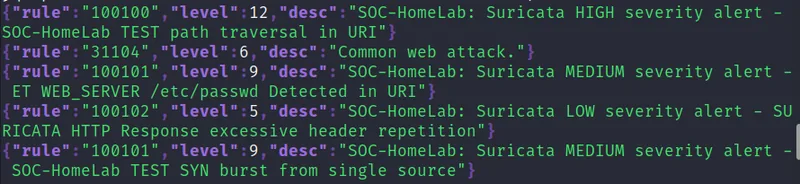
sudo jq -c 'select(.event_type=="alert")' /var/log/suricata/eve.json | tailA few seconds after the scan and the traversal request that followed it, the alert view read back through jq (this run pulls the rule ID, level and description from Wazuh's own alert file, since that is what confirms the whole chain worked, not only Suricata's own copy) looked like this:
{"rule":"100100","level":12,"desc":"SOC-HomeLab: Suricata HIGH severity alert - SOC-HomeLab TEST path traversal in URI"}
{"rule":"31104","level":6,"desc":"Common web attack."}
{"rule":"100101","level":9,"desc":"SOC-HomeLab: Suricata MEDIUM severity alert - ET WEB_SERVER /etc/passwd Detected in URI"}
{"rule":"100102","level":5,"desc":"SOC-HomeLab LOW severity alert - SURICATA HTTP Response excessive header repetition"}
{"rule":"100101","level":9,"desc":"SOC-HomeLab: Suricata MEDIUM severity alert - SOC-HomeLab TEST SYN burst from single source"}
Every one of those is a signature I expected. The level 12 line is sid 9000003, the
traversal test rule, coming through exactly as the severity-1-to-level-12 mapping predicts.
The two level 9 lines are both rule 100101, my severity-2 mapping, one from the SYN burst
rule and one from a generic ET Open /etc/passwd detection riding along on the
same traffic. The level 6 line is Wazuh's own generic "common web attack" classification,
firing independently of anything I wrote. Nothing here was a surprise, which is exactly the
point of building custom rules I fully control before trusting the rest of the pipeline.
For the two web rules, I need a live HTTP server on the other end first, since sid 9000002
and 9000003 only ever see traffic that reaches DVWA on port 80. A request like
curl "http://192.168.56.10/vulnerabilities/sqli/?id=1' UNION SELECT
      user,password FROM users -- -&Submit=Submit"
from Kali is enough to trip the SQL
injection rule, and something with ../../ in the path trips the traversal
rule. The healthcheck script (scripts/99-healthcheck.sh) runs a version of
this check automatically and tells you which hop broke if nothing shows up, rather than
leaving you to guess between "Suricata isn't running," "the rule isn't loaded" and "nothing
reached the interface yet."
Reading an EVE alert
Once you have an alert, it is worth knowing how to read it, because both interviews and
real triage depend on it. An alert event carries a timestamp, a flow identifier that ties
together every event from the same connection, the interface it was captured on, and then
the source and destination address and port, and the protocol. Inside the nested
alert object are the action (which for IDS mode is always "allowed," since
nothing was blocked), the signature identifier and revision, the human-readable signature
name, the category, and the severity number.
Severity in EVE is a number where one is the most severe, which is the opposite of what a lot of people expect the first time they see it, and it matters the moment you start writing SIEM rules against it, because a rule that treats a larger number as "worse" will quietly invert your priorities. In my Wazuh rules, which I cover in the next post, severity 1 maps to Wazuh level 12, severity 2 maps to level 9, and severity 3 maps to level 5.
The flow identifier is quietly one of the most useful fields in the whole event. Suricata can log HTTP, DNS and TLS events for that same flow, so once you have found an alert, you can pull the surrounding conversation: which hostname was requested, which user agent was used, which TLS certificate was presented. That context is what turns "a signature fired" into "here is what actually happened," which is the difference between a checkbox and a real answer during triage.
Tuning: the part nobody puts in the tutorial
An IDS with no tuning is a noise generator. On a lab this small there is not much background noise to begin with, since the only traffic on the wire is what Kali or I generate on purpose, but the habit of tuning is the point, and it is worth writing down how I would approach it even here.
The preferred tool is suppression rather than deletion. Suricata's rule-management supports per-signature suppression, and I can scope it to a specific source or destination address instead of turning a rule off everywhere. That way the rule keeps protecting everything else it was meant to catch, and only the specific noisy combination goes quiet. I record every suppression with a date, the signature, the address involved, and the reason it was a false positive. That record is a small change log, and in a real job it is exactly the kind of thing an auditor or a teammate reads six months later and is grateful you wrote down.
The second lever is category selection, as above. If an entire enabled category produces alerts that never once lead to an action, that category is a candidate for removal rather than something to keep suppressing rule by rule.
The third is severity mapping. Not every alert deserves a person's immediate attention. In the next post, I translate Suricata's signature severity into Wazuh levels with target response times attached, so that only a small set of high-confidence alerts interrupt anyone directly and the rest wait for a daily review pass.
What I would do differently
Two things, stated as a design review rather than a confession, since neither is a mistake so much as a scoping decision I would revisit on a second pass.
I would enable flow-level logging (HTTP, DNS, TLS events) from the start rather than treating it as an afterthought. Alerts alone tell you something matched a pattern; the surrounding flow events tell you the story around it, and I wanted that context the very first time I sat down to explain one of my own alerts to myself.
I would also build a genuinely separate sensor tier in a later iteration, exactly the trade-off I named earlier: a sensor host on a span port or tap that has no interactive login and cannot be reached from the machine it is watching, shipping its logs to a collector over a transport I would validate the way I described above for the old design. It is the natural next step once a single-host lab like this one is solid, and it would let me speak concretely, from having built it, about what changes when the sensor is no longer sitting next to its own target.
Recap
Suricata on the SOC VM sees every packet that crosses enp0s8 before
ufw gets a chance to drop it, which is a real advantage even on a single host.
The honest cost is that a compromised sensor host is a compromised sensor, and a real
deployment separates those roles with a span port or a tap. Virtual NICs need offloads
turned off, handled here with a small sensor-nic.service unit that runs before
Suricata starts. HOME_NET has to be the SOC VM's own address, not the shared /24, or Kali
stops counting as external and most rules go quiet. A narrow, deliberate set of ET Open
categories keeps a modest VM's memory and alert volume in check. Three small custom rules
(sid 9000001 through 9000003) give the lab a known-good signal that does not depend on a
community signature's exact wording, and the first real end-to-end test came back with
exactly the alerts predicted. And because Wazuh's manager reads
/var/log/suricata/eve.json directly from the same disk Suricata writes to,
there is no transport layer to build, tune or break, which is one less thing that can go
quietly wrong between an attack and an alert.
In the next post, those alerts meet the rest of the pipeline. Zeek adds behavioral detections and network metadata from the same interface, Wazuh correlates all of it into severity-based incidents with custom rules built on top of its own Suricata decoder, and Loki with Grafana Alloy give me a place to hunt through raw telemetry that never touches the SIEM's indexer.
Frequently asked questions
Why does a virtual NIC need offloads turned off before an IDS can see traffic correctly?
Checksum and segmentation offloading let a network card, physical or virtual, calculate
checksums itself and merge or split frames below the kernel's normal view of a packet. A
sensor that captures a packet before that work finishes sees a checksum that looks wrong or
a frame that does not match what actually went on the wire, and Suricata may treat it as
invalid and silently drop it from analysis. Turning off generic receive offload, large
receive offload, TCP and generic segmentation offload, and receive and transmit checksum
offload with ethtool fixes this, and it has to happen every boot, not just
once.
Why write custom Suricata rules instead of relying only on Emerging Threats Open?
A community rule set changes over time. A signature name that fires today might get renamed, retired, or rewritten in a future update, and whether a given rule fires on a particular scan depends on exact packet timing and the rule revision installed. Three small custom rules, checked into the repository and fully controlled, give the lab a known-good signal that always fires the same way, which turns troubleshooting a broken pipeline into a fast, repeatable test instead of a guess about which community signature should have caught it.
Does Suricata's alert data have to travel over the network to reach the SIEM?
Not in this lab. Suricata and Wazuh's manager run on the same virtual machine, so Wazuh's
built-in local agent reads /var/log/suricata/eve.json directly off the same
disk Suricata writes to, through a localfile block that just names the path.
There is no syslog daemon, no message-length limit, and no risk of a JSON line getting
truncated in transit, because the line never leaves the disk it was written to.
Where this goes from here
Full source, configs and the runbook are on GitHub: github.com/rachata072/soc-homelab. The next post covers Wazuh, Zeek and Grafana: One Pipeline, Three Jobs.
This is part of an ongoing series of networking and cybersecurity projects I am building for my portfolio while studying for the CCNA (more on my background here). More lab notes and write-ups land here as each one ships.