Threat Intelligence in Sentinel, Part 1: Inventory What You Already Have
A feed switched on is not a feed working. Part 1 counts what Sentinel actually holds, collapses duplicate rows, then mines my own failed logons for 220 candidate bad IPs and asks the question that matters: did any of them get in?
show ip route | toc (7 sections)
Turning on a threat intelligence feed in Microsoft Sentinel takes a couple of clicks. Finding out whether it does anything useful takes a lot more. This project is my attempt to close that gap: start from the intelligence Microsoft already provides, add indicators built from my own logs, match both against real telemetry, turn the matches into analytics rules, and then check whether any of it earned its place.
The labs behind it come from the Cyber Range community (that link carries my referral code, so it costs you nothing and may credit me). I used them as a baseline and then extended them, which includes fixing a few inconsistencies in the originals. I point those out as they come up.
This is a three-part series. This post inventories what intelligence you already have and finds suspicious IPs in your own logs. Part 2 turns those IPs into STIX indicators with Python and matches them against logons, network flows and 90 days of history. Part 3 proves the file hash rule with the EICAR test file, builds three analytics rules and works through the incident. The full procedure lives in the RUNBOOK on GitHub and every query is in the KQL library next to it.
One thing to know before the screenshots: the Cyber Range workspace is shared. Many students' virtual machines report into it, so some rows in the results come from machines that are not mine. My own VM is called threatintel-lab. Where the difference matters, I say so.
Preflight: four checks before any intelligence work
Before querying indicators, confirm the data you will match them against actually exists. Four quick checks:
ThreatIntelIndicators | take 5should return rows. If Sentinel says it failed to resolve the table, the connector is not on yet. Install the Threat Intelligence solution from the Content hub, connect Microsoft Defender Threat Intelligence, and wait fifteen to thirty minutes.DeviceLogonEvents | take 5should return rows. If it is empty, check that the Defender XDR connector is on with device events enabled.NTANetAnalytics | take 5should return rows if Traffic Analytics is enabled. It is only needed for one query in Part 2, so an empty table is not a blocker.- Create a watchlist called
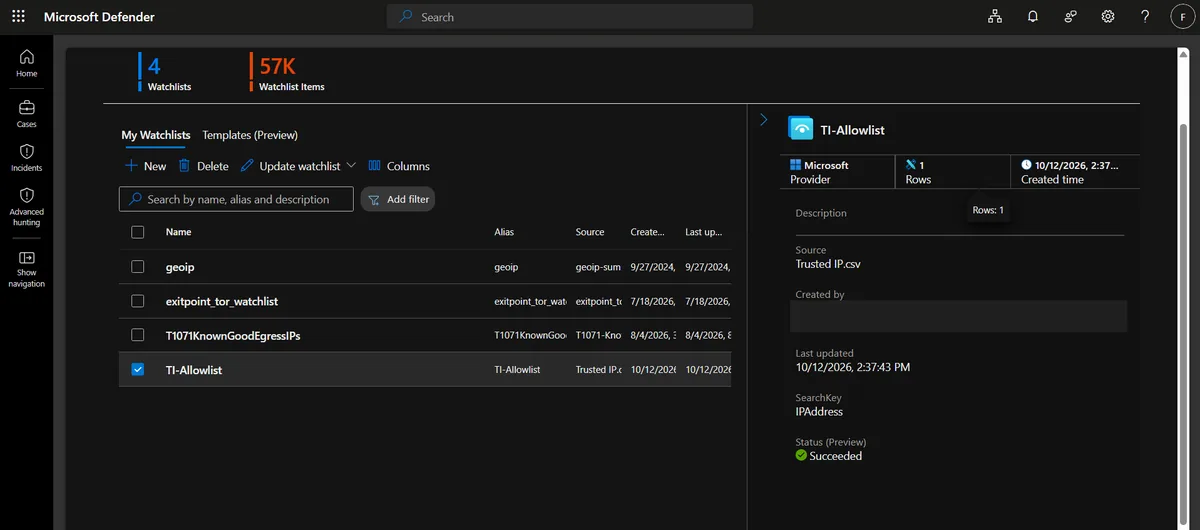
TI-Allowlistwith one column,IPAddress, holding your own egress IP and any scanner or partner addresses you never want to alert on. The rules in Part 3 fail if this watchlist does not exist.
A note on schema, because it will trip you up if you copy older queries from blogs. Microsoft moved indicators into the ThreatIntelIndicators and ThreatIntelObjects tables, and its threat intelligence documentation says ingestion into the legacy ThreatIntelligenceIndicator table stopped after July 31, 2025. A query that still points at the old table will quietly return stale data. If a column in my queries is missing in your tenant, run ThreatIntelIndicators | take 1 and compare.
Query 1.1: what kinds of indicators do you own?
You cannot match what you have not inventoried, so the first real query counts indicators by type and source.
ThreatIntelIndicators
| where TimeGenerated > ago(30d)
| summarize Indicators = dcount(ObservableValue), Active = countif(IsActive == true) by ObservableKey, SourceSystem
| order by Indicators desc
ObservableKey tells you what kind of thing the indicator describes, such as an IP in a network traffic object, a domain name or a file hash. SourceSystem tells you who supplied it.
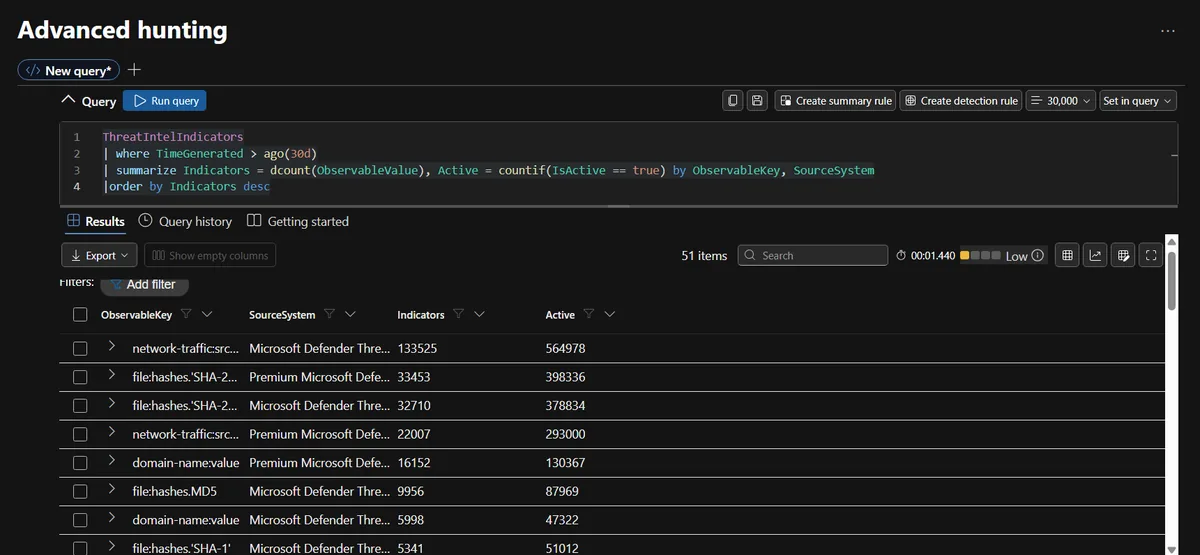
The query returned 51 rows. The biggest groups were not IPs at all:
| Observable key | Source | Distinct values | Active rows |
|---|---|---|---|
file:hashes.'SHA-256' | Premium | 33,453 | 398,336 |
file:hashes.'SHA-256' | Microsoft Defender Threat Intelligence | 32,710 | 378,834 |
network-traffic (IP) | Premium | 22,007 | 293,000 |
domain-name | Premium | 16,152 | 130,367 |
domain-name | Microsoft Defender Threat Intelligence | 5,998 | 47,322 |
Look at the last two columns together. The Active count is far bigger than the number of distinct values, and that is not a bug in the query. Active counts rows, and Sentinel stores a new row every time an indicator is updated. At the top of the list, one source showed 133,525 distinct values against 564,978 active rows. If I had counted rows and called them indicators, I would have overstated my coverage by a factor of four. That is the reason every later query collapses to the newest row per Id.
Queries 1.2 and 1.3: do the built-in IPs and hashes exist?
Next, confirm the two indicator types the rest of the series depends on. IP addresses first:
ThreatIntelIndicators
| where TimeGenerated > ago(7d)
| where IsActive == true
| where ObservableKey == "network-traffic:src_ref.value"
| project TimeGenerated, SourceSystem, ObservableValue, ObservableKey, ValidUntil, Confidence
| order by TimeGenerated desc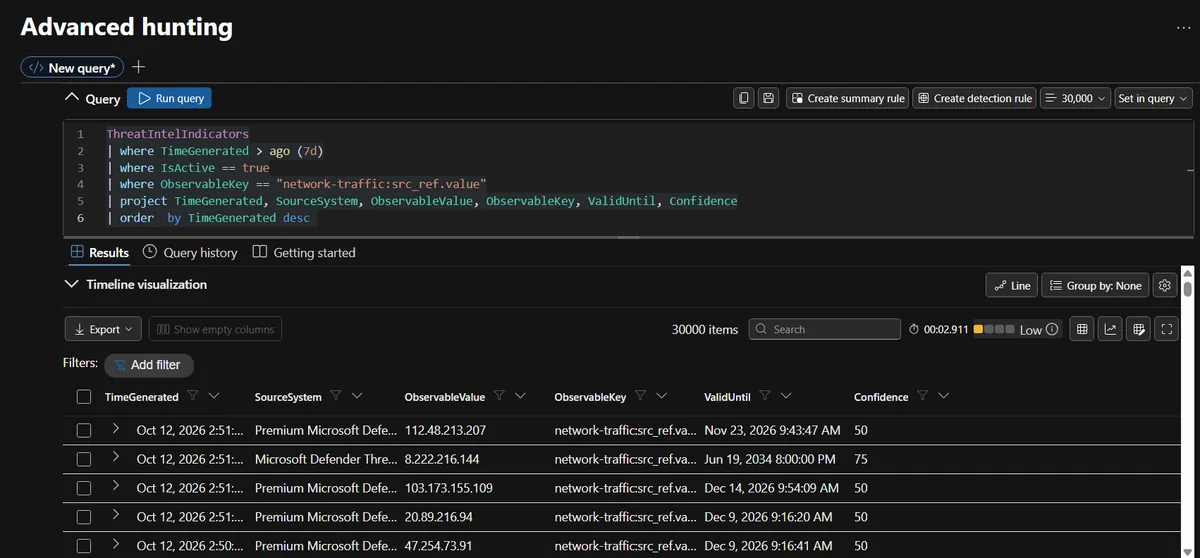
The results panel stopped at 30,000 rows, which tells you something by itself: the built-in feed is large. The confidence scores in the visible rows were mostly 50, with a 75 among them, and one indicator, 8.222.216.144, was valid until June 2034. A feed IP that stays active for eight years is exactly how a residential address ends up on a blocklist long after the botnet node moved on, and it is one reason I treat expiry as a first-class field later.
Then file hashes, summarised by key and source:
ThreatIntelIndicators
| where TimeGenerated > ago(14d)
| where IsActive == true
| where ObservableKey has "hashes"
| summarize Count = dcount(ObservableValue) by ObservableKey, SourceSystem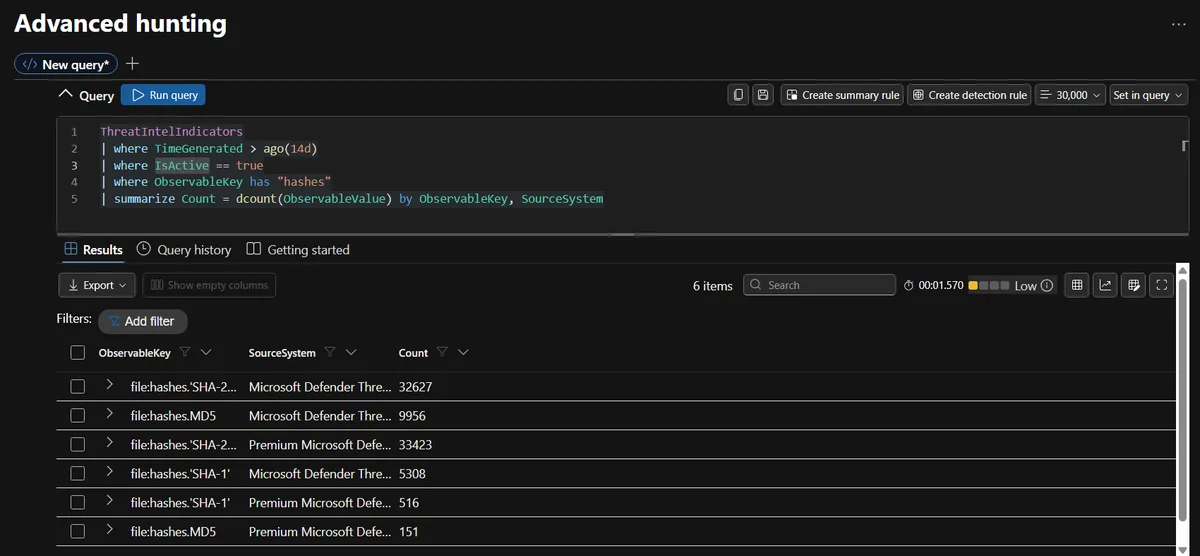
Six rows came back: SHA-256 from two sources, SHA-1 from two, and MD5 from two. Write down the exact key string for SHA-256. In my tenant it is file:hashes.'SHA-256', quotes included, and later queries filter on it. I also noted that SHA-1 indicators exist, because that turns out to decide whether the hash test in Part 3 works at all.
The original lab heading talks about file hashes but its queries only use IPs. Query 1.3 and the hash matching in Part 3 are my additions to close that gap.
Query 1.4: hygiene before you match anything
The last inventory query is the one I would keep running monthly. It collapses every indicator to its newest row, drops anything expired, and shows how much is about to expire:
let LatestIndicators = ThreatIntelIndicators
| where TimeGenerated > ago(30d)
| summarize arg_max(TimeGenerated, *) by Id
| where IsActive == true and ValidUntil > now();
LatestIndicators
| summarize Active = count(), ExpiringIn7Days = countif(ValidUntil < now() + 7d) by SourceSystem
Microsoft's documentation says indicators are deduplicated on the Id property and the newest TimeGenerated wins. In the raw table I still saw several rows per indicator, so I collapse them myself with arg_max in every query rather than trusting the portal to have done it. Stale indicators are the most common reason a threat intelligence rule gets noisy, and they are cheap to exclude.
Finding suspicious IPs in my own logs
Third-party intelligence tells you what is bad somewhere in the world. The IPs that matter most are the ones that have already touched your own machines. So the next phase mines DeviceLogonEvents for them.
Query 2.1: the lab baseline
DeviceLogonEvents
| where ActionType == "LogonFailed"
| summarize Count = count() by RemoteIP, ActionType
| order by Count desc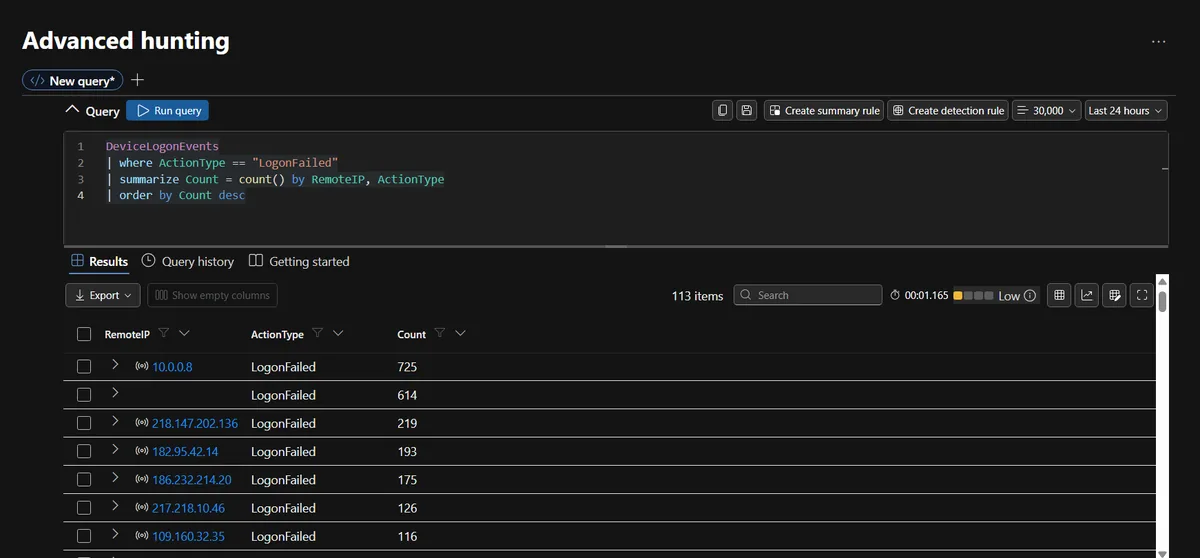
This is the baseline from the lab, and the top of the list is a good lesson in why you should never export a query like this straight into indicators. The biggest source, with 725 failed logons, was 10.0.0.8, a private address. The second biggest, with 614, was an empty RemoteIP. The first real public address, 218.147.202.136, came third with 219, followed by 182.95.42.14 (193), 186.232.214.20 (175), 217.218.10.46 (126) and 109.160.32.35 (116).
A private address can never be a useful indicator, and a blank one is not an address at all. Both have to be filtered out.
Query 2.2: built to produce a defensible indicator
My version adds a seven-day window, the private and empty filters, and three pieces of context: how many different devices the source hit, how many accounts it tried, and when it was first and last seen.
let startTime = ago(7d);
DeviceLogonEvents
| where TimeGenerated > startTime
| where ActionType == "LogonFailed"
| where isnotempty(RemoteIP)
| where not(ipv4_is_private(RemoteIP))
| summarize
    FailedLogons = count(),
    DistinctDevices = dcount(DeviceName),
    DistinctAccounts = dcount(AccountName),
    FirstSeen = min(TimeGenerated),
    LastSeen = max(TimeGenerated)
    by RemoteIP
| where FailedLogons >= 10
| order by FailedLogons desc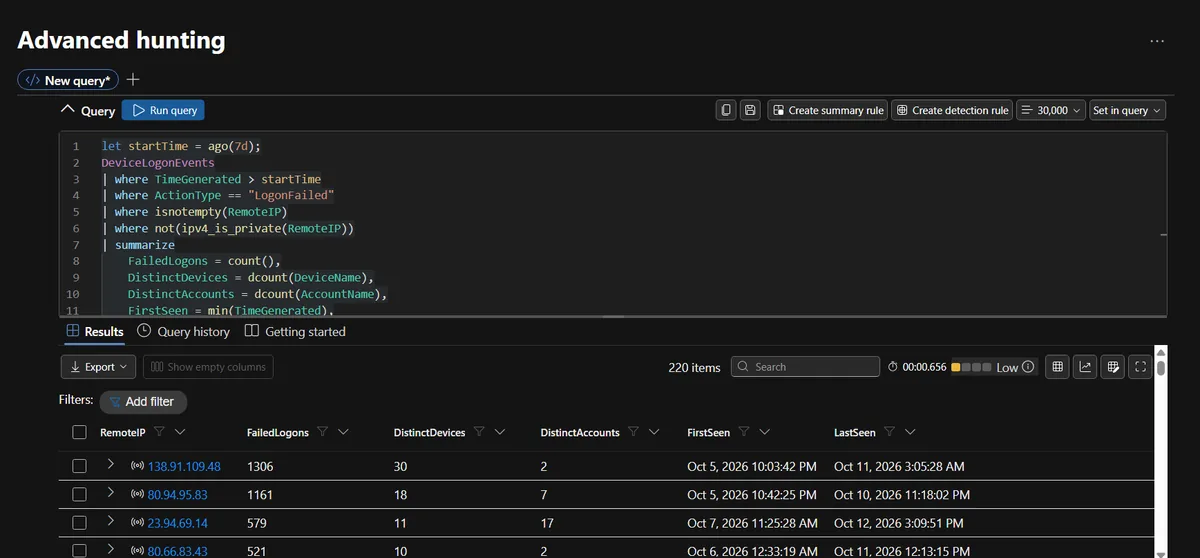
It returned 220 candidate IPs. The top four tell different stories:
| Source IP | Failed logons | Devices hit | Accounts tried |
|---|---|---|---|
| 138.91.109.48 | 1,306 | 30 | 2 |
| 80.94.95.83 | 1,161 | 18 | 7 |
| 23.94.69.14 | 579 | 11 | 17 |
| 80.66.83.43 | 521 | 10 | 2 |
The first and last rows are the same pattern: very few account names tried against many machines, which looks like a short username list swept across everything reachable (password guessing, T1110.001 in MITRE ATT&CK). The third row is different. Seventeen accounts across eleven devices is a much wider spread of usernames, and a wide spread of accounts with only a modest number of failures per account is the pattern to check for password spraying (T1110.003). Counts alone cannot confirm it, and 579 failures over 17 accounts is not a textbook spray, but this is exactly the kind of detail that makes an indicator more convincing than a bare IP and a number. An address that failed 700 times against nine different machines tells a stronger story than one that failed twelve times against one.
Remember that this is the shared workspace, so "30 devices" means 30 devices across many students' labs, not 30 of mine.
Query 2.3: did any of them ever get in?
A brute force source is an annoyance. A brute force source that later logged in is an incident, so this is the query I would not skip:
let Attackers = DeviceLogonEvents
| where TimeGenerated > ago(7d)
| where ActionType == "LogonFailed" and isnotempty(RemoteIP)
| summarize Failed = count() by RemoteIP
| where Failed >= 10;
DeviceLogonEvents
| where TimeGenerated > ago(7d)
| where ActionType == "LogonSuccess"
| join kind=inner Attackers on RemoteIP
| project TimeGenerated, DeviceName, AccountName, RemoteIP, LogonType, Failed
| order by TimeGenerated asc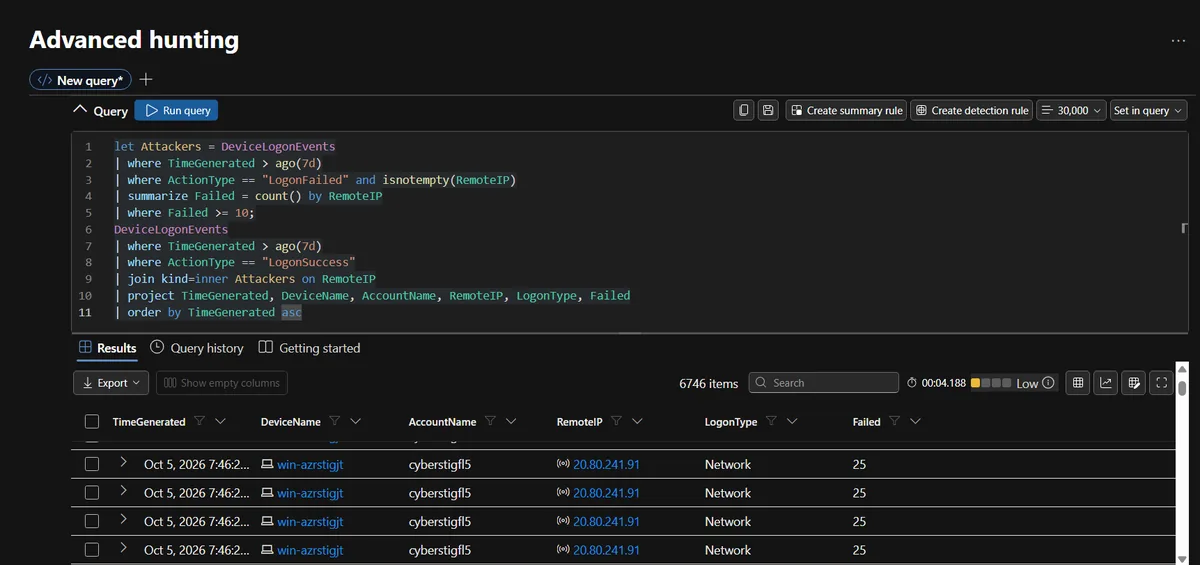
On a quiet network the expected answer is zero rows, and my runbook says so. In this workspace the answer was 6,746 rows. The first visible row was a successful network logon on a device named win-azrstigjt from 20.80.241.91, an address with 25 earlier failures.
That number does not mean 6,746 compromises, and it does not mean the query is broken. My best explanation is that this is a shared, deliberately exposed lab range where lots of machines are reachable from the internet and most of them belong to other people, so a join across the whole workspace was never going to come back empty. The practical fix is the same one I use for the hash query in Part 3: scope the result to a device you own with | where DeviceName startswith "threatintel-lab", or summarise by device and look at the ones with the largest ratio of successes to failures. Keep the query as it is for a production tenant, where a single row should wake someone up.
What goes into Part 2
The output of this post is a list of 220 public IPs that have repeatedly failed logons, with a count, a device spread and a time window for each, plus a baseline answer to whether any of them got in. Part 2 takes that list, validates it with Python, scores confidence and turns each address into a STIX indicator that Sentinel can match against logons, network flows and 90 days of history.
If you want to see what the free tools look like on the same idea, my SOC-HomeLab threat hunt write-up walks through reading a day of Wazuh and Zeek alerts cold, and it is a useful contrast to doing the same work in Sentinel.
Frequently asked questions
What is the ThreatIntelIndicators table in Microsoft Sentinel?
It is the table where Sentinel stores threat indicators such as IP addresses, domains, URLs and file hashes, whether they came from Microsoft's own feed, a connector, a file import or the portal. It replaced the older ThreatIntelligenceIndicator table, and Microsoft's documentation says ingestion into the legacy table stopped after July 31, 2025, so queries written for the old table need to be moved over.
Why do the Active and Indicators numbers in my inventory query not match?
Because Active counts rows and Indicators counts distinct values. Sentinel keeps a new row each time an indicator is updated, so one indicator can appear many times. In my workspace one source showed 133,525 distinct values against 564,978 active rows. Collapsing to the newest row per Id with arg_max, and checking ValidUntil, gives you the real number.
Why filter out private and blank IP addresses before building indicators?
Because they are noise that looks like signal. In my 24-hour baseline the top source was a private 10.x address and the second was an empty RemoteIP, both ahead of any real attacker. An indicator for a private address can never be matched to anything useful, and one for your own network can cause alerts about yourself.
What does the failed-then-succeeded join tell you?
It separates an annoyance from a possible incident. A source that failed logons ten or more times is background noise on an internet-facing machine. The same source followed by a successful logon means a guess may have worked, and that is the result you escalate. Always check it before you turn a brute force source into an indicator.
Do I need Traffic Analytics and NTANetAnalytics to follow this series?
No. NTANetAnalytics, which comes from NSG flow logs with Traffic Analytics enabled, is only used for the network flow match in Part 2. If the table is empty in your workspace you can skip that one query and still finish everything else.
Will this cost anything to run?
In the Cyber Range lab environment I did not pay anything beyond the course. In your own tenant, Sentinel bills for the data you ingest and keep, so check the pricing for your workspace before turning on extra connectors. The queries themselves are ordinary KQL and add no separate charge.