Threat Intelligence in Sentinel, Part 3: EICAR, Analytics Rules and Incidents
Part 3 closes the loop: an EICAR hash proof that exposes the SHA-1 versus SHA-256 trap, three scheduled analytics rules, a real incident with a triage note, and a frank look at whether the feeds earned their place.
show ip route | toc (6 sections)
Part 1 inventoried the intelligence in Microsoft Sentinel and found 220 brute force IPs in my own logs. Part 2 turned them into STIX indicators with Python and matched them against logons, flows, outbound connections and 90 days of history. Everything so far was a query someone had to remember to run. This post makes it automatic: it proves the file hash path with a harmless test file, builds three scheduled analytics rules, works an incident from alert to triage note, and then asks the uncomfortable question of whether any of it was worth doing.
The step-by-step version is the RUNBOOK on GitHub. The labs this grew out of come from the Cyber Range community, and as in Part 1 that link carries my referral code. The workspace is still shared, so some rows below come from machines that are not mine. Mine is threatintel-lab.
Proving the hash rule with EICAR
The built-in hash indicators describe real malware. A clean lab will never match them, and a rule that has never matched anything is a rule you cannot trust. I needed something harmless that antivirus and threat intelligence both recognise, and that is what the EICAR test file is for: a 68-byte text file that antivirus products deliberately treat as a virus. One rule in my repo is never to paste the EICAR string into a document, because antivirus will quarantine the file. Download it from the official page instead, and only on a lab machine.
Import two indicators, not one, with the source set to MaliciousFlows-Lab and a name like MaliciousFlows - TEST - EICAR:
SHA-256  275a021bbfb6489e54d471899f7db9d1663fc695ec2fe2a2c4538aabf651fd0f
SHA-1    3395856ce81f2b7382dee72602f798b642f14140
The reason for two is the most useful thing I learned in the whole project. When Defender blocks or deletes a file the moment it arrives, the evidence is an AntivirusDetection row in the DeviceEvents table, and there may be no ordinary row in DeviceFileEvents at all. Those antivirus rows carry the SHA-1 and leave SHA256 empty. An indicator for the SHA-256 alone has nothing to match against. A hash matching rule has to compare every hash type the telemetry provides.

With the file detected on the lab VM, here is Query 5.1. It looks in both DeviceFileEvents and the antivirus rows, puts both hashes of each event into an array, and joins every one of them to the indicators:
let BadHashes = ThreatIntelIndicators
| where TimeGenerated > ago(30d)
| where ObservableKey has "hashes"
| summarize arg_max(TimeGenerated, *) by Id
| where IsActive == true and ValidUntil > now()
| project Hash = tolower(ObservableValue), Confidence, Source = SourceSystem;
let FileHits = DeviceFileEvents
| where TimeGenerated > ago(1h)
| project TimeGenerated, DeviceName, FileName, FolderPath, SHA256, SHA1, ActionType, Table = "DeviceFileEvents";
let AvHits = DeviceEvents
| where TimeGenerated > ago(1h)
| where ActionType == "AntivirusDetection"
| project TimeGenerated, DeviceName, FileName, FolderPath, SHA256, SHA1, ActionType, Table = "DeviceEvents";
union FileHits, AvHits
| extend Hash = pack_array(tolower(SHA256), tolower(SHA1))
| mv-expand Hash to typeof(string)
| where isnotempty(Hash)
| join kind=inner BadHashes on Hash
| project TimeGenerated, DeviceName, FileName, FolderPath, ActionType, Table, Hash, Confidence, Source
| order by TimeGenerated desc
Lowercase both sides, because hash case is an easy way to miss a match. While testing, change both ago(1h) values to ago(1d) and add | where DeviceName startswith "threatintel-lab" after the union so other people's devices in the shared workspace do not appear.
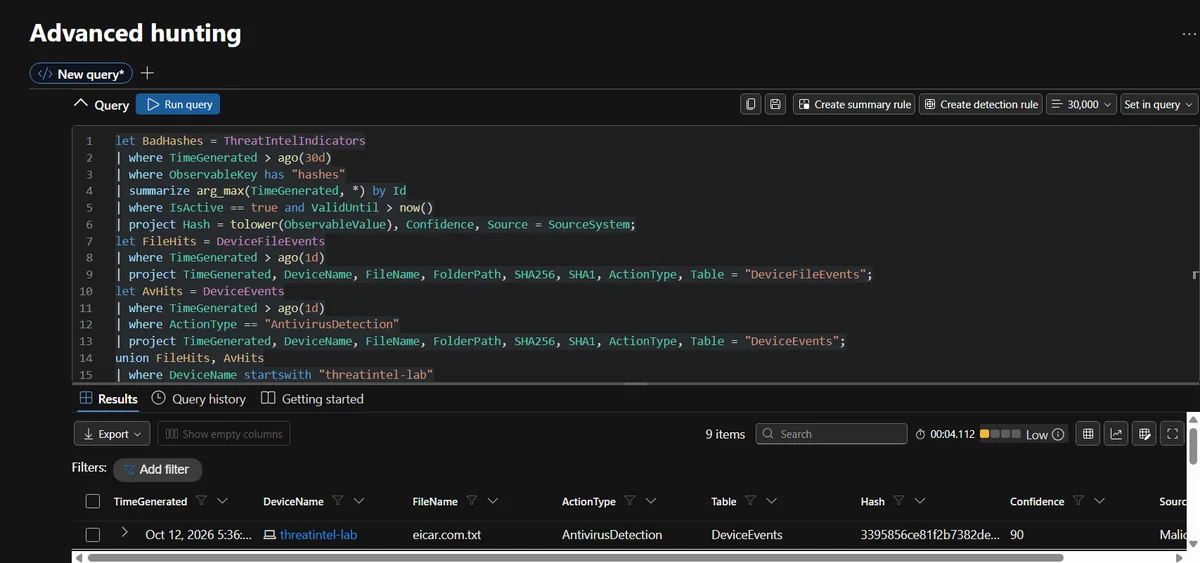
It worked: nine rows, all eicar.com.txt on my VM, all from DeviceEvents as AntivirusDetection, matched on the SHA-1 hash with a confidence of 90. If yours does not, the checks are the same three every time. Is the stored hash lowercase? Does the indicator key really contain SHA-256 or SHA-1 (Query 1.3 shows the exact string)? And did Defender record the hash for that file at all?
Three rules, one pattern
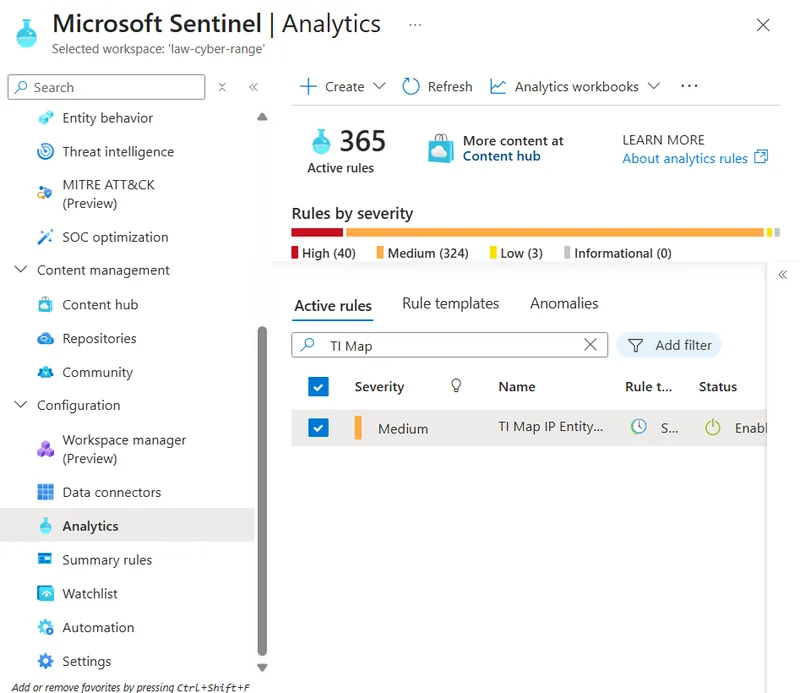
Each rule is a scheduled query that reuses a query from the series, runs every 5 minutes and looks back one hour. The lookback has to be at least as long as the run interval plus the ingestion delay, or events that arrive late slip past.
| Rule | Matches | Severity | Tactics |
|---|---|---|---|
A: TI Map IP Entity to DeviceLogonEvents - MaliciousFlows | Indicator IPs against device logons | Medium, High on any success or confidence 80+ | Credential Access, Initial Access |
B: TI Map SHA256 to DeviceFileEvents | Indicator hashes against file events and antivirus detections | High | Execution, Defense Evasion |
C: TI Map IP Entity to DeviceNetworkEvents (outbound) | Indicator IPs against outbound connections | High | Command and Control |
The ATT&CK mapping is deliberately modest. Rule A covers Brute Force (T1110) as the source of the indicators, Valid Accounts (T1078) when a logon succeeds and External Remote Services (T1133) for exposed RDP or SSH. Rule B covers User Execution: Malicious File (T1204.002) and Rule C covers Application Layer Protocol (T1071). A hash or IP match tells you the indicator, not which technique an attacker used.
Rule A: logons
let Allow = _GetWatchlist('TI-Allowlist') | project IPAddress;
let BadIPs = ThreatIntelIndicators
| where TimeGenerated > ago(365d)
| where tostring(Data.name) startswith "MaliciousFlows"
| summarize arg_max(TimeGenerated, *) by Id
| where IsActive == true and ValidUntil > now()
| project BadIP = ObservableValue, Confidence, IndicatorName = tostring(Data.name), ValidUntil;
DeviceLogonEvents
| where TimeGenerated > ago(1h)
| where RemoteIP !in (Allow)
| join kind=inner BadIPs on $left.RemoteIP == $right.BadIP
| extend Outcome = iff(ActionType == "LogonSuccess", "SUCCESS after known bad", "Failed attempt")
| extend Severity = case(ActionType == "LogonSuccess", "High", Confidence >= 80, "High", Confidence >= 50, "Medium", "Low")
| project TimeGenerated, DeviceName, AccountName, RemoteIP, ActionType, Outcome, Confidence, IndicatorName, Severity
Three details are doing real work here. The Allow watchlist keeps the rule from alerting on my own address. The join carries confidence and the indicator name into the alert. And the Severity column makes any successful logon High regardless of confidence, because confidence is not severity. A weak indicator that lines up with a login on a server is still the thing you look at first.
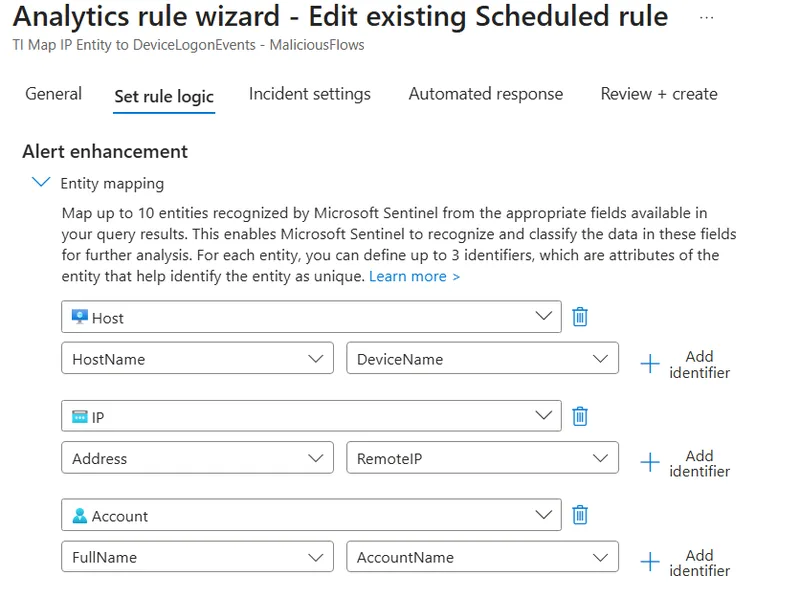
In the rule wizard I set the alert name format to TI Match: {{RemoteIP}} on {{DeviceName}}, took severity from the Severity column, grouped all events into a single alert, and grouped alerts into incidents by matching IP entity within 24 hours.
Entity mapping is where a rule becomes useful to the person who gets the incident, because it is what lets an analyst pivot from the alert to the host, the IP and the account. The columns you map have to exist in the query output.
Rule B: file hashes
Rule B uses Query 5.1 as it is. One practical note: the query projects a Hash column, not SHA256, so map the file hash entity to Hash, and add InitiatingProcessAccountName to the final project line if you want an Account entity to pivot on. The wizard only lets you map columns the query actually returns.
Rule C: outbound connections
Rule C is Query 4.4 from Part 2 with the lookback shortened to match the schedule:
DeviceNetworkEvents
| where TimeGenerated > ago(1h)
| where ActionType in ("ConnectionSuccess", "ConnectionAttempt")
| join kind=inner BadIPs on $left.RemoteIP == $right.BadIP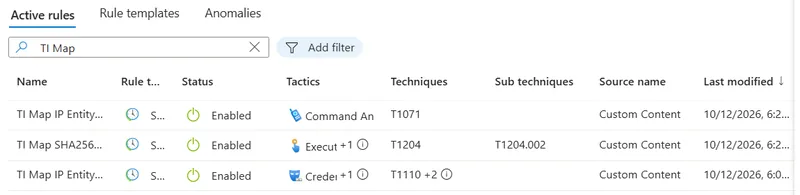
There is a trap in Rule A. It only looks back one hour, so it will never fire on old test data, and you cannot create a fresh failed logon from someone else's IP. To prove it works, widen the lookback to seven days temporarily, take your screenshot, then set it back to one hour. Write down that you did it. A rule you have never seen fire is a rule you have not tested.
An incident, and the note I wrote
The first incident came from Rule C, and it was High.
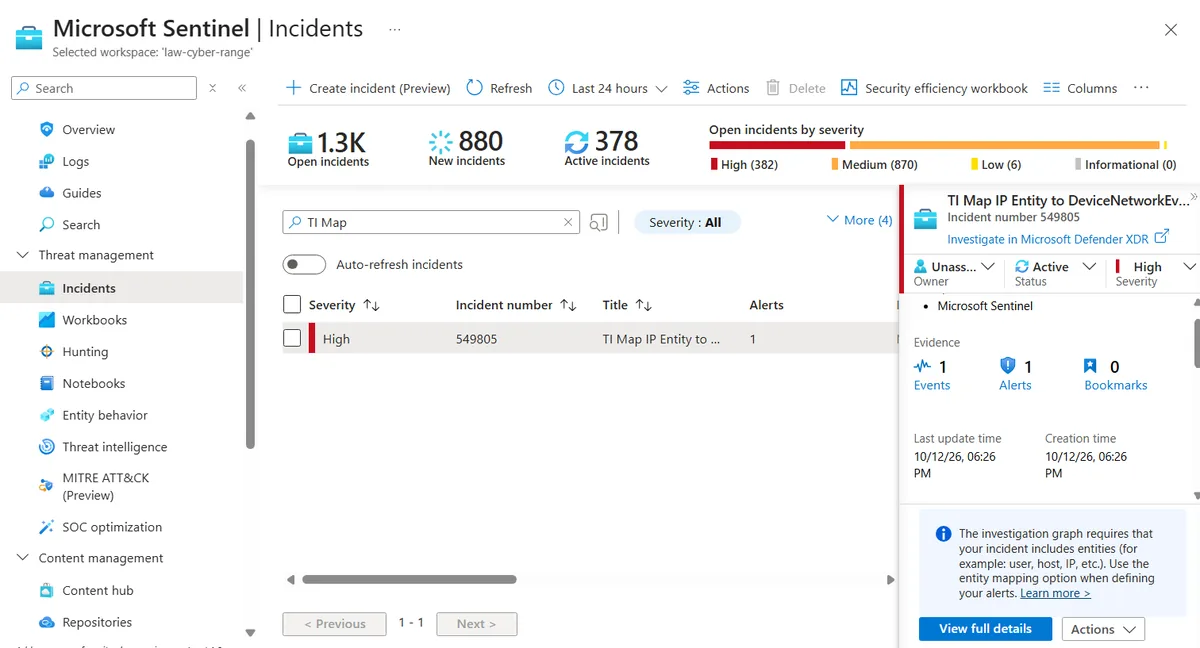
It was created on the evening of October 12, shortly after the rules were switched on, in a workspace with roughly 1,300 open incidents. The devices involved were lab machines in the shared environment, not mine, so containing anything was not an option and not my place. What I could do was triage it properly, and the runbook has a short template for that: what the indicator was, what it touched, whether any attempt succeeded, a verdict and an action. My note looked like this:
- Indicator: multiple MaliciousFlows and feed indicators, confidence 70 to 97.
- What it touched: outbound connections from lab devices in the shared workspace, not
threatintel-lab. - Did any attempt succeed: connections recorded as
ConnectionSuccessorConnectionAttempt, no account compromise confirmed. - Verdict: needs more data. The devices are not my assets.
- Action: scoped the query to my own VM, fixed a missing entity mapping on the rule, no blocking performed.
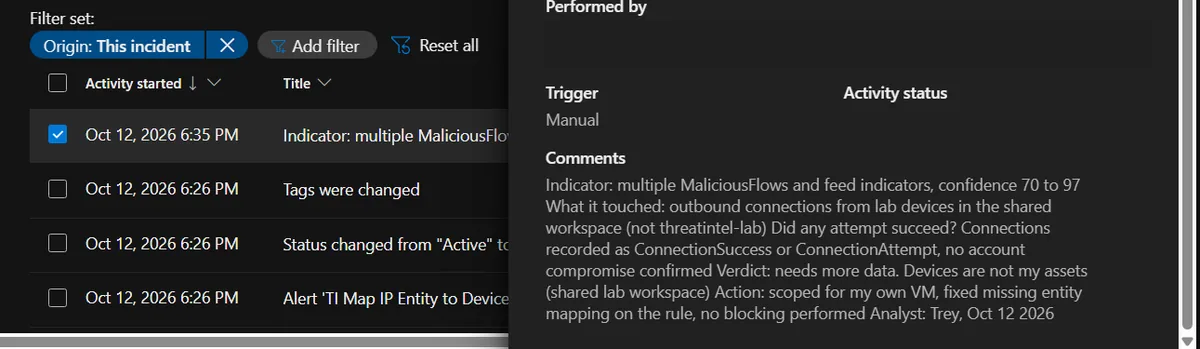
Writing "needs more data" felt unsatisfying, and it was still the right verdict. A confident wrong answer in an incident note is worse than an honest one. The same note records that I found a missing entity mapping on the rule while working the incident, which is the sort of fix you only find by actually using the output.
If a successful logon from an indicator address ever appears on a device you do own, the response changes. The runbook treats it as a potential compromise: disable the account, isolate the device, preserve logs and tell the security lead.
Did any of it earn its place?
The last query is the one that keeps a threat intelligence program honest. It counts active indicators and average confidence per source, so you can set that against what each source actually produced.
let Hits = SecurityAlert
| where TimeGenerated > ago(30d)
| where AlertName startswith "TI Map"
| summarize AlertCount = count();
ThreatIntelIndicators
| where TimeGenerated > ago(30d)
| summarize arg_max(TimeGenerated, *) by Id
| summarize ActiveIndicators = countif(IsActive == true), AvgConfidence = avg(toreal(Confidence)) by SourceSystem
| extend Note = "Compare with alert counts per rule. A source with thousands of indicators and zero hits is cost, not value."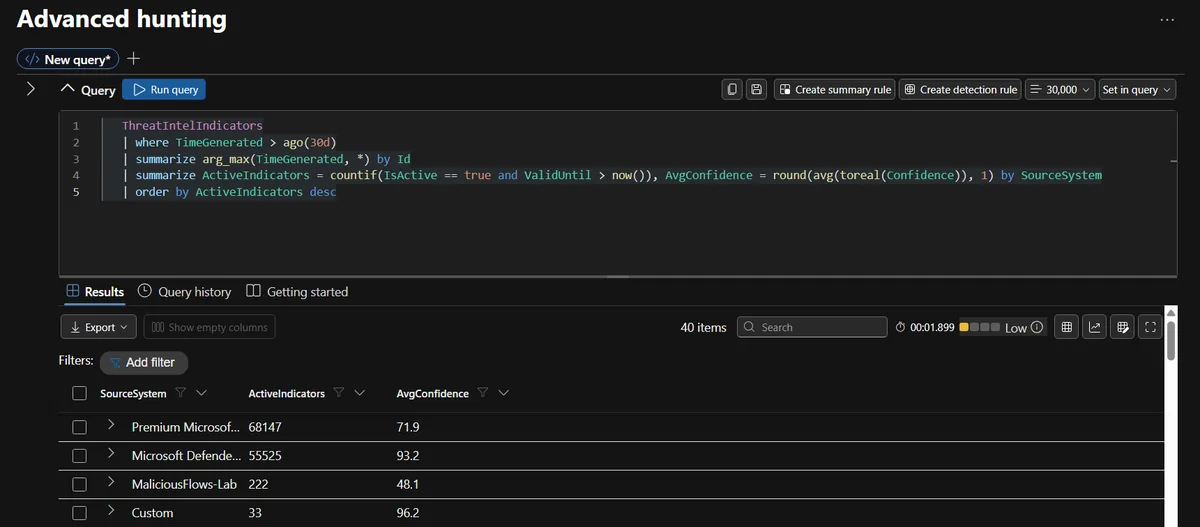
The numbers by source:
| Source | Active indicators | Average confidence |
|---|---|---|
| Premium | 68,147 | 71.9 |
| Microsoft Defender Threat Intelligence | 55,525 | 93.2 |
| MaliciousFlows-Lab | 222 | 48.1 |
| Custom | 33 | 96.2 |
The 222 under MaliciousFlows-Lab is the 220 indicators from the script plus the two EICAR test indicators. Its average confidence is the lowest, which is fair: it is driven by failure counts, and most of those addresses had modest totals.
Then the check against reality. Searching SecurityAlert for alerts from the TI Map rules over 30 days returned a single alert.
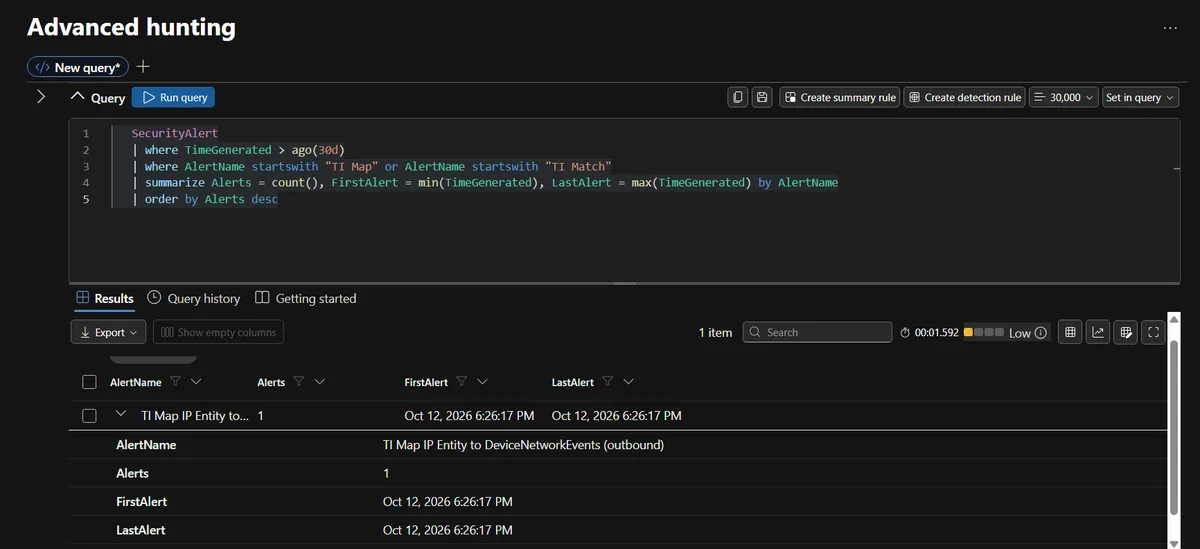
One alert, from Rule C, on the same evening I created the rules. Rule A and Rule B had no alerts in that window. That is not proof they work, and I would not treat it as proof they are broken either. Rule A only looks back one hour, so without a fresh logon from an indicator address it has nothing to match, and I did not force Rule B to fire. If I trusted them without running the seven-day test, I would be fooling myself. As a measure of the two big feeds, it is stark: more than 120,000 active indicators between them and one alert from the rules built on top. The query as written reports indicators per source and leaves the comparison with alert counts to the analyst, which is why the note column says so. The obvious improvement is to join alerts back to the source of the indicator that caused them.
The allowlist and the limits
A rule that alerts on the owner's own address gets switched off within a week, so the allowlist is not optional. Create a watchlist named TI-Allowlist with a single IPAddress column holding your egress address, scanners and partner IPs, and exclude it in every matching rule:
let Allow = _GetWatchlist('TI-Allowlist') | project IPAddress;
// ... then in the match query:
| where RemoteIP !in (Allow)
Now the honest part, because a project like this is easy to oversell. What I built detects known-bad infrastructure, and that is the weakest layer there is. David Bianco's Pyramid of Pain ranks indicators by how much it hurts an attacker when you deny them: hashes and IP addresses sit at the bottom because they cost almost nothing to change. That is why every indicator here expires in 30 days, and why this is only a starting layer. A new attacker on fresh addresses walks straight past it. Behaviour-based detections catch that, the same idea as the Suricata and Zeek signatures in my SOC-HomeLab IDS setup.
Other limits worth saying out loud:
- Confidence from failure volume is a rough proxy. It tells you an address is persistent, not that it is malicious, and a shared NAT address can look the same.
- The shared workspace meant I had no ground truth for devices that were not mine, so several results ended in "needs more data".
- I did not block anything or automate any response. That is a deliberate stop, not an oversight.
- Two of my three rules produced no alerts, and I have not yet proven them with the seven-day test.
Cleanup is short: expire or delete the lab indicators, disable the rules you do not want running, and delete any EICAR remnants. And do not commit your out/ folder, your allowlist or real employer IPs to GitHub.
If you want to repeat this, start with the RUNBOOK on GitHub, the query library and the Python script in the same repository, and the labs in the Cyber Range community. Go back to Part 1 if you skipped the inventory, which is the step I would not skip.
Frequently asked questions
What is the EICAR test file and is it safe to use?
EICAR is a harmless 68-byte text file, created by the European Institute for Computer Antivirus Research, that antivirus products deliberately treat as a virus so you can test a scanner without handling real malware. It is safe, but use it on a lab machine rather than your daily one, and never paste its string into a document or repository because antivirus will quarantine the file.
Why did my SHA-256 indicator not match the EICAR detection?
Because Defender's antivirus detection rows in the DeviceEvents table carry the SHA-1 hash and leave the SHA256 column empty. A SHA-256 indicator has nothing to match. Import an indicator for each hash type your telemetry provides, and make the matching query compare every hash column, lowercased on both sides.
What run interval and lookback should a threat intelligence analytics rule use?
I run the rules every 5 minutes with a one hour lookback. The lookback has to be at least as long as the run interval plus the ingestion delay, otherwise events that land late are missed. The overlap means the same event can be seen twice, so group events into a single alert and group alerts into incidents by IP entity.
How do I stop a threat intelligence rule from alerting on my own IP address?
Put your egress address, scanners and partner addresses in a watchlist, then exclude them in the rule with a not-in check against that watchlist. Also remove any indicator that was created from your own address. A rule that alerts on the owner's home IP gets switched off within a week.
What is the difference between indicator confidence and alert severity?
Confidence is how likely the indicator is to be truly malicious. Severity is how urgent the match is. They can disagree: a low-confidence indicator that matches a successful logon is still urgent. My logon rule raises severity to High on any successful logon from an indicator address, whatever the confidence says.
Does a threat intelligence match mean a device is compromised?
No. A match means a known indicator appeared in your telemetry. For an inbound failed logon that is mostly background noise. For an outbound connection it is stronger, but you still need the initiating process, the command line and the account before calling it. My own triage note ended with a verdict of needs more data.
How do I know if a threat feed is worth keeping?
Count active indicators per source, compare that with the alerts each source actually produced, and review it on a schedule. A source with tens of thousands of indicators and no alerts is a cost, not a defence. In my workspace the two big feeds held over a hundred thousand active indicators between them and one alert came from all the rules in thirty days.
Which MITRE ATT&CK techniques does this project cover?
The logon rule maps to Brute Force (T1110), Valid Accounts (T1078) and External Remote Services (T1133). The file hash rule maps to User Execution: Malicious File (T1204.002). The outbound rule maps to Application Layer Protocol (T1071). A match gives you the indicator, not the whole technique chain.