%BLOG-6-PYTHON
I Built a Netmiko Config Backup Tool So I'd Stop Losing Arguments With My Own Router
A few weeks into studying for the CCNA, I noticed something that annoyed me every time it happened in a lab: I'd make a change, forget exactly what the config looked like before, and have no clean way to prove what actually changed. On real gear in a real job, that's not a minor annoyance, it's how outages happen. Someone changes an ACL at 4pm on a Friday, doesn't write it down anywhere, and three days later a completely different team is debugging a "mystery" connectivity issue that isn't a mystery at all, it's just undocumented.
So I built a tool to fix that for myself, on my own lab, using nothing but Python, Netmiko, and a free Gmail account. This post is the story of building it: the design decisions, a real two-router VyOS lab I stood up from scratch to test it against, two genuine bugs I found the hard way, and why I think this small, unglamorous script is one of the more honest "day one on the job" projects I've built.
The problem, stated plainly
Config drift is the term for what happens when a device's actual running configuration quietly diverges from what everyone believes it is. It happens for boring reasons: someone SSHes in to fix an urgent problem and doesn't loop back to document it, a script runs a one-off change and nobody generalizes it into the standard build, a vendor tech makes a "quick tweak" during a support call. None of these are malicious. All of them leave a gap between "what we think is running" and "what is actually running," and that gap is where outages hide.
The fix isn't complicated in theory: keep a history of every device's configuration over time, and get told the moment something changes. The reason this doesn't happen automatically in a lot of smaller shops isn't that it's hard, it's that it's tedious to set up and easy to deprioritize until the outage that makes everyone wish it already existed. I wanted to build the smallest possible version of "already existed."
What I actually built
configbackup is a command-line tool. You give it a CSV inventory of devices. For
each one, it does four things: connects over SSH using
Netmiko and pulls
the running configuration, saves that configuration to disk as a timestamped file in
a per-device folder, compares the new config against the most recent previous backup
using Python's built-in
difflib,
and, only if anything actually changed, sends an email alert showing exactly which
lines are different.
That's the whole tool. No dashboard, no database, no agent installed on the devices themselves. Just SSH, a diff, and an email. I think there's a real lesson in that: the tools that actually get adopted on a small team are usually the boring ones that do exactly one job and don't ask anyone to change how they already work.
Building a real two-router lab, without buying hardware or a license
I didn't want to test this against a single Cisco IOS box in Packet Tracer and call it done, because a config backup tool is only interesting once there's more than one device and a real SSH session to negotiate. So I built a genuine two-node lab using containerlab, a free, open-source tool that spins up container-based network topologies from a small YAML file, and VyOS, a free, open-source router operating system that runs on ordinary x86 hardware or in a container. VyOS specifically has a free rolling release alongside its paid LTS release, which mattered to me: I wanted this project reproducible by anyone, not gated behind a subscription.
VyOS doesn't publish a ready-made Docker image, so the first real step was building
one myself from VyOS's own ISO: extracting the root filesystem with bsdtar and
sqfs2tar, then a short Dockerfile that masks a couple of services that don't
belong in a container and boots /sbin/init. That's a one-time cost; once the image
is built, containerlab deploy against a two-node topology file brings both routers
up, wired to each other, in under a minute, and prints each node's management IP,
which is exactly what the inventory CSV in Part 6 of the runbook needed.
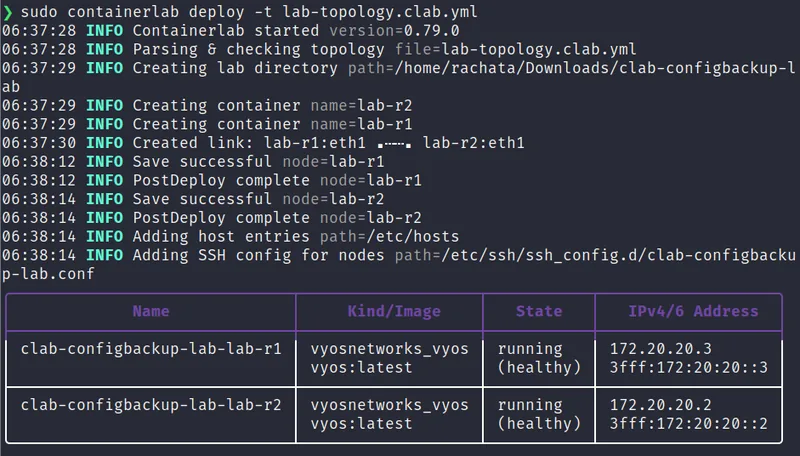
From there it was ordinary router setup: SSH into each node with the VyOS
containerlab image's default credentials, set a real password instead of leaving the
default in place, and, critically, remember that VyOS keeps a running config and a
separately-saved boot config, so a commit without a following save evaporates
the moment the container restarts. That's a small platform quirk, but it's exactly
the kind of thing that looks like a mysterious "my config disappeared" bug the first
time you hit it and is actually just a missed command.
Why Netmiko and not raw Paramiko or an API
Netmiko is a library built specifically to smooth over the differences between how
various network operating systems handle an SSH session. Cisco IOS, Arista EOS,
Juniper Junos, VyOS, and dozens of other platforms all have slightly different login
prompts, paging behavior, and command syntax. Netmiko's ConnectHandler takes a
device_type string and handles all of that platform-specific plumbing internally,
so my code gets to just call send_command("show running-config") and get clean text
back, instead of me hand-rolling a screen-scraper for every vendor.
Using a REST API where one's available, and a lot of modern network gear has one, is often the better long-term choice for production automation. I went with SSH and Netmiko for this project specifically because it works identically across old and new gear, doesn't require API access to be enabled and licensed separately, and is genuinely the most universal way to reach a network device that's been around for twenty years. For a config backup tool meant to work against whatever's actually deployed rather than only the newest hardware, that universality mattered more to me than API elegance.
Designing the inventory format around a security mistake I didn't want to make
The first version of the inventory CSV I sketched out on paper had a password
column. It's the obvious design. It's also exactly the kind of thing that ends up
committed to a public GitHub repo by accident, because a CSV doesn't look dangerous
the way a .env file does, it looks like a spreadsheet, and it's the textbook shape
of CWE-798, Use of Hard-coded Credentials.
I changed the design before writing any connection code. The real inventory format
has a password_env column instead, which holds the name of an environment
variable, not a password. The tool resolves the actual credential from the
environment at runtime:
# my-lab-inventory.csv
hostname,ip,device_type,port,username,password_env,secret_env
lab-r1,172.20.20.3,vyos,22,admin,CONFIGBACKUP_LAB_R1_PASSWORD,
lab-r2,172.20.20.2,vyos,22,admin,CONFIGBACKUP_LAB_R2_PASSWORD,
That CSV file is completely safe to commit to git as-is. The real password lives in
a .env file that's explicitly listed in .gitignore, loaded into the shell with
set -a; source .env; set +a rather than the older export $(... | xargs) pattern,
which breaks silently on any value containing a space, #, or $. I kept a literal
password column as a fallback purely so someone could point this at a disposable
lab without setting up environment variables first, but the loader prints a visible
warning to the console every time that path gets used, specifically so it's never a
silent, accidental choice.
When I wrote a fictional stakeholder meeting later in this project, I gave the security-lead character the very first question about credential handling, before anything else. That wasn't an accident. If I were reviewing someone else's automation tool that touches production network gear, that's the first thing I'd want answered too, and I wanted the design to already have a good answer before anyone asked, the same instinct behind a Linux hardening audit I ran against my own machine: find the gap before someone else has to point it out.
The bug that taught me the most
I want to spend real time on this, because it's the part of the project I'm actually most proud of, not the part that worked on the first try.
While writing the CLI's integration tests, I had one test that ran the backup tool twice in a row inside the same test function: once to establish a baseline backup, then again with a different (mocked) config to confirm a change gets detected. That second run kept reporting "no change," even though I was explicitly feeding it different text.
My first instinct was that the test itself was wrong. It wasn't. I added print
statements to trace exactly which files were being written and read, and found the
actual problem: my original timestamp format only had one-second resolution
(%Y%m%d-%H%M%S). Both calls to main() happened inside the same wall-clock
second, since a test suite runs fast, so both backup files got the exact same
filename. The second call's save_backup() silently overwrote the first backup on
disk. Then, because of the order I'd written the code in, the "read the previous
backup" step happened after the new file had already been written, so it read the
new content and diffed it against itself. Zero diff, reported as "no change," even
though a real change had absolutely happened.
This is a genuinely nasty class of bug because it fails silently. A tool that crashes when something's wrong is annoying but honest. A tool that reports "no change" when something actually changed is worse than useless, it's actively misleading, and on a real network that's exactly the kind of bug that would let a real config drift incident slip through undetected while everyone trusted the tool that was supposed to catch it.
I fixed it two ways, deliberately not just one. First, I switched the timestamp
format to include microseconds (%Y%m%d-%H%M%S-%f), which makes a same-second
filename collision essentially impossible even if the tool gets run multiple times
in rapid succession. Second, and I think this is the more important fix, I reordered
the code so the previous backup's content gets read into memory before the new
backup file gets written, regardless of whether their filenames could theoretically
collide. Relying on unique filenames to make a bug impossible is fragile. Reading
old-then-new in the correct order makes the bug structurally impossible, independent
of timestamp precision. Belt and suspenders. Both fixes are covered by dedicated
tests now, so if I ever refactor this code later and accidentally reintroduce the
ordering bug, the test suite catches it before I do.
Handling a platform that doesn't have a "running-config"
The wrinkle with VyOS is that it doesn't structure its configuration the way Cisco
IOS does. IOS has one obvious, universally-known command, show running-config,
which dumps a flat, human-readable config file. VyOS's configuration is stored as a
tree, not a flat file, and the closest equivalent for backup purposes is show
configuration commands, which prints the config as an ordered list of set
statements. It's a different mental model, and I only found the right command by
actually researching how other people automate VyOS backups, not by guessing based
on my Cisco-flavored assumptions from CCNA study.
Rather than hardcode one command for one platform, I built a small lookup table in
backup.py:
# backup.py
RUNNING_CONFIG_COMMANDS = {
    "cisco_ios": "show running-config",
    "cisco_xe": "show running-config",
    "arista_eos": "show running-config",
    "juniper_junos": "show configuration",
    "vyos": "show configuration commands",
}
Adding support for a new platform, once I have one to test against, is a one-line addition to that dictionary, not a rewrite of the connection logic. That felt like the right amount of abstraction: flexible enough to grow, not so clever that it's hard to read six months from now.
How this compares to tools that already exist
I want to be upfront about something: I'm not claiming to have invented config backup automation. Tools like Oxidized, RANCID, and rConfig have existed for years and do this job at a scale I'm not trying to compete with, watching hundreds or thousands of devices, storing history in git automatically, integrating with existing NMS platforms. If I were solving this problem for a large enterprise network tomorrow, I'd start by seriously evaluating one of those instead of writing something from scratch.
So why build my own instead of just deploying Oxidized? Two honest reasons. The first is that I wanted to actually understand every piece of the pipeline, the SSH session handling, the diff logic, the alerting, rather than configuring a YAML file for a tool that handles all of that for me behind an abstraction I don't fully understand yet. Being able to explain, line by line, why a diff came back empty when it shouldn't have (see the bug story above) is a different level of understanding than knowing how to point an existing tool at a device list. The second reason is more practical: a from-scratch project like this is something I can walk an interviewer through end to end, design decisions and all, in a way that "I deployed Oxidized" doesn't really let me do, the same reasoning behind a Python VLSM subnetting tool I built earlier in this series instead of just using an online calculator. Both are valuable skills. This project was about building the first one before I lean on the second.
That said, I'd genuinely recommend an existing tool like Oxidized for anyone who needs this working reliably across a real fleet today. The value of what I built here is what I learned building it, and having a small, fully understood codebase I can extend in exactly the direction a specific job needs, not a claim that it should replace mature, battle-tested tooling.
Making sure it can never be the thing that breaks something
This was a non-negotiable design constraint from the very start, and it's worth
stating explicitly rather than leaving it implicit: this tool never enters
configuration mode on a device, and never writes anything to a device. Every single
command it sends is a read-only show-style command. The worst thing that can go
wrong if this tool has a bug is that a backup doesn't get saved, or an alert email
doesn't go out. It cannot be the reason a device goes down, because it never has the
ability to change one.
I think this matters more than any other design decision in the project. A lot of automation tooling proposals stall out in real organizations because someone, reasonably, pictures a script accidentally pushing a bad configuration to forty devices at once. Making the read-only boundary a structural guarantee rather than a policy someone has to remember removes that entire category of risk from the conversation, and I wrote a fictional stakeholder meeting specifically to test whether that argument actually lands the way I think it does when I have to defend it out loud to a skeptical Ops Manager character.
Testing without needing a live router for every test run
Netmiko's whole purpose is talking to real SSH-reachable devices, which creates an obvious tension with wanting a fast, reliable test suite. A test that needs my actual VyOS lab running to pass isn't something that runs reliably in CI, and it's not something anyone reviewing this project on GitHub could run without first building the exact lab described in the runbook.
The fix was mocking at the right boundary. netmiko.ConnectHandler gets patched in
the backup module's tests, so fetch_running_config() is tested against a fake
connection object that returns scripted text, or raises a timeout or authentication
exception on command, without a socket ever opening. smtplib.SMTP gets the same
treatment in the alert module's tests. The CLI's own tests mock fetch_running_config
one level higher, which let me write a test where one device in a two-device
inventory times out and the other succeeds, and confirm the tool still backs up the
healthy device and reports the correct overall exit code, all without any of it
touching a network.
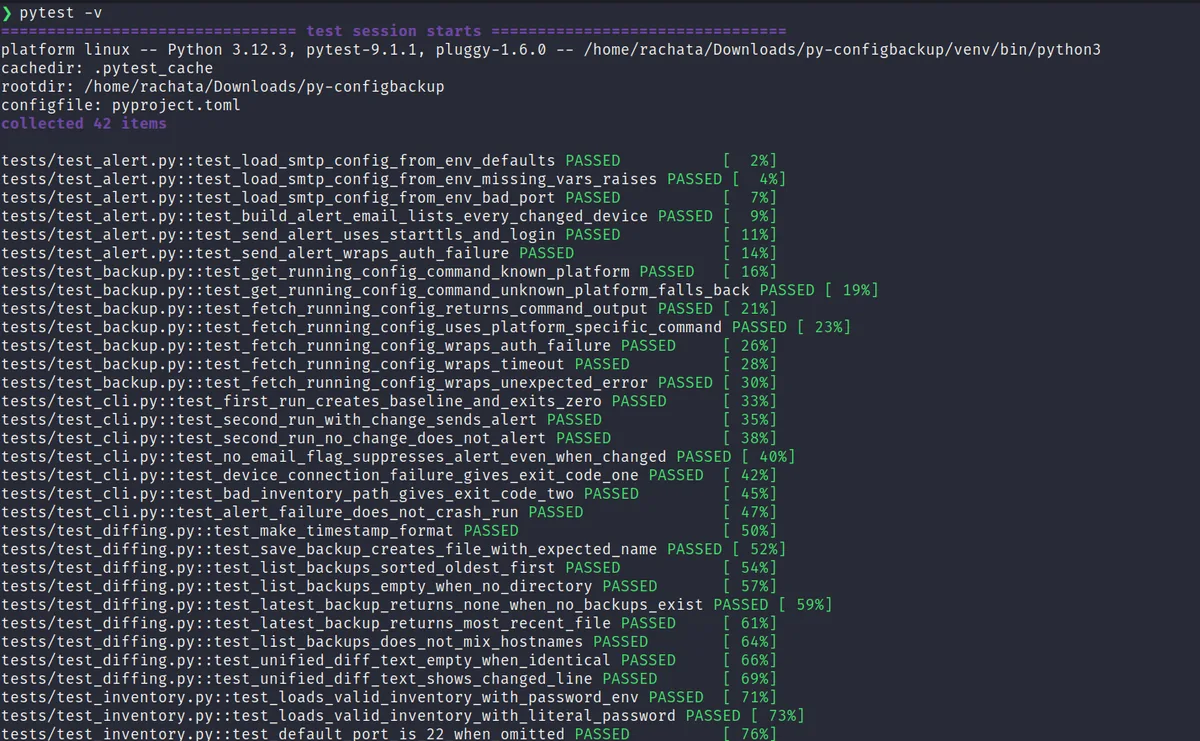
The result was 46 tests (42 at the point of the screenshot above, before the noise-filtering fix described later in this post) that run in well under a second and cover every error path I could think of: missing inventory columns, a bad port number, a missing environment variable, an authentication failure, a connection timeout, an SMTP login failure, and the exact ordering bug described above. None of that replaces actually running the tool against real SSH-reachable devices, which I also did, and which the runbook walks through step by step. But it means the logic of the tool is verified independently from whether my lab happens to be powered on that day.
What it actually looks like running against real devices
Once the lab was up and the credentials were configured, the actual usage is about as simple as I could make it. First run against a fresh inventory:
$ configbackup --inventory my-lab-inventory.csv --backup-dir backups
[lab-r1] first backup saved: lab-r1_20260919-075834-904492.cfg
[lab-r2] first backup saved: lab-r2_20260919-075843-195007.cfg
done: 2 device(s) in inventory, 0 changed, 0 failed.
Then I SSHed into lab-r1 directly and changed its hostname, a small, deliberate,
obviously-detectable change, and ran the tool again:
$ configbackup --inventory my-lab-inventory.csv --backup-dir backups
[lab-r1] CHANGED - saved lab-r1_20260919-080538-799084.cfg
[lab-r2] no change - saved lab-r2_20260919-080547-117601.cfg
alert email sent for 1 device(s).
done: 2 device(s) in inventory, 1 changed, 0 failed.
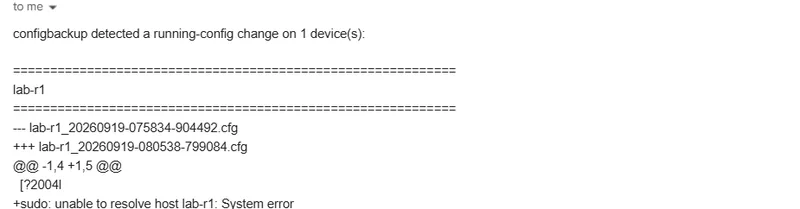
And the alert email itself landed with the diff in the body, exactly the "here's what changed and when" artifact that would have turned a multi-hour manual investigation into a two-minute read.
A second bug, found only by testing against a real device
That alert email above is also how I caught something the mocked test suite had no
way of catching: a stray line, sudo: unable to resolve host lab-r1: System error,
sitting inside an actual saved backup file, and a second one, [?2004l, present in
every single backup from the very first run. I confirmed both by going straight to
the files on disk and diffing them directly:
$ find backups -type f
backups/lab-r1/lab-r1_20260919-075834-904492.cfg
backups/lab-r1/lab-r1_20260919-080538-799084.cfg
backups/lab-r2/lab-r2_20260919-075843-195007.cfg
$ diff backups/lab-r1/lab-r1_*.cfg
1a2
> [?2004l
> sudo: unable to resolve host lab-r1: System error
29c30
< set system host-name 'lab-r1'
---
> set system host-name 'lab-r1-renamed'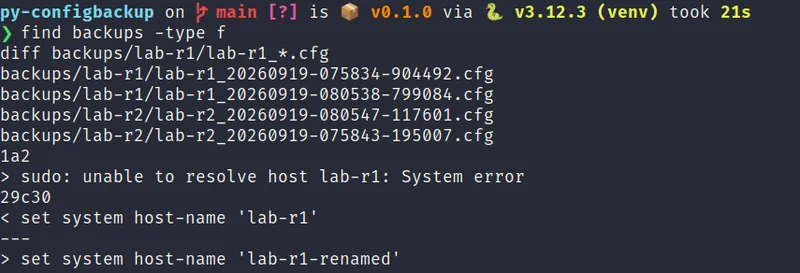
Neither of those extra lines is part of VyOS's configuration. The first is a
diagnostic message sudo prints internally when /etc/hosts doesn't yet match the
device's current hostname, which happened right after I renamed lab-r1. The second
is a bracketed-paste-mode terminal control sequence some shells emit, that ended up
as a bare, visible line instead of being swallowed as invisible terminal signaling.
Both are artifacts of talking to a real, live SSH session on a real (if
containerized) operating system, exactly the category of thing a mocked
ConnectHandler in a test can never produce, because I control every byte it returns.
Left alone, this is a real correctness bug, not just a cosmetic one. If a stray line like this can appear once, it can appear again on a totally unrelated day, and the tool would report that as a "change" and fire an alert for a config that never actually changed. That's the same failure mode I care about avoiding from the very first bug story above: noise that looks like signal trains people to stop trusting the alerts.
The fix is a small, explicit filter in backup.py, applied to every command's
output before it's ever saved or diffed:
# backup.py
_NOISE_LINE_PATTERNS = (
    re.compile(r"^\s*sudo:\s.*$"),
    re.compile(r"^\s*\x1b?\[\?2004[hl]\s*$"),
)
It's deliberately narrow, matching only the two specific patterns I actually observed, rather than trying to guess at every possible kind of terminal noise in advance. I added four new tests covering it directly, including one that reproduces the exact combined output from the real screenshots above, and the whole suite (46 tests now) still runs in about a second with no real device involved. If a different noise pattern shows up from a different platform down the line, the fix is the same: add the pattern here, add a test that encodes exactly what was observed, and move on. That's a much better place to keep growing this list than hoping it never happens again.
The meeting I wrote to pressure-test the design
I wrote a full fictional stakeholder meeting as part of this project, real back-and-forth dialogue, not a bullet list, as a private exercise rather than something published alongside the code. The scenario: an undocumented config change on a branch router breaks connectivity to a finance VLAN, takes hours to root-cause because there's no baseline to diff against, and I pitch this tool as the fix in the following infra/security sync.
Writing it as an actual conversation instead of a feature list forced me to
anticipate real objections instead of only the ones I'd already thought of. The
security lead character asks about credential storage before anything else, which is
exactly the order I'd expect a real reviewer to ask questions in, and it's the reason
the password_env design exists at all rather than a simpler plaintext column. The
Ops Manager character asks specifically whether the tool can ever push a config
change, and getting to answer "no, structurally, not just by policy" is the
strongest sentence in the whole pitch. If I couldn't answer that question with total
confidence, I'd know the design wasn't done yet.
What I'd build next
A few things I'd genuinely add if this went from a portfolio project to something
running against a real fleet. A --dry-run flag that connects and diffs but never
writes a new backup file, useful for testing an inventory change safely before
trusting it. Right now every run writes a permanent file, which is the right default
but not always what you want while debugging the inventory itself.
Some kind of retention policy. Right now every single backup is kept forever, which is completely fine for a two-node lab and would eventually be a real disk-space conversation on a large fleet running hourly. A heartbeat alert separate from the change-detection alert: right now, if the SMTP server itself is down, a real config change would still get backed up correctly but the alert about it would silently fail with only a console warning, an acceptable gap for a personal lab and not one for production monitoring. And support for pulling from a real secrets manager instead of plain environment variables, which the code is already structured to make a small, isolated change rather than a rewrite, since credential resolution lives in exactly one function.
Why I think this is a good "day one" project
This isn't a flashy project. It doesn't have a web dashboard or a machine learning component or anything that looks impressive from across the room. What it has is a clear, real problem, undocumented config changes causing outages, a design that takes read-only safety seriously as a structural guarantee rather than a policy, two genuinely nasty bugs that I found through testing and fixed correctly instead of papering over, and a credential-handling decision I made before a security reviewer had to ask me to make it, the same evidence-over-assertion habit that ran through the packet-capture project I wrote up right before this one.
That combination, small in scope, careful about the things that actually matter, honest about what it doesn't solve yet, is closer to what day-one network automation work actually looks like on a real team than a more impressive-sounding project would be. I'd rather walk into an interview with this than with something flashier and less thought through.
Frequently asked questions
Why use SSH and Netmiko instead of a REST API?
A REST API is often the better long-term choice for production automation where it's available and licensed, but SSH works identically across old and new gear, doesn't require any API to be enabled separately, and remains the most universal way to reach a network device that's been in service for twenty years. Netmiko exists specifically to smooth over the differences in login prompts, paging, and command syntax between platforms, so the tool's own code just calls one command and gets clean text back, regardless of which vendor's box is on the other end.
Why doesn't the inventory CSV ever contain a real password?
The first sketch of the inventory format had a plain password column, which is
exactly the kind of thing that ends up committed to a public GitHub repository by
accident, because a CSV doesn't look dangerous the way a .env file does. The
shipped design uses a password_env column that holds only the name of an
environment variable; the real credential is resolved from the environment at
runtime and lives in a git-ignored .env file. That maps directly to CWE-798, Use
of Hard-coded Credentials, and a plaintext fallback column still exists purely for a
disposable lab, but the loader prints a visible warning every time that path gets
used so it's never a silent, accidental choice.
Can this tool ever push a configuration change to a device?
No, structurally, not just by policy. Every command the tool sends to a device is a read-only show-style command; it never enters configuration mode and never writes anything to a device. The worst failure mode is a missed backup or a missed alert email, never a pushed change, because the ability to change a device's configuration was never built into the tool in the first place.
Why did a stray sudo message end up inside a saved backup file?
It's a real artifact of a real SSH session, not a bug in VyOS. Right after a
hostname change, sudo prints an internal warning when /etc/hosts doesn't yet
match the new hostname, and a bracketed-paste-mode terminal control sequence from the
shell showed up as a visible line instead of being swallowed as invisible signaling.
Both leaked into the saved config text and would have been read as a false
configuration change. The fix is a small, explicit regex filter in backup.py that
strips exactly those two observed patterns before anything is saved or diffed, with a
dedicated test reproducing the real output that caught it.
Where this goes from here
The full source, the 46-test suite, and the runbook for rebuilding the two-router lab from scratch are all on GitHub:
Repository: github.com/rachata072/py-configbackup · Full lab build steps: RUNBOOK.md
This is part of an ongoing series of networking and cybersecurity projects I'm building for my portfolio while studying for the CCNA (more on my background here). More lab notes and write-ups land here as each one ships.