%BLOG-5-SEC
I Built a Vulnerability Management Program From Scratch, Policy to Remediation
A scanner finding a vulnerability is the easy part. Any tool pointed at a network will find something. The actual work, the part that separates a real vulnerability management program from a folder full of scan exports nobody reads, is everything around the scan: a policy that defines how fast a finding has to get fixed based on how bad it actually is, buy-in from the team that has to do the fixing, a prioritization method that does not just chase whatever number the scanner assigned, a change process that catches a bad remediation before it takes down a service, and an actual habit of doing this again next month rather than treating it as a one-time project.
I built that whole cycle from the ground up: no existing policy, no existing scanning practice, starting from a completely clean slate. By the end there was a signed-off policy, a scan across two systems, ten confirmed findings, a Change Advisory Board approval, ten completed remediation rounds split between PowerShell and Bash, and a documented transition into ongoing maintenance. I also ended up with two honest dead ends along the way, a finding that never got confirmed by any scan and a fix attempt that targeted the wrong thing entirely, and I decided early on that those belonged in this writeup too, not swept out of the final draft. This article walks through the whole thing, the parts that worked and the parts that did not, with the actual scan results and remediation proof alongside it, not just the narrative.
Why the policy has to come first
It is tempting to skip straight to scanning. Point Tenable at a network, get a report, start fixing things, that feels like progress. It is also exactly how a vulnerability management effort quietly falls apart three months later, because nobody agreed in advance on what "fixed in time" actually means, and without that agreement, every remediation timeline is just whatever felt urgent that particular week.
A policy fixes that by making the rules explicit before there is a finding to argue about. Mine defined scope (every asset the organization is responsible for securing), roles (who owns scanning versus who owns actually applying a fix), a scanning cadence (monthly full scans, plus a targeted scan after every remediation to confirm it worked), remediation windows by severity, and an exception process for the case where a team genuinely cannot hit a deadline. None of that is exciting to write. All of it is the difference between a program and a one-off exercise.
Getting buy-in instead of just imposing a policy
My first draft set the critical remediation window at 48 hours, always, no exceptions. That number felt right on paper, critical means urgent, urgent means fast. It did not survive contact with the team that would actually have to hit it.
Walking the draft past the server team surfaced the actual constraint I had not accounted for: change control. Anything touching a production system, even something as small as a single registry value, was expected to go through a Change Advisory Board review first, and that board did not meet on weekends. A critical finding discovered on a Friday afternoon meant the fix could not realistically land until Monday or Tuesday, policy or no policy, because the process standing between "found it" and "fixed it" simply did not move that fast.
Rather than either caving to a longer window across the board or holding a deadline nobody could actually meet, the fix was a split: 7 days for critical findings by default, with a 48 hour carve-out specifically reserved for anything confirmed as actively exploited in the wild. That distinction matters beyond just being a compromise everyone could live with. It also makes the 48 hour window more credible when it does get invoked, because at that point everyone understands it means something concrete is actually happening, not just that a scanner assigned a high severity score by default.
This is the part of building a program like this that I think gets underrated. The scripting and the scanning are the mechanical half. Getting a timeline that a real team can actually sustain, by asking what specifically blocks them rather than just asserting a number, is the half that determines whether the policy survives contact with reality.
Two real targets: Windows and Linux, both fully exercised
This project runs two live targets, not one: the standard Windows Server target, configured with a deliberately insecure baseline, and a second target running Linux with its own real, independently scanned findings. That's what makes the "PowerShell and Bash" part of this project real rather than a label sitting in a README, both halves of the stack actually get exercised, broken, and fixed.
That distinction matters more than it might sound like at first. A lot of public examples of this kind of project label Windows Command Prompt commands, reg add, net localgroup, as "Shell" scripting. cmd.exe is technically a shell, but it's not what most people mean by Bash, and it means the Linux side of a cross-platform remediation story never actually gets exercised. This project's Linux target ships real Linux-specific findings, weak SSH configuration among them, so the Bash scripts here had to actually work against a real sshd config file, not just exist as a labeling choice.
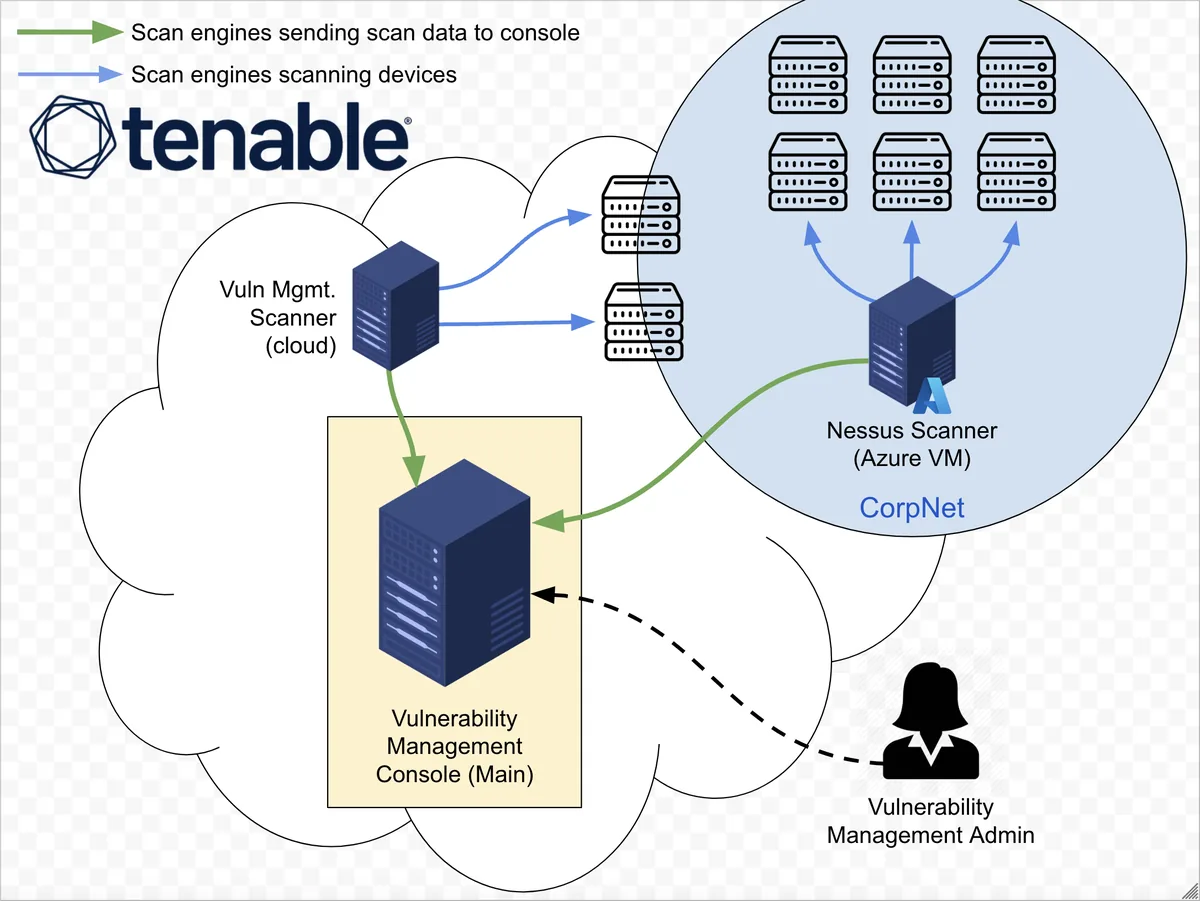
Both targets were scanned with an authenticated, credentialed scan rather than an unauthenticated one. The difference matters: an unauthenticated scan is mostly guessing from outside the system, checking what's visible on the network without ever actually logging in. A credentialed scan authenticates to the target and inspects it from the inside, which is the only way to reliably catch things like a missing patch or a misconfigured local setting rather than just what happens to be exposed on an open port.
The gap nobody warns you about: vulnerability scans versus compliance audits
Here is something I did not fully appreciate going into this project, and it turned out to be one of the more useful things I learned building it. I had planned two Windows findings, Automatic Updates disabled and the Guest account sitting inside local Administrators, as standard entries on my list, the kind of thing any credentialed vulnerability scan should obviously catch. Neither one showed up. Not partially, not with a lower severity than expected, just absent from the scan results entirely, even after I confirmed the underlying vulnerable state was genuinely present on the target.
The reason turned out to be straightforward once I understood it, and slightly embarrassing that I hadn't already known it: a standard vulnerability scan template is mostly built to check for missing patches tied to specific, tracked CVEs. It is not generally built to evaluate policy or configuration state, questions like "is this account disabled" or "is this registry policy set to the recommended value." Those live in a different world of scanning entirely, compliance or configuration auditing, and Tenable has a completely separate scan template for it built around CIS Benchmarks, the Center for Internet Security's published hardening standards.
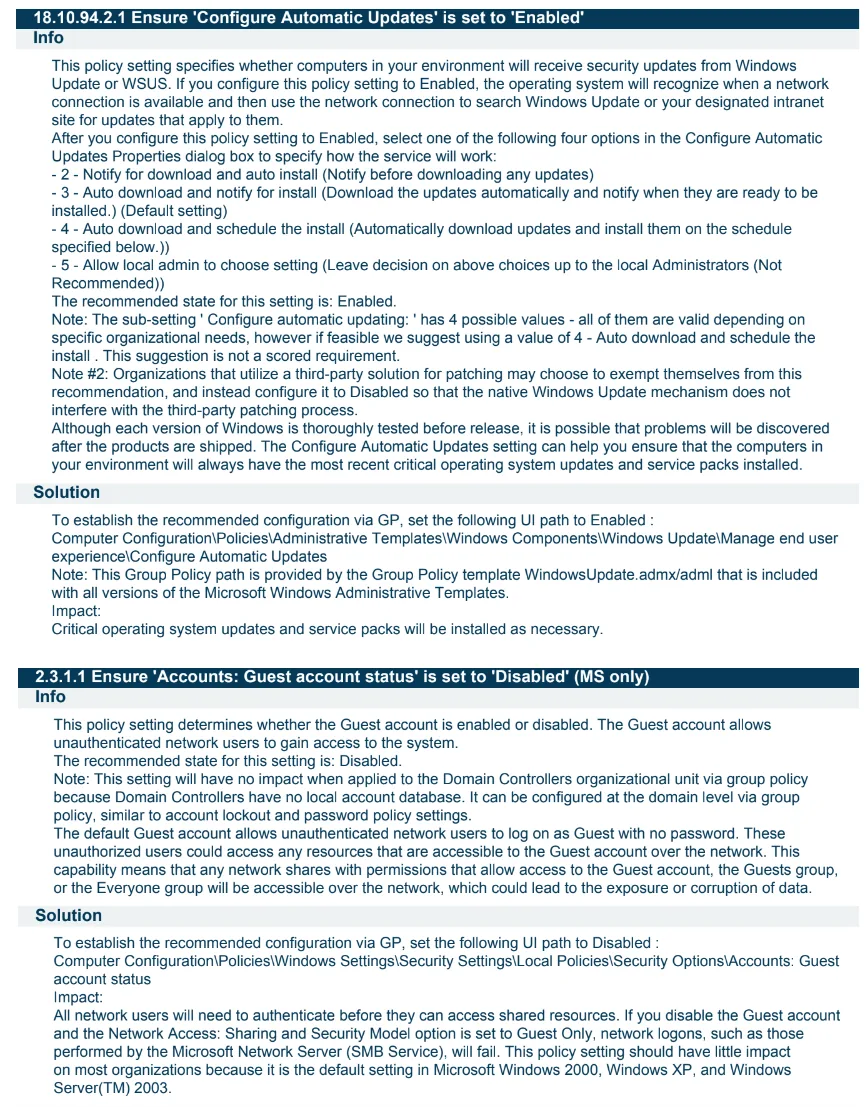
Running that CIS Benchmark audit against the same Windows target surfaced both findings immediately: control 18.10.94.2.1, "Ensure 'Configure Automatic Updates' is set to 'Enabled,'" failed, and control 2.3.1.1, "Ensure 'Accounts: Guest account status' is set to 'Disabled,'" also failed. Same target, same underlying vulnerable state, completely different scan type needed to actually see it.
I think this is a genuinely important thing to know if you are building or running a vulnerability management program for real, not just for a portfolio project. If your program only runs the standard vulnerability scan template every month and calls that comprehensive, you have a coverage gap you may not know about until an actual audit or a real incident surfaces it the hard way. A mature program runs both: vulnerability scanning for the patch and CVE side of exposure, compliance auditing for the policy and configuration side. I'm folding that lesson directly into how I'd design a real maintenance cadence going forward, not just noting it as a curiosity.
Two honest dead ends, documented instead of hidden
I want to spend real space on this, because it would have been easy to just quietly not mention either one and present a cleaner-looking final number. I think that would have made this a worse project, not a better-looking one.
The Edge finding that never got confirmed. I configured Microsoft Edge's auto-update policy to be disabled on the Windows target, the same way I configured every other finding on that machine. I expected it to show up as a straightforward outdated-software finding, similar in shape to the Wireshark one. It never did. Not on the standard vulnerability scan, and not on the CIS compliance audit either, no plugin, no failed control, nothing pointing to it as a detected problem at all. I could have written a remediation script for it anyway and presented it as one of the findings, the fix itself is genuinely simple, a single winget upgrade command. But I would have been documenting a fix for something nothing had actually proven was broken on this specific target, and that felt like exactly the kind of thing this whole project is supposed to avoid: reporting what I assumed would happen instead of what scanning actually showed. So it's in the writeup, and it's in the scripts folder for reference, but it is not counted in the final finding total.
The missing-updates finding I actively tried and got wrong. This one is more interesting because I did not just fail to reproduce it passively, I made a specific, diagnosable mistake trying to force it. I wanted a fourth Linux finding to mirror the Windows Update one, so I ran apt-mark hold against a batch of installed packages, intending to freeze them at their current version and create a real patch gap. The command I actually used was apt-mark hold $(dpkg -l | grep ^ii | awk '{print $2}' | head -15), which holds the first fifteen installed packages in alphabetical order: adduser, apparmor, apport, and so on down the alphabet. What I needed to hold were the packages that actually had a pending security-tagged update available, and those were nowhere near the start of the alphabet: bind9-dnsutils, curl, libnss-systemd, the vim family, and a handful of others, all sourced from Ubuntu's noble-security update pocket. My hold command and the actual list of security-relevant packages did not overlap at all. I had built a mechanism that looked like it should create a vulnerability and pointed it at completely the wrong target.
Once I laid the two lists side by side and saw the mismatch, the fix for my mistake would have been simple: hold the actual security-tagged packages instead. But by that point the box's real patch state was already genuinely current against every tracked advisory Tenable's plugin feed knew about. Re-targeting the hold command at that point would have meant manufacturing a finding by deliberately regressing a package to an old, vulnerable build, which is a fundamentally different thing than a real vulnerability management scan discovering a real gap. That crossed a line I did not want to cross for the sake of hitting a round number, so I dropped it, and documented exactly what went wrong instead of just saying "it didn't work out."
I think both of these are worth more to a reader, and to anyone evaluating this as portfolio work, than a clean eleven-for-eleven scorecard would have been. Anyone can present a list where everything worked. Showing the actual mechanics of a finding that didn't pan out, and being specific about why, demonstrates the same diagnostic thinking as the successful remediations do, just applied to a dead end instead of a fix.
Prioritizing by more than just severity score
Ten confirmed findings came back across the two targets, once the two Windows compliance findings and the eight vulnerability-scan findings were all accounted for. The obvious approach is to sort by severity and work top to bottom. I did something slightly different: severity mattered, but so did how quickly a given finding could actually be closed, and clearing the fast, easy wins early reduces total exposure faster than working strictly by severity score alone, especially when several of the "quick" fixes are also genuinely dangerous ones.
Three findings landed at the top of the list as Critical, and all three share the same underlying shape: a well-known account or default credential, protected by nothing but a password or a policy toggle, holding full administrative rights, on a system reachable over the network. Guest sitting inside local Administrators and Windows Update disabled were the two confirmed via the compliance audit, the coverage gap described above. The third came directly out of the actual vulnerability scan and was not something I had specifically planned for this target: the root account on the Linux target had a default, guessable password, and SSH was configured to accept password logins as root at all. Tenable does not need a scan's own configured credentials to catch that one, it tries a list of common credential pairs itself, and root/root succeeded. None of these three require an attacker to be clever. They just require the attacker to try, which is exactly why Critical is the right label here, not an inflated one.
The remaining seven findings tracked closer to severity order: an outdated Wireshark install that turned out to generate eleven separate plugin findings rather than one, protocol-level weaknesses that need a specific network position or a specific kind of attack to actually matter, down to two low-severity ICMP timestamp findings, one on each target, that both turned out to be the exact same class of issue: a response that leaks almost nothing of real value but costs nothing to fix either, at least in theory.
The Change Advisory Board conversation that actually mattered
Ten remediations, packaged and ready, went to a Change Advisory Board review before any of them touched a system. Most of the ten were low-risk, a registry value, a firewall rule, generally applied and then followed by a full server restart on the Windows side, since the lab procedure I was following restarts after every single change as a matter of course, not because each individual change strictly requires it. Two remediations did strictly require a service restart to take effect at all, rather than just following a cautious procedure: both SSH-related fixes on the Linux side, the default root password fix and the weak algorithms fix, since changing sshd_config only takes effect once sshd reloads.
The SSH restart was the one that actually generated real pushback in that meeting, and for good reason. Restarting the SSH daemon with a broken configuration file locks out remote access to that machine entirely, which on a cloud VM without separate console access is a genuinely bad place to end up. The answer was not "trust me, it'll be fine," it was pointing to the specific safeguard already built into the remediation script: sshd -t validates the configuration syntax before the script ever issues a restart command. If the config is malformed, the script exits there, before touching the running service. Worst case under that design is the fix did not apply. It is not "we just locked ourselves out of the box."
I also raised something in that meeting I could have quietly left out: the ICMP Timestamp fix on the Windows target was correctly configured, confirmed enabled, inbound, blocking, on every firewall profile, but I did not expect it to actually clear on the follow-up scan. Windows Firewall itself was fully disabled on that VM, a deliberate setup requirement for this lab so the scanner could reach the target without connectivity troubleshooting getting in the way, and a firewall rule cannot enforce anything while the firewall's own profiles are all switched off, no matter how correctly the rule is written. I could have turned the firewall back on to make the fix actually take effect, but doing that late in the project meant introducing a new variable I hadn't fully tested against everything else already remediated, so I chose to document the limitation honestly instead. That is the kind of detail that actually earns a Change Advisory Board's confidence, not a general assurance that everything is fine, but a specific, verifiable answer, including an honest "this one won't fully clear, and here's exactly why," about a failure mode someone in the room might otherwise discover for themselves on the next rescan.
The board approved all ten as a single change window, tiered so the Windows target and the Linux target were not touched at the exact same moment, giving each set of changes its own confirmation step before moving to the next.
Walking through a few of the ten remediations
Not every finding here is interesting on its own, some are a single registry value, but a handful are worth walking through in more detail because of what they actually protect against or what building them taught me.
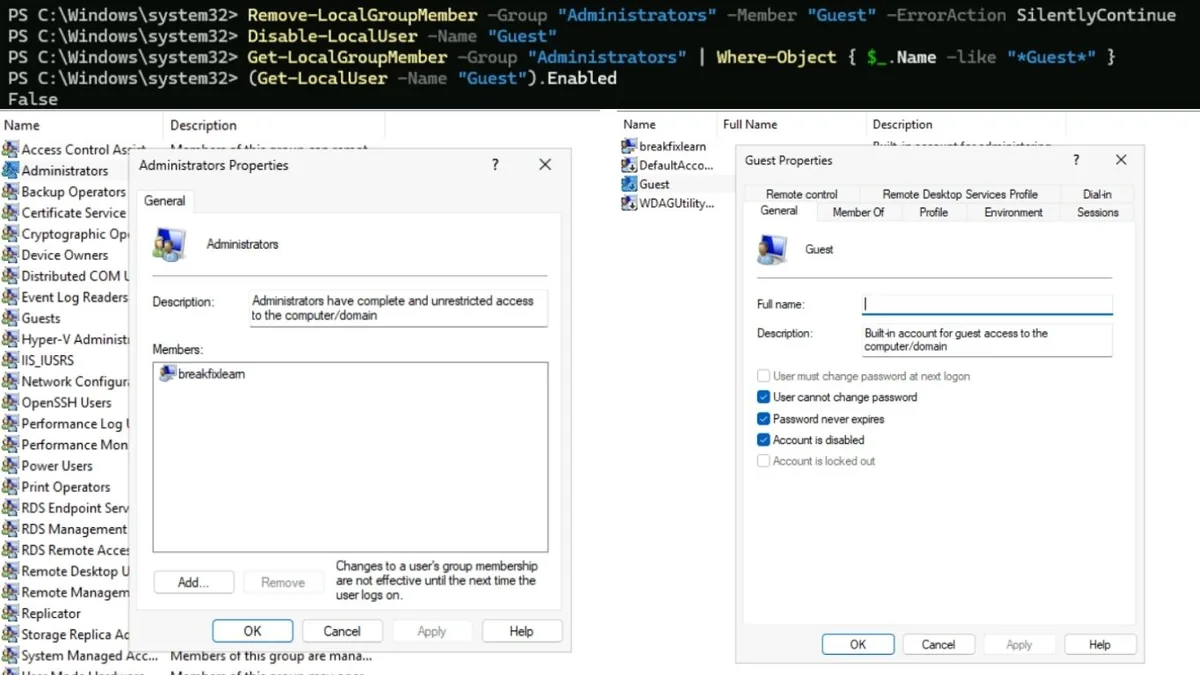
Guest account removed from Administrators. This is the single highest-value fix on the entire list relative to how little effort it takes. One command removes the account from the group, a second disables it outright. The value is not in the complexity of the fix, there is none, it is in recognizing that this specific combination, a predictable account name with administrative rights, is disproportionately dangerous compared to almost everything else on the list, and in knowing to run the right kind of scan to find it in the first place.
Default root password, remediated on the Linux target. Changing the password alone would not have been a durable fix, the next weak password is one passwd command away. The real fix is removing the attack surface entirely: the script backs up the original sshd_config with a timestamp before editing anything, uses sed to disable both PermitRootLogin and PasswordAuthentication, falls back to appending the directives if they were not already present in the file at all, validates the result with sshd -t, and only then restarts the service. Every one of those steps exists because of a specific failure mode: editing blind risks a broken config, restarting blind risks a lockout, and assuming a directive already exists risks silently doing nothing if it was actually absent from the file. Afterward, no password, weak or strong, gets root a remote shell over SSH at all. One real operational side effect worth mentioning: disabling password authentication for root also breaks any scan credential relying on a root password, so the scanning credential itself needed to move to key-based authentication after this fix went in, a downstream consequence I hadn't fully planned for until I ran into it directly.

SSH weak key exchange, ciphers, and MACs, also on the Linux target. This one is not about the login itself, it is about the cryptography protecting the SSH session. The daemon still accepted outdated key exchange algorithms, CBC-mode ciphers, and weak MACs alongside the modern ones, so someone positioned on the network path had a realistic shot at tampering with or eventually breaking the confidentiality of that connection. The fix pins KexAlgorithms, Ciphers, and MACs in sshd_config to explicit allow-lists of only strong options, rather than appending more choices on top of what was already there, so the weak algorithms are actually removed instead of just outnumbered. Same backup, validate, restart pattern as the root login fix, applied to a threat that is easy to miss because it never shows up as a failed login attempt anywhere.
Outdated Wireshark removal. This one is a small case study in a real tradeoff, and also in how granular a real scan result can be compared to what you might expect going in. I assumed outdated software would generate one plugin, "Wireshark is out of date." Instead it generated eleven: five High-severity findings, one for each patched version between the installed 4.2.0 and the version current when I scanned, five more at Medium severity, and one Low severity "support ended" finding. For the fix itself, Win32_Product is the WMI class that reliably enumerates and uninstalls MSI-based software, but it is also notorious, in Microsoft's own guidance, for being slow and for triggering a reconfiguration pass across every other MSI-installed application on the machine, which is why almost every piece of PowerShell guidance tells you to avoid it in production automation. For a one-time, targeted removal on a single machine, the reliability of a clean uninstall outweighed the performance cost. That is a genuinely different calculus than the same decision made for a script running against a thousand machines on a schedule, and knowing which situation you are actually in matters more than following a rule of thumb blindly in either direction.
ICMP timestamp response, on both targets, with two different endings. A stock Ubuntu VM responds to ICMP timestamp requests by default, no configuration change needed to introduce it. On the Linux target, the fix was a single iptables rule dropping ICMP type 13 specifically, leaving ordinary ping (type 8) untouched, and it fully cleared on the follow-up scan, iptables enforces at the packet level regardless of anything else happening on the box. The Windows target showed the same underlying behavior, and I applied the equivalent fix, a Windows Firewall rule blocking the same ICMP type. It did not clear, and the reason has nothing to do with the rule itself. This specific lab environment runs with Windows Firewall completely disabled, a setup requirement so the scanner could reach the target without connectivity issues, and a firewall rule sitting in a disabled firewall profile does not enforce anything, no matter how correctly it is written. Same fix, same finding type, two different platforms, and only one of them actually resolved in this specific run, for a reason that has nothing to do with the quality of the remediation itself.
What the numbers actually showed
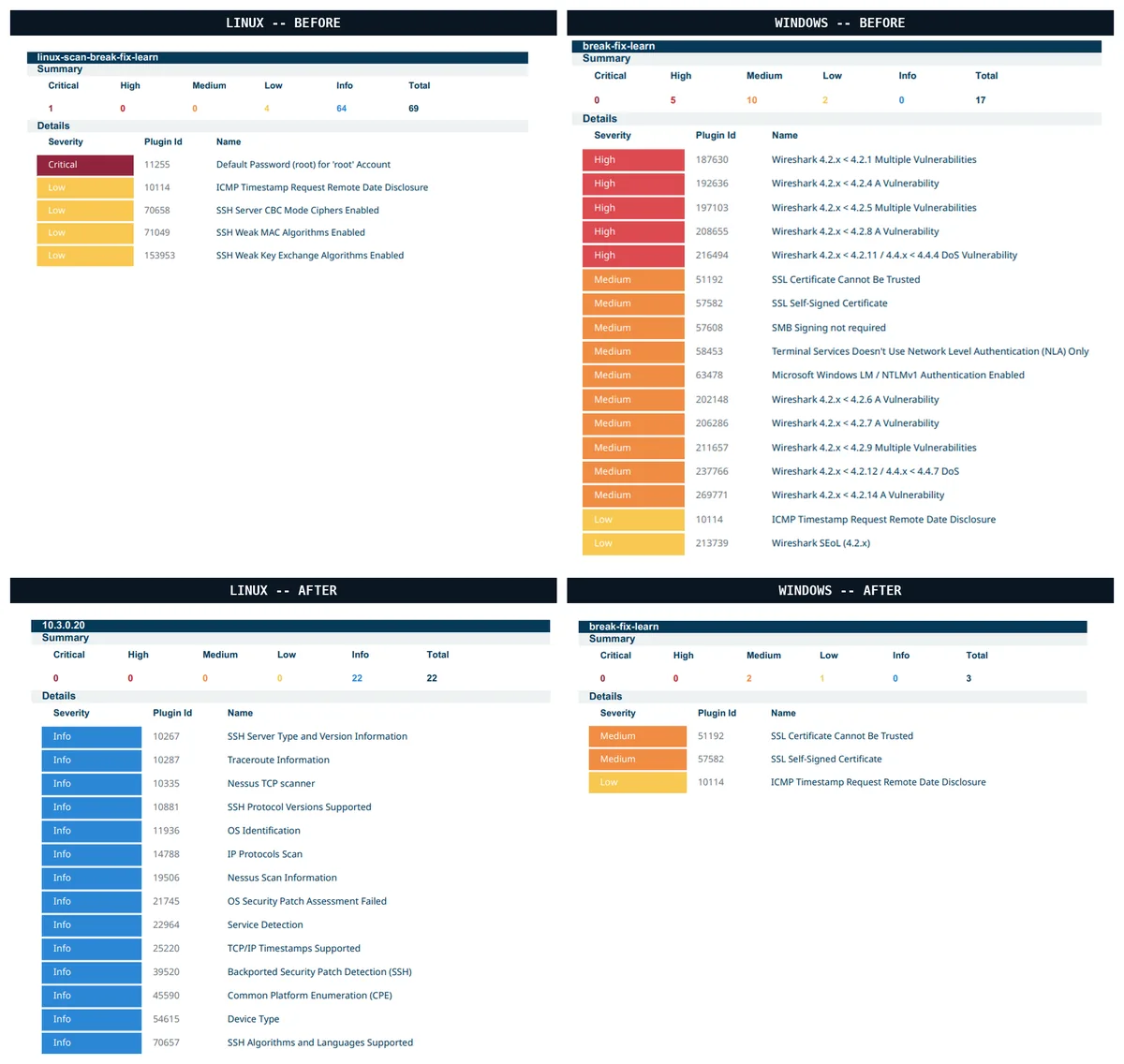
The Linux target went from 1 Critical and 4 Low findings to a fully clean 0/0/0/0 rescan, every single confirmed finding resolved and verified. The Windows target went from 5 High and 10 Medium/Low findings to 2 Medium and 1 Low remaining, and I'm reporting that honestly rather than rounding it up to a clean sweep. The two remaining Medium findings are a self-signed and an untrusted SSL certificate, both expected on a lab VM with no real certificate authority behind it and treated as accepted risk rather than something to remediate. The one remaining Low finding is the ICMP timestamp response described above, remediated at the configuration level but not actually enforced in this specific lab because of the disabled firewall. Every one of the findings that did clear has a targeted follow-up scan behind it, not just an assumption that a script exiting without an error means the underlying problem is actually resolved.
Nothing here is hidden
Anyone can write a PowerShell script that flips a registry value. What actually separates a working vulnerability management program from a script collection is the part most write-ups leave out entirely: the policy negotiation, the Change Advisory Board conversation, and an honest account of what didn't work. This project keeps all of it, including the Edge finding that never got confirmed and the missing-updates attempt that held the wrong packages, because that same diagnostic thinking, knowing exactly what happened and why, is what a real security review actually tests for. Not a clean scorecard. The ability to explain it.
Who this affects inside a real organization
The server team and any other asset-owning team benefit from remediation timelines that were actually negotiated with them rather than imposed on them, and from remediation packages that include a working script and a verification step rather than just a scan export and an instruction to "fix this." Security and compliance teams benefit from a documented, defensible answer to "how do you know what's currently exposed and how fast does it get fixed," which is close to the first question any real audit or security review asks, and from knowing explicitly which scan type covers which category of exposure rather than assuming one tool does everything. The Change Advisory Board benefits from remediation proposals that come with a specific, verifiable answer to the specific failure mode they are worried about, including an honest flag when a fix won't fully take effect in the current environment, rather than a general assurance that a script is safe. And the organization as a whole benefits from a program built to survive its second cycle and its tenth, not just its first, since a vulnerability management effort that quietly stops after the first remediation round was never really a program to begin with.
What I learned building this
The technical remediations were the easier half. The harder, more transferable skill was the negotiation itself, learning to treat a stakeholder's pushback on a policy draft as useful signal rather than an obstacle to route around. The 48-hour-to-7-day conversation is one of the most valuable exchanges in this entire project, not because the final number is clever, but because of what asking "what specifically blocks you" instead of just asserting a deadline actually surfaces: a real constraint, change control not running on weekends, that a policy written in isolation would never have accounted for.
I also came away with a much clearer sense of the actual difference between vulnerability scanning and compliance auditing, which I would not have internalized nearly as well if both of my planned Windows findings had simply shown up where I expected them to. And I came away with a concrete example of what a wrong diagnostic step actually looks like: I did not fail to find a missing-updates finding through bad luck, I built a mechanism, held the wrong fifteen packages, and could point to exactly why it didn't work once I compared it against the real list of security-tagged packages. Being able to explain a mistake that specifically is a different and more useful skill than simply avoiding mistakes by accident.
How this fits into the larger project series
This is the third project in an ongoing series of hands-on IT support and cybersecurity projects, building on the identity automation work in the previous project in this series, which covered onboarding, offboarding, and delegated administration on the same kind of Microsoft 365 tenant this project's Windows target is modeled after. Where that project automated identity lifecycle management, this one is about proving the underlying systems are actually patched and hardened in the first place, a different but related half of keeping a small environment defensible.
Frequently asked questions
Do I need Tenable specifically, or does this work with another scanner?
The remediation scripts themselves are scanner-agnostic, they fix the underlying issue regardless of what found it. Tenable is what I used here because of the environment I built this in, but the same program structure, policy first, then scanning, then prioritization, then a change process, then remediation with verification, applies with any credentialed vulnerability scanner. The one caveat worth carrying over regardless of scanner: check whether your standard scan template covers policy and configuration findings, or whether you need a separate compliance or audit scan template to catch those, the way I needed to here.
Why scan a Linux target when most examples of this kind of project only use Windows?
Because a project claiming to cover both PowerShell and Bash should actually exercise both. A lot of public examples label Windows Command Prompt output as "Shell" scripting, which never really tests real Bash against a real Linux configuration file. Adding a genuine Linux target with genuine Linux-specific findings closes that gap.
Is it risky to automate something like an SSH configuration change?
It carries real risk if done carelessly, a broken config restarted blind can lock out remote access entirely. The mitigation here is not avoiding automation, it is validating before acting: the script checks the configuration syntax with sshd -t before ever issuing a restart, and backs up the original file first, so a bad edit fails safely instead of locking anyone out.
Why did two Windows findings not show up on the vulnerability scan?
Because a standard credentialed vulnerability scan is mostly built to check for missing patches tied to known CVEs, not policy or configuration state. Whether Automatic Updates is enabled, or whether the Guest account is disabled, are the kind of settings a CIS Benchmark compliance audit checks, a genuinely different scan template and a genuinely different category of finding. Both were confirmed as real, failed controls on that audit, just invisible to the scan type I originally assumed would catch everything.
What happened to the findings that didn't make the final count?
Outdated Microsoft Edge was configured on the Windows target but never confirmed as detected by either the vulnerability scan or the compliance audit, so it's documented as an honest attempt rather than counted as a real finding. Missing Linux security updates was actively attempted, but the wrong packages got held, the first fifteen alphabetically rather than the ones with actual pending security updates, and by the time that mistake was diagnosed, the box's real patch state was genuinely current. Both are covered in detail in the project's runbook and evidence files rather than left out.
How do you decide what order to remediate findings in?
Severity matters, and in this case the three Critical findings, disabled Windows Updates, an overprivileged default account, and a default password on the Linux root account with SSH configured to accept it, genuinely earned that ranking, two of them through a compliance audit rather than the standard scan. All three represent a direct, low-effort path to full administrative access, which is a more urgent problem in practice than a technically lower-scored finding that requires a specific network position to exploit. Within a severity tier, ease of remediation also matters, clearing a fast, simple fix early reduces total exposure faster than working strictly top-down by score.
What happens to a finding that cannot be remediated within its policy timeline?
It goes through the documented exception process: a specific finding, a business justification, a compensating control if one exists, and a target date for either remediation or formal risk acceptance by leadership. An exception without an owner and a review date is not a real exception, it is just an unaddressed finding with better paperwork. The Windows ICMP timestamp finding in this project is close to that shape, technically remediated but not enforced due to a lab-specific constraint, and it's documented with exactly that level of specificity rather than marked as simply "fixed."
Where this goes from here
The first cycle is done, but a vulnerability management program is not judged by its first cycle, it is judged by whether the second one happens on schedule without anyone having to be reminded. That is what maintenance mode is for: the same monthly scan cadence, run against both the standard vulnerability template and the CIS compliance template now that I know the two catch genuinely different things, the same severity-based remediation windows, applied to whatever the next scan finds instead of a hand-picked set of ten. I will be running this again next month against both targets and comparing the results against the baseline shown above, which is the actual test of whether this was a program or just a demo.
Try it yourself
If you want to walk through any part of this yourself, the full policy document, the phase-by-phase runbook including the stakeholder and Change Advisory Board conversations, and the complete set of PowerShell and Bash remediation scripts (with the exact commands used to both break and fix each finding, including the two that didn't work out) are all public:
Program walkthrough:
github.com/rachata072/vulnerability-management
Remediation scripts:
github.com/rachata072/vulnerability-management
I built this one inside The Cyber Range, which is where the live Tenable and Azure access for this lab came from, that link is a referral if you're looking for the same kind of hands-on environment.
This is the third project in an ongoing series of hands-on IT support and cybersecurity projects I'm building for my portfolio (more on my background here). More lab notes and write-ups land here as each one ships.