%BLOG-6-NETWORK
I Kept Getting VLSM Wrong By Hand, So I Wrote a Tool That Can't
A few weeks into studying for the CCNA, I noticed a pattern in my practice exams. I wasn't failing the questions that asked me to define a routing protocol or explain the difference between a trunk port and an access port. I was failing arithmetic. Specifically, I was failing Variable Length Subnet Mask problems, the ones where you're given a block of address space and a list of departments or sites with different host requirements, and you have to carve that block up efficiently without anything overlapping.
Not because I didn't understand the concept. I understood VLSM fine conceptually: allocate the biggest chunks first, compute the smallest subnet that fits each requirement, don't waste address space you don't need. The problem was execution. Somewhere around the fourth or fifth department in a six-department problem, I'd lose track of exactly where the last block ended, round a boundary the wrong way, or transpose a digit while converting a host count to a prefix length. The concept was solid. The bookkeeping kept failing.
That's a very specific, very human failure mode, and it's exactly the kind of
thing computers are good at fixing. So I built
Py-SubnetCalc: a small, dependency-free
Python command-line tool that takes a list of departments and host counts and
produces a correct, non-overlapping VLSM allocation plan, every time, using
nothing but the Python standard library's
ipaddress module.
This post is about what I built, why I made the specific decisions I made, and what I actually learned doing it, which turned out to be more about argparse and test design than I expected going in.
The problem with doing VLSM by hand
If you've studied for the CCNA, or done real IP address planning, you already know the drill. You're handed a block of address space, say a /24, and a list of requirements: Sales needs 60 host addresses, Engineering needs 25, Support needs 12, Guest WiFi needs 8, Management needs 5, and there's a point-to-point link back to a core switch that needs 2.
The standard procedure is to sort those requirements from largest to smallest, then work through them one at a time, computing the smallest subnet that covers each host count and tracking where you are in the address space so the next subnet starts after the previous one ends. Get the order right, get the math right, and you end up with a tight, efficient plan. Get any single step wrong, and either two departments' address ranges overlap (a real, later problem, not a theoretical one) or you waste far more address space than you needed to, which matters more than people expect once you're planning for growth across dozens of sites instead of one lab exercise.
The core arithmetic isn't hard. For a department that needs H usable host addresses, you compute needed = H + 2 (one address reserved for the network ID, one for the broadcast address), take host_bits = ceil(log2(needed)), and the prefix length is 32 - host_bits. Twenty-five hosts needs 27 addresses accounted for, log2(27) is about 4.75, round up to 5 host bits, and you land on a /27, which has 32 addresses and 30 usable, the smallest block that actually covers 25 hosts. A /28 would only give you 14 usable addresses, not enough.
None of that is conceptually hard. What's hard is doing it seven times in a row, by hand, under time pressure, while also tracking cumulative address offsets, and never making a single mistake. That's not a math problem. That's a working-memory problem, and working memory is exactly where humans are unreliable and computers are not.
Why an existing subnet calculator wasn't the answer
There are plenty of free subnet calculators online, and some of them even do VLSM. I used a few of them while studying. They're fine for checking your work on a single practice problem. But almost all of them share the same limitation: they compute one subnet at a time. You type in a network and a host count, it gives you back a subnet, and if you have six departments, you do that six times, copying each result into a spreadsheet yourself and manually tracking where the next one needs to start.
That workflow has the exact same failure mode as doing it entirely by hand, just with less arithmetic. The bookkeeping, tracking cumulative address offsets across multiple independent lookups, is still entirely on you, and that bookkeeping is where I kept making mistakes in the first place. A tool that computes one subnet at a time doesn't actually solve the problem I had. It just makes each individual step faster.
I wanted something that took the entire list of requirements as input and produced the entire plan as output, in one operation, so there was no manual bookkeeping step left for me to get wrong. That's a genuinely different design than "a subnet calculator you use six times."
I also wanted an excuse to actually learn argparse properly. I'd written plenty of small Python scripts that read sys.argv[1] positionally and called it a day, which works right up until you need a second flag, an optional third flag, and decent --help output, at which point that approach falls apart fast. I wanted a real command-line tool with subcommands, typed arguments, and proper validation, not another disposable script.
What it actually does
You start with a CSV. One row per department, a name and a host count:
department,hosts
Sales,60
Engineering,25
Support,12
Guest_WiFi,8
Management,5
Router_Link,2
Extra columns are fine and get ignored, so if you want to keep a site or VLAN ID column in the same file for your own notes, nothing stops you.
You run one command:
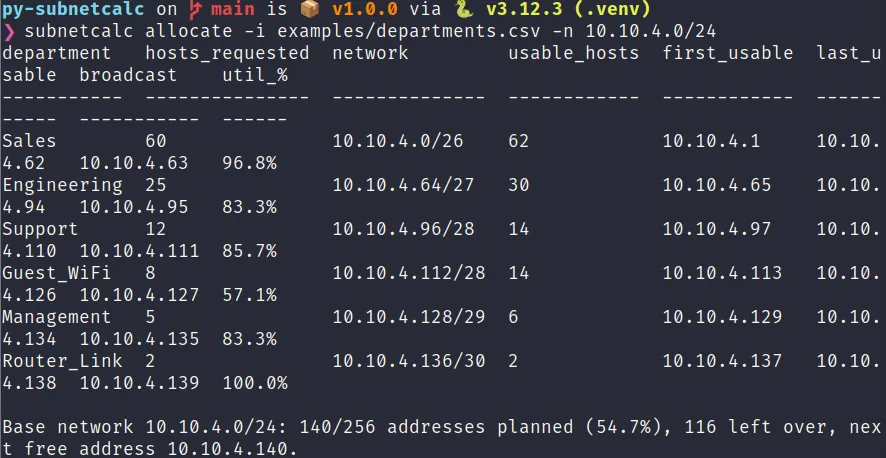
subnetcalc allocate -i departments.csv -n 10.10.4.0/24And you get back a complete, non-overlapping plan:
department   hosts_requested  network         usable_hosts  first_usable  last_usable  broadcast    util_%
-----------  ---------------  --------------  ------------  ------------  -----------  -----------  ------
Sales        60               10.10.4.0/26    62            10.10.4.1     10.10.4.62   10.10.4.63   96.8%
Engineering  25               10.10.4.64/27   30            10.10.4.65    10.10.4.94   10.10.4.95   83.3%
Support      12               10.10.4.96/28   14            10.10.4.97    10.10.4.110  10.10.4.111  85.7%
Guest_WiFi   8                10.10.4.112/28  14            10.10.4.113   10.10.4.126  10.10.4.127  57.1%
Management   5                10.10.4.128/29  6             10.10.4.129   10.10.4.134  10.10.4.135  83.3%
Router_Link  2                10.10.4.136/30  2             10.10.4.137   10.10.4.138  10.10.4.139  100.0%

Base network 10.10.4.0/24: 140/256 addresses planned (54.7%), 116 left over, next free address 10.10.4.140.
Notice the departments come back in the order I originally listed them, even though internally the tool allocated Sales first because it has the most hosts, not because it was listed first. That's a deliberate choice: the report reads the way your input file did, which matters when you're handing this to someone else to review, but the allocation logic underneath does the largest-first ordering regardless of input order, because that's what actually prevents wasted space.
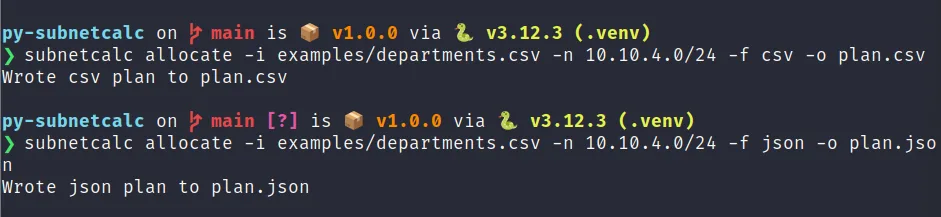
There's also a validate command that checks the input file for problems, missing columns, duplicate department names, non-integer host counts, without doing any allocation, and an --allow-p2p flag that lets a department needing exactly 2 hosts get a /31 instead of a /30, using the RFC 3021 point-to-point exception, which has no reserved network or broadcast address and gives you both addresses as usable. That's the kind of small, correct detail I wanted the tool to get right, since it's exactly the sort of thing that separates "technically works" from "actually understands the protocol."
The design decision that mattered most: allocation order
The single most important decision in the whole project was choosing to always allocate the largest requirement first, internally, regardless of what order the input file lists things in. This isn't a stylistic choice. It has a direct, measurable effect on how much address space gets used.
Here's why. Every subnet block has to start at an address that's a multiple of its own size. A /27 block (32 addresses) has to start on a boundary that's a multiple of 32. A /29 block (8 addresses) has to start on a multiple of 8. This is just how CIDR addressing works, it's not a choice the tool makes, it's a property of the address space itself.
If you allocate a small block first, say a 2-host point-to-point link that only needs a /30, and then need to place a much bigger block right after it, that bigger block has to round its starting address up to its own alignment boundary, which might be well past where the small block actually ended. That gap between where the small block ends and where the big block's alignment boundary begins is wasted space, gone, unusable by anything else.
Allocate the big block first instead, and it gets to start right at the very beginning of the available space, with no wasted alignment gap, since nothing came before it yet. The small blocks then fill in around it afterward, and because they're small, their own alignment requirements are easy to satisfy without much waste.
I didn't just take this on faith from what I'd read studying for the CCNA. I wrote a specific test to prove it: a scenario with a 2-host point-to-point link and a 50-host department, where placing the small link first would push the total plan past the size of a /25, but placing the big department first lets both fit inside it. That test exists in the suite specifically because "I read that this is the right order" and "I can prove this order produces a smaller result" are very different levels of confidence, and I wanted the second one before I trusted my own tool.
Building it like real software, not a script
I made a deliberate choice early on to structure this as an actual installable Python package rather than a single flat script, even though the whole thing is small enough that a single file would have technically worked. A few specific decisions came out of that:
Separating pure logic from I/O. The actual VLSM math lives in vlsm.py, and it has zero knowledge of argparse, CSV files, or print statements. It takes typed Python objects in, returns typed Python objects out. That separation is what made the test suite fast and easy to write, since testing the math never requires spinning up a CLI process or touching the filesystem, it's just calling a function and checking the return value.
A src/ layout instead of a flat package folder. This forces you to actually pip install the package to use it, which sounds like a small thing, but it catches an entire category of bug where something only works because you happen to be running it from the right directory. If it only works from inside the project folder, it's not really installed software yet, it's a script pretending to be one.
Custom exceptions instead of generic ones. InputValidationError and InsufficientAddressSpaceError are both specific, named exception types, and the CLI layer catches each one separately and maps it to a specific, documented exit code. That matters if you ever want to call this tool from another script or a CI pipeline: you can tell "the input file was garbage" (exit code 1) apart from "the input was fine, but the network you gave me is too small" (exit code 2) programmatically, without parsing error text.
Error messages that name the actual problem. When the base network is too small, the tool doesn't just say "error" or "network too small." It says which department it was trying to place, what size subnet that department needed, and exactly how many addresses were left when it ran out of room. I wrote that message the way I'd want a message written to me at 4pm on a Friday when something's broken and I need to fix it fast, not decode it first.
None of this was strictly necessary to solve "compute a VLSM plan from a CSV." All of it was necessary to build something I'd trust the output of, and something that would actually hold up if someone other than me tried to use it, extend it, or debug it later.
Testing the edge cases that actually matter
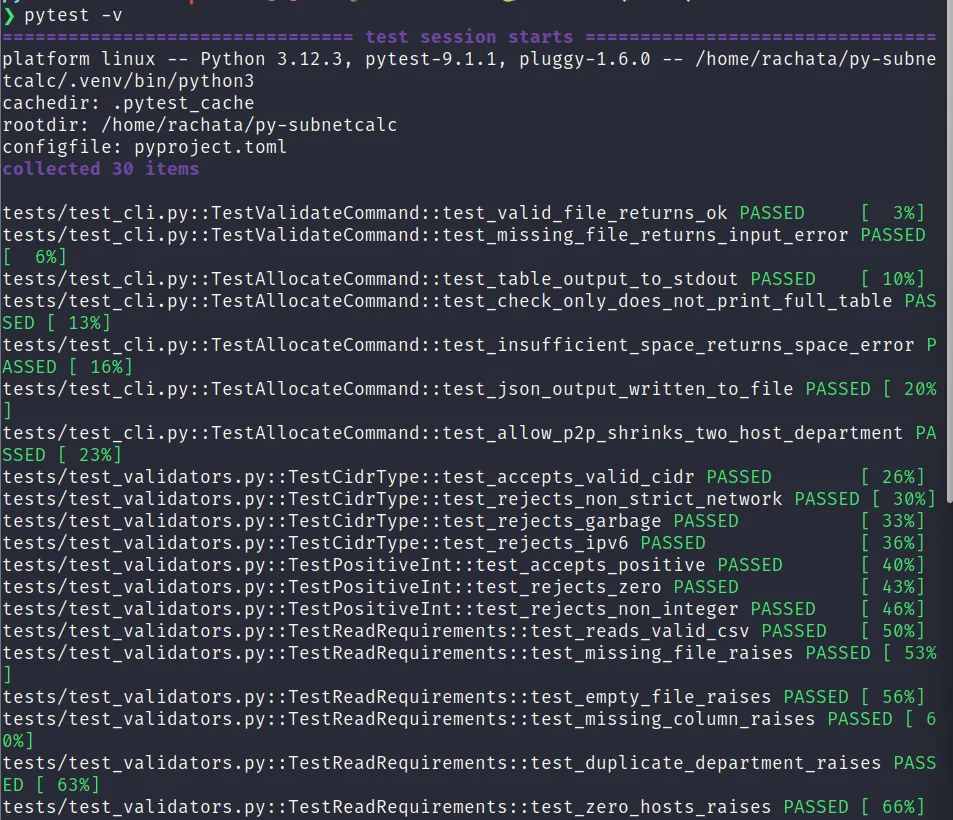
I wrote 30 tests for this project, and I want to talk about a specific subset of them, because I think the choice of what to test says more about understanding a domain than the raw test count does.
The most important tests aren't the ones checking that 60 hosts produces a /26. Those are useful, but they're the easy case, the kind of input where getting it right doesn't prove much. The tests I care about most are the ones sitting exactly on a boundary: does 6 hosts correctly land in a /29, which has 8 addresses and exactly 6 usable after reserving the network and broadcast addresses? And does 7 hosts correctly bump up to the next size, a /28, since a /29 genuinely isn't big enough for 7?
That boundary, where a host count exactly fills a subnet with nothing to spare, is where off-by-one errors live, both in doing this by hand and in code. It's incredibly easy to write host_bits = floor(log2(needed)) instead of ceil, get every "obvious" test case right by coincidence, and only discover the bug when someone hits an exact power-of-two boundary in production. I wrote that test first, before I was confident the implementation was right, specifically because I've made that exact mistake doing subnetting problems by hand before.
The other test I'd point to is the failure path: what happens when the base network genuinely isn't big enough for the plan. A lot of small tools I've looked at only test the happy path, does it produce correct output when everything fits. I wanted to know, with equal confidence, that when things don't fit, the tool fails safely and specifically instead of producing a wrong or overlapping plan silently. That's arguably more important than the happy path, since a wrong answer that looks plausible is far more dangerous than an obvious crash.

Taking it to a real stakeholder conversation
Building the tool was one part of this project. The other part, which matters just as much for anyone building something like this for a portfolio, was thinking through how you'd actually get a team to adopt it, not just ship it into a repo and move on.
I wrote out a meeting scenario grounded in a specific, realistic incident: a subnet overlap during a floor buildout that wasn't caught until DHCP started handing out addresses that were already routed somewhere else, requiring an unplanned re-IP of a segment over a weekend to fix. That's the kind of failure this tool is built to prevent structurally, not just make less likely, since the allocation algorithm makes overlap impossible by construction: there's a single address cursor that only ever moves forward, so two departments landing on the same range isn't a bug that could theoretically happen, it's a case that can't occur given how the code works.
The conversation I wrote out has two stakeholders with genuinely different concerns, and I think that's the realistic part. A security-minded reviewer cares about auditability: is this deterministic, is it tested, does it leave behind an artifact that can go into a change ticket. An infrastructure manager who actually implements these plans on real switches cares about something different: does this add friction to an already-working process, and critically, does it touch live equipment on its own, which is exactly the kind of overreach that makes people rightfully suspicious of a new tool.
The honest answer to that second question is no. This tool produces a document. It does not talk to a switch, a DHCP server, or an IPAM system directly. A human still reviews the plan and a human still applies it. That boundary was a deliberate choice, not a missing feature: I wanted a tool that makes the planning step correct before a human touches real equipment, not a tool that can misconfigure a live network faster than a person could. Keeping that boundary explicit is also, I think, what actually makes a tool like this easy to get buy-in for. Nobody has to trust it with anything they can't immediately verify by reading the output file.
What I'd tell someone starting a similar project
If you're studying for a networking certification and you keep making the same category of mistake I was making, my honest suggestion is: build the tool that would have caught it, not just more practice problems. Practice problems train you to get better at doing the mistake-prone process by hand. Building the tool forces you to fully externalize the logic, which means you can't get away with a fuzzy mental model, since code either produces the correct subnet boundary or it doesn't, there's no partial credit.
A few things I'd do again without hesitation: write the pure logic completely separate from any CLI or file-handling code, since it makes testing dramatically easier and faster. Write tests for the exact boundary cases in your domain, not just typical inputs, since that's where the real bugs live. And write error messages as if a person under time pressure is going to read them, because eventually, someone will.
A few things I'd think more carefully about next time: I initially didn't think hard enough about what "insufficient address space" should actually tell the caller until I'd already written the happy path, and had to go back and redesign that error message to name the specific department and shortfall instead of just saying the plan didn't fit. Designing the failure case with the same care as the success case, from the start, would have saved a rewrite.
What's next
The repo is public, MIT licensed, and includes the example input file, the full test suite, and this write-up's companion documents: a build-and-troubleshoot runbook, a meeting script, and an interview prep document built around the project using the STAR method, since a project like this is only half useful if you can't also talk about it clearly afterward.
Next on the list, if I keep extending it: IPv6 support, which isn't a simple port of the same algorithm, since IPv6's conventions (mostly /64 everywhere, rather than minimizing address usage) don't map cleanly onto what this tool currently optimizes for, and a --reserve flag that holds back a percentage of each block for planned future growth instead of allocating the tightest possible size. Both are good excuses to keep writing tests before I write the feature, which is, at this point, just how I want to build things going forward.
If you've made the same kind of subnetting mistakes I have, coming off the security audit I ran against my own Linux machine with Lynis and rkhunter in the last post, or you're looking for a small, real project to sharpen your Python and your networking fundamentals at the same time, the code is up on GitHub. Clone it, break it, and see if you can find an edge case my 30 tests missed. I'd genuinely like to know if you do.
Try it yourself
The full source, the test suite, the runbook, and the companion meeting and interview-prep documents are all in the GitHub repository linked here.
Repository: github.com/rachata072/py-subnetcalc
This is the fifth project in an ongoing series of hands-on IT support and cybersecurity projects I'm building for my portfolio (more on my background here). More lab notes and write-ups land here as each one ships.