Segmentation & Layer 2 Hardening Lab
Download a working but insecure switched network and harden it step by step: management baseline, VLANs, trunks, port security, BPDU Guard, protected ports and unused-port lockdown.
Download the lab
- PKTBaseline lab (.pkt)start here · 64 KB, download
- PKAGraded activity (.pka)Activity Wizard version · 270 KB, download
Verify your download (SHA-256)
| File | SHA-256 |
|---|---|
| l2-hardening-baseline.pkt | ed71e17c8123d3ba8a2250be38a2f597a65a1ac14525bd53b7f62fdff397487e |
| l2-hardening-graded.pka | c1784a4eca82c6563f02eec1a90e990eca06749212d0a311046f807a20af8ae6 |
Compare with Get-FileHash .\file.pkt -Algorithm SHA256 (PowerShell) or sha256sum file.pkt. Different hash, different file: delete it.
Read the Segmentation & Layer 2 Hardening notes first. Topics: 2.3
show ip route | toc (12 sections)
- What you'll build
- Topology and addressing
- Part A: management-plane baseline (both switches)
- Exercise 1: see the segmentation you already have
- Exercise 2: lock down access ports and the trunk
- Exercise 3: stop a host from flooding the MAC table (B4)
- Exercise 4: PortFast, BPDU Guard and host isolation
- Exercise 5: lock unused ports, then verify everything
- Troubleshooting
- Answer configs
- What Packet Tracer can't do, and how to go further
- Exam mapping
What you'll build
You get a small switched network that works but was configured the lazy way: DTP on, native VLAN 1, every unused port live in VLAN 1, no port security, an open management plane. Your job is to harden switch SW-2 (and the trunk end on SW-1) until every Layer 2 weakness from the notes is closed, and to prove it with show commands and ping tests.
| Item | Detail |
|---|---|
| Tool | Cisco Packet Tracer 9.0 or later, two Catalyst 2960 switches |
| Time | 60 to 90 minutes |
| You'll practice | Management-plane baseline, VLANs and dead VLANs, access and trunk hardening, native VLAN, port security, PortFast and BPDU Guard, protected ports, unused-port lockdown |
| Exam topics | 2.3 (core), 2.5 CIS-style baseline, 2.7 secure management |
| Read first | Segmentation & Layer 2 Hardening notes |
How to approach it like a security engineer
Don't type the commands as a checklist. For every port, ask the three questions from the notes: who should be on the other end, what is it allowed to say, and if it lies, how far can the lie travel? Write your answer next to each port in the port table below before you configure anything. Then the configuration is just your answers translated into IOS.
Each exercise follows the same rhythm:
- Do: the commands to type.
- See: the output you should get.
- Why: the attack this closes, and why it matters on the exam.
- Checkpoint: prove it worked before moving on.
Topology and addressing
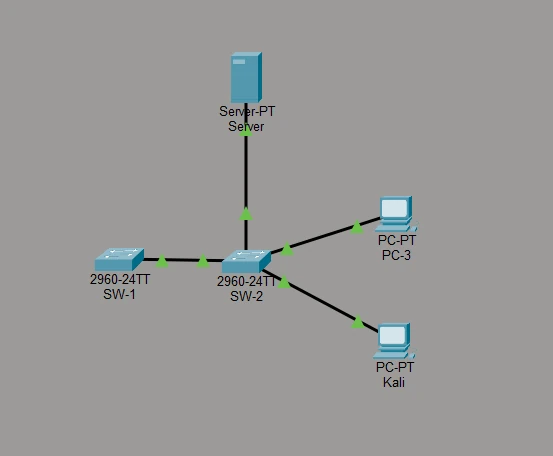
SW-2 is the switch under test. SW-1 only needs the management baseline and its end of the trunk. The inter-switch trunk uses the Gigabit uplinks (SW-2 Gi0/2 ↔ SW-1 Gi0/1); end devices use FastEthernet ports on SW-2.
VLAN plan
| VLAN | Name | Subnet | Purpose |
|---|---|---|---|
| 40 | users | 10.40.0.0/24 | User hosts (PC-3, Kali) |
| 50 | servers | 10.50.0.0/24 | Protected server |
| 99 | mgmt | 10.99.0.0/24 | Switch management (SVIs) |
| 777 | Nowhere | none | Dead VLAN for unused, shut ports |
| 999 | Native-T | none | Dead VLAN used only as the trunk's native VLAN |
Addressing
| Device | Interface | VLAN | IP address | Gateway |
|---|---|---|---|---|
| Server | Fa0 | 50 | 10.50.0.10/24 | 10.50.0.1 |
| PC-3 | Fa0 | 40 | 10.40.0.11/24 | 10.40.0.1 |
| Kali | Fa0 | 40 | 10.40.0.12/24 | 10.40.0.1 |
| SW-1 | VLAN 99 SVI | 99 | 10.99.0.1/24 | none |
| SW-2 | VLAN 99 SVI | 99 | 10.99.0.2/24 | none |
There is no router on purpose. This is a pure Layer 2 lab, so traffic from VLAN 40 to VLAN 50 must fail: that failure is the segmentation working. The gateways are configured on the hosts but nothing answers on them yet.
SW-2 ports: target state
| Port | Connects to | Mode | VLAN | Hardening |
|---|---|---|---|---|
| Gi0/2 | SW-1 (trunk) | trunk | native 999, allow 40,50,99 | nonegotiate, native = dead VLAN, pruned |
| Fa0/1 | Server | access | 50 | nonegotiate, port security, PortFast, BPDU Guard |
| Fa0/2 | PC-3 | access | 40 | nonegotiate, port security, PortFast, BPDU Guard, protected |
| Fa0/3 | Kali | access | 40 | nonegotiate, port security, PortFast, BPDU Guard, protected |
| Fa0/4-24, Gi0/1 | unused | access, shut | 777 | shutdown + dead VLAN |
Required exact values
Use these exactly; the graded activity and the answer configs expect them.
| Setting | Value |
|---|---|
| Hostnames | SW-1, SW-2 |
| Domain name | lab.breakfixlearn.com |
| Enable secret | Lab!Enable2026 |
| Admin user / password | admin / Lab!Admin2026 (privilege 15) |
| SSH | version 2, RSA modulus 2048 |
| Banner (motd) | Authorized access only. All activity is logged. |
| exec-timeout | 5 0 |
| Management IP SW-1 / SW-2 (VLAN 99) | 10.99.0.1 / 10.99.0.2 (/24) |
| VLANs | 40 users, 50 servers, 99 mgmt, 777 Nowhere, 999 Native-T |
| Port security | maximum 5, violation shutdown |
| Trunk | native 999, allowed 40,50,99 |
These are lab passwords. Never reuse lab credentials on real equipment.
Part A: management-plane baseline (both switches)
Before any Layer 2 work, lock the front door. A switch whose management plane is open doesn't need to be VLAN-hopped: the attacker just logs in. This baseline mirrors what the CIS benchmark for Cisco IOS checks (SCOR 2.5) and the secure management in SCOR 2.7.
Do (SW-2 shown; repeat on SW-1 with its own hostname and 10.99.0.1):
enable
configure terminal
 hostname SW-2
 enable secret Lab!Enable2026
 service password-encryption
 username admin privilege 15 secret Lab!Admin2026
 ip domain-name lab.breakfixlearn.com
 crypto key generate rsa
  2048
 ip ssh version 2
 banner motd #Authorized access only. All activity is logged.#
 line console 0
  login local
  exec-timeout 5 0
  logging synchronous
 line vty 0 15
  login local
  transport input ssh
  exec-timeout 5 0
 exit
 vlan 99
  name mgmt
 interface vlan 99
  ip address 10.99.0.2 255.255.255.0
  no shutdown
 interface vlan 1
  shutdown
 end
The hostname and domain name must exist before crypto key generate rsa: the key is named after them. When prompted for the modulus, enter 2048 (SSH v2 needs at least 768; use 2048).
Why each line matters
| Line | Closes |
|---|---|
enable secret, service password-encryption | Cleartext or weakly hashed passwords in the config |
username ... secret + login local | Shared line passwords with no accountability |
transport input ssh, ip ssh version 2 | Telnet's cleartext sessions |
exec-timeout 5 0 | Forgotten open sessions |
| Banner | Legal notice for prosecution and policy |
| Management SVI in VLAN 99, VLAN 1 SVI shut | Management reachable from the default VLAN every unconfigured port sits in |
Also turn off CDP toward hosts (A6). It advertises the switch model, IOS version and native VLAN to anyone listening:
configure terminal
 interface range fa0/1 - 3
  no cdp enable
 end
Checkpoint
show ip ssh
show running-config | section line vty
show ip interface brief
SSH Enabled - version 2.0; VTY lines show transport input ssh; Vlan99 is up/up (once VLAN 99 crosses the trunk in Part B) and Vlan1 is administratively down.
Exercise 1: see the segmentation you already have
Do on SW-2:
show vlan brief
show interface status
See
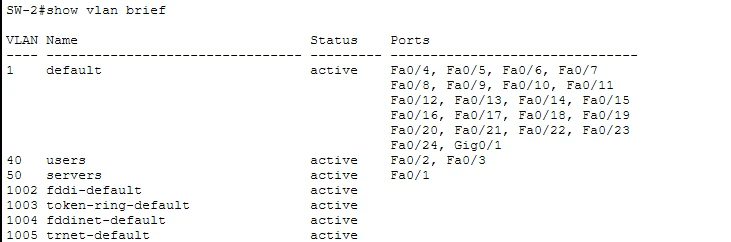
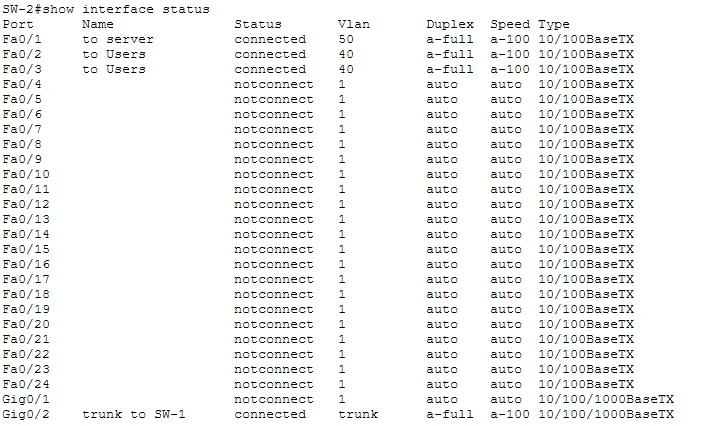
Why: PC-3 and Kali (VLAN 40) and the Server (VLAN 50) are in different broadcast domains. A Layer 2 attack in VLAN 40 (ARP spoofing, a MAC flood, a broadcast storm) cannot reach VLAN 50. That containment exists from VLAN assignment alone. But look at the rest: 22 unused ports live in VLAN 1 and are enabled. Any one of them is a walk-up network connection. Remember that for Exercise 5.
Checkpoint: check PC-3's addressing (Desktop → IP Configuration):
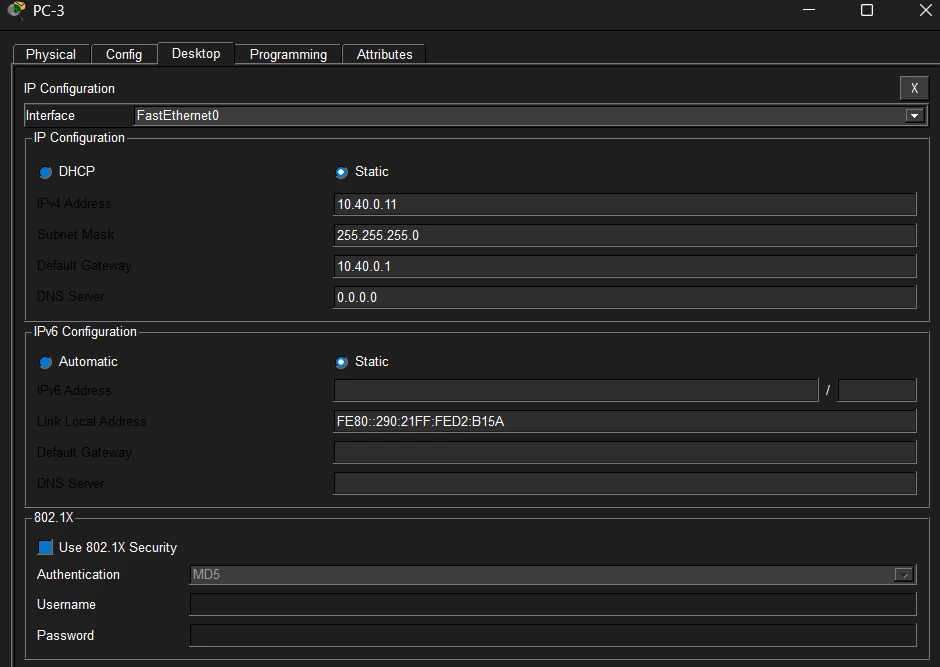
From PC-3: ping Kali 10.40.0.12 → succeeds (same VLAN). Ping the Server 10.50.0.10 → fails (different VLAN, no router).
Exercise 2: lock down access ports and the trunk
The weakness
Do
show interface fa0/3 switchportSee two danger signs:
Administrative Mode: dynamic auto
Negotiation of Trunking: On          <-- DTP is running
Access Mode VLAN: 40 (users)
Trunking Native Mode VLAN: 1 (default)
Why: "Negotiation of Trunking: On" means the port speaks DTP and will become a trunk if a device asks. Kali sits on this port. If Kali sends DTP, it gets a trunk carrying every VLAN and can tag its way into VLAN 50, bypassing every inter-VLAN control. That's switch-spoofing VLAN hopping.
Add the dead VLANs (B1)
Do
configure terminal
 vlan 777
  name Nowhere
 vlan 999
  name Native-T
 end
show vlan brief
VLANs 40 and 50 already exist; just confirm their names are users and servers.
Harden the access ports (B2)
Do
configure terminal
 interface fa0/1
  description to Server
 interface range fa0/2 - 3
  description to Users
 interface range fa0/1 - 3
  switchport mode access
  switchport nonegotiate
 end
show interface fa0/3 switchport
See: Administrative Mode: static access and Negotiation of Trunking: Off.
Why: a hard-coded access port can't be talked into trunking. Switch spoofing is dead on these ports.
Harden the trunk and the native VLAN (B5)
Do on SW-2:
configure terminal
 interface gig0/2
  description trunk to SW-1
  switchport mode trunk
  switchport nonegotiate
  switchport trunk native vlan 999
  switchport trunk allowed vlan 40,50,99
 end
See a native VLAN mismatch until the other side matches:
%CDP-4-NATIVE_VLAN_MISMATCH: Native VLAN mismatch discovered on GigabitEthernet0/2 (999), with SW-1 GigabitEthernet0/1 (1).That's expected. Do on SW-1 (create VLANs 40, 50, 99 and 999 there too if they don't exist):
configure terminal
 interface gig0/1
  switchport mode trunk
  switchport nonegotiate
  switchport trunk native vlan 999
  switchport trunk allowed vlan 40,50,99
 end
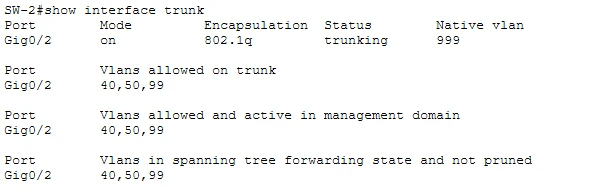
Checkpoint
show interface gig0/2 switchport
show interface trunk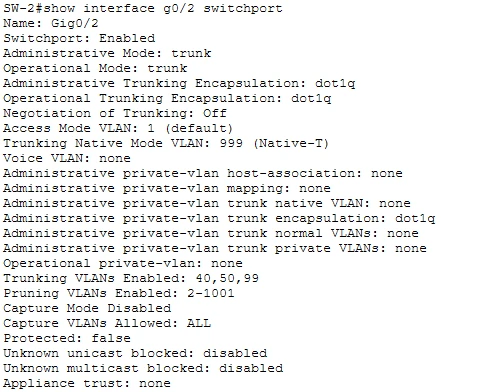
Why:
nonegotiateon the trunk stops DTP on infrastructure links too; both ends are hard-coded, so nothing needs negotiating.- The native VLAN is now 999, a VLAN with no hosts in it. Nobody can stand in the native VLAN, so double tagging has nothing to start from.
- The allowed list carries only 40, 50 and 99. VLAN 1 no longer crosses the trunk, and future VLANs won't spread unless you add them.
- With VLAN 99 on the trunk, the management SVIs can now reach each other: from SW-2,
ping 10.99.0.1should succeed.
On real Catalyst switches you'd also add
vlan dot1q tag nativeso even native-VLAN frames are tagged. Packet Tracer doesn't model it.
Exercise 3: stop a host from flooding the MAC table (B4)
Why first: the CAM table is finite. A MAC flood (the notes show macof adding 3,300 entries in two seconds) fills it, and the switch floods unknown unicast out every port like a hub, so the attacker can sniff. Port security caps how many MACs each port may use.
Do
configure terminal
 interface range fa0/1 - 3
  switchport port-security
  switchport port-security maximum 5
  switchport port-security violation shutdown
 end
show port-security
See

CurrentAddr reads 0 until a host sends a frame. Ping from PC-3 and the Server, then run show port-security again: each active port learns one address.
The number one mistake: typing maximum and violation but not the bare switchport port-security. Without it the feature is off: show port-security interface fa0/2 says Port Security : Disabled.
Recovering a tripped port. If a port goes err-disabled (show interface status shows err-disabled), bounce it:
configure terminal
 interface fa0/2
  shutdown
  no shutdown
 end
Automatic recovery (errdisable recovery cause psecure-violation) is real-IOS only and not modeled in Packet Tracer.
Checkpoint: show port-security interface fa0/3 → Port Security : Enabled, Port Status : Secure-up, Maximum MAC Addresses : 5.
Exercise 4: PortFast, BPDU Guard and host isolation
PortFast + BPDU Guard (B3)
Do
configure terminal
 interface range fa0/1 - 3
  spanning-tree portfast
  spanning-tree bpduguard enable
 end
show running-config interface fa0/2
Why: PortFast lets hosts come up without the 30-second STP delay. BPDU Guard err-disables a port the moment it receives a BPDU, so a rogue switch (or an attacker sending superior BPDUs to become root) on a user port is cut off instead of rebuilding your spanning tree around itself.
Try it: connect a spare 2960 to one of these ports and watch it go err-disabled (%SPANTREE-2-BLOCK_BPDUGUARD). Recover it with shutdown / no shutdown after you remove the switch.
Protected ports (C1, stretch)
Do
configure terminal
 interface range fa0/2 - 3
  switchport protected
 end
Checkpoint (C2): from PC-3, ping Kali 10.40.0.12 → now fails, even though both are in VLAN 40 and the same subnet. PC-3 → Server still fails (different VLAN).
Why: protected ports can't forward any traffic to other protected ports on the same switch. It's Packet Tracer's stand-in for private VLAN isolated ports: the blast radius of a compromised host shrinks to that host. Kali is now alone on its segment even though it shares the subnet. Protected ports are local to one switch; private VLANs and SGTs scale beyond it (see the notes).
Exercise 5: lock unused ports, then verify everything
Unused ports to the dead VLAN (B6)
Do
configure terminal
 interface range fa0/4 - 24 , gig0/1
  switchport mode access
  switchport access vlan 777
  shutdown
 end
show interface status
See: Fa0/4 to Fa0/24 and Gi0/1 show disabled in VLAN 777.
Why: a port at defaults is in VLAN 1 and enabled, so whoever plugs into a lobby jack is on your network. Both steps: shut it, and park it in a VLAN that isn't routed or trunked anywhere, so an accidental no shutdown still leads nowhere.
Final verification
| Check | Command or test | Expected |
|---|---|---|
| Access ports can't trunk | show interface fa0/3 switchport | static access, Negotiation Off, VLAN 40 |
| Trunk hardened | show interface trunk | native 999, allowed 40,50,99 |
| Port security on | show port-security | Fa0/1-3, max 5, Shutdown |
| Edge protection | show running-config interface fa0/2 | portfast, bpduguard, protected, no cdp |
| Unused ports | show interface status | Fa0/4-24, Gi0/1 disabled, VLAN 777 |
| Management | show ip interface brief | Vlan99 up/up, Vlan1 administratively down |
| Management path | SW-2: ping 10.99.0.1 | succeeds |
| SSH only | show running-config (line vty section) | transport input ssh, login local |
| Isolation in VLAN 40 | PC-3 → Kali | fails (protected ports) |
| Segmentation | PC-3 → Server | fails (no routing between VLANs) |
Troubleshooting
| Symptom | Likely cause | Fix |
|---|---|---|
% Invalid input on switchport trunk encapsulation dot1q | The 2960 is 802.1Q-only | Skip the command on a 2960 |
| Native VLAN mismatch messages keep appearing | Only one side changed | Set switchport trunk native vlan 999 on SW-1 Gi0/1 too |
ping 10.99.0.1 from SW-2 fails | VLAN 99 missing on one switch, not allowed on the trunk, or the SVI is shut | show vlan brief, show interface trunk, show ip interface brief on both |
show port-security lists nothing | The bare switchport port-security is missing | Add it on Fa0/1-3 |
Command rejected: ... is a dynamic port | Port security on a port still in dynamic mode | switchport mode access first |
A port shows err-disabled | Port security or BPDU Guard fired | Remove the cause, then shutdown / no shutdown |
crypto key generate rsa fails | No hostname or domain name yet | Set both, then generate |
Trunk drops after nonegotiate | Far end still dynamic | Hard-code switchport mode trunk on both ends |
| PC-3 → Kali still works after C1 | switchport protected on only one port | Both ports must be protected |
Answer configs
Try the whole lab before opening these.
Show the full SW-2 answer config
hostname SW-2
enable secret Lab!Enable2026
service password-encryption
username admin privilege 15 secret Lab!Admin2026
ip domain-name lab.breakfixlearn.com
! crypto key generate rsa  (modulus 2048, from exec/config prompt)
ip ssh version 2
banner motd #Authorized access only. All activity is logged.#
line console 0
 login local
 exec-timeout 5 0
 logging synchronous
line vty 0 15
 login local
 transport input ssh
 exec-timeout 5 0
!
vlan 40
 name users
vlan 50
 name servers
vlan 99
 name mgmt
vlan 777
 name Nowhere
vlan 999
 name Native-T
!
interface vlan 99
 ip address 10.99.0.2 255.255.255.0
 no shutdown
interface vlan 1
 shutdown
!
interface fa0/1
 description to Server
 switchport mode access
 switchport access vlan 50
 switchport nonegotiate
 switchport port-security
 switchport port-security maximum 5
 switchport port-security violation shutdown
 no cdp enable
 spanning-tree portfast
 spanning-tree bpduguard enable
!
interface range fa0/2 - 3
 description to Users
 switchport mode access
 switchport access vlan 40
 switchport nonegotiate
 switchport port-security
 switchport port-security maximum 5
 switchport port-security violation shutdown
 switchport protected
 no cdp enable
 spanning-tree portfast
 spanning-tree bpduguard enable
!
interface gig0/2
 description trunk to SW-1
 switchport mode trunk
 switchport nonegotiate
 switchport trunk native vlan 999
 switchport trunk allowed vlan 40,50,99
!
interface range fa0/4 - 24 , gig0/1
 switchport mode access
 switchport access vlan 777
 shutdown
Show the SW-1 answer config
hostname SW-1
enable secret Lab!Enable2026
service password-encryption
username admin privilege 15 secret Lab!Admin2026
ip domain-name lab.breakfixlearn.com
! crypto key generate rsa  (modulus 2048)
ip ssh version 2
banner motd #Authorized access only. All activity is logged.#
line console 0
 login local
 exec-timeout 5 0
 logging synchronous
line vty 0 15
 login local
 transport input ssh
 exec-timeout 5 0
!
vlan 40
 name users
vlan 50
 name servers
vlan 99
 name mgmt
vlan 999
 name Native-T
!
interface vlan 99
 ip address 10.99.0.1 255.255.255.0
 no shutdown
interface vlan 1
 shutdown
!
interface range gig0/1 - 2
 switchport mode trunk
 switchport nonegotiate
 switchport trunk native vlan 999
 switchport trunk allowed vlan 40,50,99
What Packet Tracer can't do, and how to go further
Packet Tracer simulates IOS; it doesn't run it. These are valid on real Cisco IOS but rejected or missing in the Packet Tracer 2960, so the lab leaves them out:
| Real IOS feature | In this lab |
|---|---|
errdisable recovery cause psecure-violation / interval 60 | Recover manually with shutdown / no shutdown |
login block-for 60 attempts 3 within 30 | Not modeled |
no ip http server / no ip http secure-server | No HTTP server in the simulated 2960 |
vlan dot1q tag native | Not modeled; the dead, host-free native VLAN is the defense here |
| Full private VLANs | switchport protected stands in |
| Attack tools (Yersinia, macof) | Not possible; the notes show each attack on virtual IOS switches |
To practice the rest of SCOR 2.3, build the same topology in Cisco Modeling Labs (IOSvL2) or on real Catalyst switches, add a router for VLAN 40 and a Linux host, and try:
! DHCP snooping + DAI (VLAN 40), trusting the uplink
ip dhcp snooping
ip dhcp snooping vlan 40
no ip dhcp snooping information option
ip arp inspection vlan 40
interface gig0/2
 ip dhcp snooping trust
 ip arp inspection trust
interface range gig1/1 - 2
 ip dhcp snooping limit rate 10
 ip verify source
 storm-control broadcast level 20.00 10.00
 storm-control action trap
Then attack it: run a rogue DHCP server on the Linux host, try ARP spoofing the gateway, and confirm the switch drops and logs each attempt. The notes list the expected result and the log message for every attack.
Exam mapping
| You configured | Attack it stops | SCOR v2.0 |
|---|---|---|
switchport mode access + nonegotiate | VLAN hopping by switch spoofing (DTP) | 2.3 |
| Native VLAN 999, allowed list | VLAN hopping by double tagging; VLAN sprawl | 2.3 |
| Port security max 5, shutdown | MAC flooding / CAM overflow | 2.3 |
| PortFast + BPDU Guard | STP manipulation, rogue switches | 2.3 |
| Protected ports | Lateral movement inside a VLAN | 2.3 (segmentation) |
| Unused ports shut + VLAN 777 | Walk-up access | 2.3 |
| SSH v2, local users, timeouts, banner, mgmt VLAN | Management-plane takeover | 2.5, 2.7, 2.4 |
If you can name the attack, the defense and the command for every row from memory, you have the Layer 2 half of SCOR Domain 2. Test yourself with the flashcards and the mock exam.